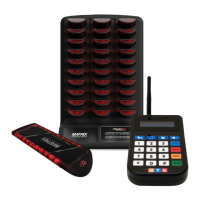
Setting the time display on your BMTX-1000 Transmitter
Your BMTX-1000 Transmitter conveniently displays a 24-hour clock when the
transmitter is idle. To set the correct current time on the transmitter, please follow the
following steps:
1. Press the first icon button on the top row of buttons on the transmitter. The icon
looks like a clock and calendar.
2. The display will then ask for a password. Enter 9513.
3. Press the orange Enter key above the green Send key.
4. Your transmitter will now display “Set Date/Time '' Please enter the current date
and time in the format of DD-MM-YY for date, and HH'MM for the 24 hour time.
5. Press the orange Enter button when finished.
6. You will then be returned to the main idle screen.
Changing the Type of Alert on your Customer Pagers
There may be a time where it would be convenient to change the type of the alert
your Pagers use. For example, if you have a quiet function where you would like to
keep noise to a minimum, you could set your pagers to Vibrate and Flash only,
forgoing the beep to keep ambient noise down, and the evening more enjoyable
for your customers.
These changes are done from your transmitter. It is also highly recommended to
make sure that all of the pagers are collected in from your floor before changing
this feature, as not to alert customers that may be waiting to be called.
To perform this procedure, all pagers must be in the charging base with power. and
using the alert type you changed it to. This tone will let you know that the pagers
received the instruc- tions correctly. To reset the pagers, simply re-plup the racks
into the wall.


 To Next Page
 Loading...