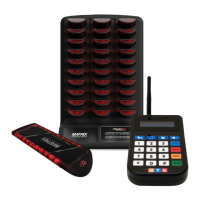
1. Press the second icon button on the top row of buttons on the transmitter.
The icon looks like a musical note.
2. The display will then ask for a password. Enter 9513.
3. Press the orange “Enter” key.
4. Your transmitter will now display “Set Alert Style”
5. Use the * and the # to scroll between options.
6. Press the green send button to transmit the new settings to the pagers.
At this point, all of the pagers in your system should tone with the alert that you
selected.
Changing the length of time that a pager alerts
There may be a situation where you would like to change the length of time that a
Pager alerts for. By default, the Customer Pager will tone continuously for 15 seconds
but this option can be changed. This may be needed if your pagers are not immediately
returned to the charging rack after they are paged, or if the pager is not returned back to
the charger until after an appointment is completed. These changes are done from your
transmitter. It is also highly recommended to make sure that all of the pagers are
collected in from your floor before changing this feature as all the pagers will buzz when
they receive this command.
To perform this procedure, all charging racks must be plugged to the power. After this
procedure is complete, all of your pagers will alert at the same time for the amount of
time you changed it to.
Press the third icon button on the top row of buttons on the transmitter. The icon looks
like an alarm clock..
1. The display will then ask for a password. Enter 9513.
2. Press the orange “Enter” key.
3. Your transmitter will now display “Set Alert Time”
4. Use the * and the # to scroll between options.


 To Next Page
 Loading...