EasyManua.ls Logo

Pakedge WX-1 - User Manual

Pakedge WX-1
64 pages
Print Icon
To Next Page IconTo Next Page
Loading...
pakedgedevice&software
inc
WX-1x
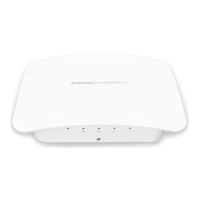
WX-1, WX-1-O
802.11ac Dual Band Access Point
User Guide Version 1.3

Other manuals for Pakedge WX-1

Question and Answer IconNeed help?

Do you have a question about the Pakedge WX-1 and is the answer not in the manual?

Summary

Introduction

Access Point Mode

Explains the typical configuration for most Wi-Fi networks.

WDS Bridge Mode

Describes using the WX-1 to send wireless internet to a hardwired device.

WDS Repeater Mode

Hardware Installation

WX-1 Mounting Options

Details methods for mounting the WX-1 access point using wall brackets and T-bars.

WX-1-O Installation

Outdoor Mounting Options

Details wall and pipe mounting procedures for outdoor installations of WX-1-O.

Powering the WX-1 x

Powering via PoE+

Explains how to power the device using PoE+ injectors or switches.

Powering with AC Adapter

Describes using the included AC power adapter for the device.

Initial Setup and Access

Configure PC TCP;IP Settings

Steps to configure your PC's TCP/IP settings to access the WX-1.

WX-1 x Startup and Login

Guide to starting the WX-1 and logging into its web interface.

Network Configuration Details

Wireless Security and Guest Access

Advanced Settings

Management and Diagnostics

Device Maintenance

Safety Precautions

General Safety Guidelines

Lists essential safety precautions for operating the WX-1x device.

Summary

Introduction

Access Point Mode

Explains the typical configuration for most Wi-Fi networks.

WDS Bridge Mode

Describes using the WX-1 to send wireless internet to a hardwired device.

WDS Repeater Mode

Hardware Installation

WX-1 Mounting Options

Details methods for mounting the WX-1 access point using wall brackets and T-bars.

WX-1-O Installation

Outdoor Mounting Options

Details wall and pipe mounting procedures for outdoor installations of WX-1-O.

Powering the WX-1 x

Powering via PoE+

Explains how to power the device using PoE+ injectors or switches.

Powering with AC Adapter

Describes using the included AC power adapter for the device.

Initial Setup and Access

Configure PC TCP;IP Settings

Steps to configure your PC's TCP/IP settings to access the WX-1.

WX-1 x Startup and Login

Guide to starting the WX-1 and logging into its web interface.

Network Configuration Details

Wireless Security and Guest Access

Advanced Settings

Management and Diagnostics

Device Maintenance

Safety Precautions

General Safety Guidelines

Lists essential safety precautions for operating the WX-1x device.

Pakedge WX-1 Specifications

General IconGeneral
ModelWX-1
Frequency Bands2.4 GHz, 5 GHz
Wireless Standards802.11a/b/g/n/ac
Antenna TypeInternal
SecurityWPA, WPA2, WPA3
MU-MIMO SupportYes
BeamformingYes
Operating Temperature0°C to 40°C
Ports1 x Gigabit Ethernet
Power over Ethernet802.3af PoE
Mounting OptionsCeiling, Wall

Related product manuals