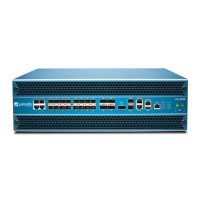
The Palo Alto Networks ION 2000 is an enterprise branch appliance designed for Prisma SD-WAN (Software-Defined Wide Area Network) deployments. It transforms traditional WANs by enabling the combination of heterogeneous underlying transports into a unified hybrid WAN. The ION 2000 establishes service-level agreements (SLAs) for security, path selection, and application performance, providing direct insight into end-user application performance for traditional, SaaS, modern, and encrypted applications. It communicates bi-directionally with the Prisma SD-WAN controller for device, application, and WAN configuration, as well as analytics.
The ION 2000 can be deployed in a standalone fashion for direct-to-internet scenarios, offering granular control and visibility without a data center device. Alternatively, it can be used in conjunction with ION 7000 or ION 9000 devices in the data center to create a secure, full-mesh fabric across the WAN. Deployment options include:
- Standalone Prisma ION 2000 (No HA)
- Prisma ION 2000 + Existing Router HA
- Prisma ION 2000 + Prisma ION 2000 HA
Technical Specifications:
I/O:
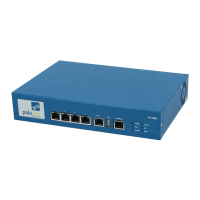
- Controller: 1 x 10/100/1000 RJ-45 port. This port is used for communication with the Prisma SD-WAN controller and is configured as a DHCP client by default.
- WAN/LAN/Internet Ports: 5 x 10/100/1000 RJ-45 ports. Ports 1-5 are used for internet, local area network (LAN), or private router/multi-path label switching (MPLS) connectivity. WAN or LAN ports can be coupled or de-coupled as needed. By default, ports 2 and 3 are DHCP-enabled.
- Fail-to-Wire Port Pair: By default, ports 4 and 5 are pre-configured as a fail-to-wire port pair, which can be set to fail open or closed.
- AUX Port: An auxiliary access port for offline access, configuration, and troubleshooting during installation.
- USB Port: Reserved for future use.
Throughput:
- Standard Throughput: Up to 250 Mbps.
- Encrypted Throughput: Measured at 1400 byte HTTP packets with all features turned on.
Power and Mechanical:
- Type/Watts: 1 x 36W Power Adapter.
- Power Input: AC 100~240 V @50~60 Hz.
- Fan Cooling: Fanless design.
Certifications:
- FCC/UL, CE (EMC).
- VCCI Class B (Japan) compliant.
- KCC Class B (Korea) compliant.
- UL Product Ambient Temperature: 0~40 degree C.
- CE (European Union (EU)) Electromagnetic Compatibility Directive (2014/30/EU) and Low Voltage Directive (2014/35/EU) compliant for devices without radios.
- CE (European Union (EU)) Radio Equipment Directive (2014/53/EU) compliant for devices with radios (ION 1200-C-ROW, ION 1200-C5G-WW).
- ICES (Canadian EMC Compliance Statement) Class B digital apparatus compliant with Canadian ICES-003.
Environmental:
- Operating Temperature: 32°F to 104°F (0°C to 40°C).
- Storage Temperature: -4°F to 158°F (-20°C to 70°C).
- Operating Humidity: 5% to 90% (non-condensing).
- Storage Humidity: 5% to 95% (non-condensing).
Physical:
- Weight: 2.64 lbs (1.2 kg).
- Dimensions: 6.97" x 1.73" x 5.73" (177mm x 44mm x 145.5mm).
Usage Features:
Installation:
The ION 2000 can be rack-mounted or wall-mounted.
- Rack Mount: Requires an optional rack-mount kit with two L-shaped brackets and a screw kit. The brackets attach to the sides of the device, which is then mounted onto a standard 19-inch rack.
- Wall Mount: Requires an optional wall-mount kit with two wall brackets and a screw kit. The brackets attach to the device, and the device is then secured to the wall using wall anchors and screws.
Deployment Modes:
- With an Existing Router (Analytic or Control Mode): The ION 2000 is inserted into the network without modifying existing network settings. It uses an inline insertion method with fail-to-wire redundancy to inspect or process traffic, requiring only physical changes. The controller port connects to an existing DHCP-enabled LAN with internet access. Internet ports (from ports 1-3) are plugged into a broadband internet source and are protected by a firewall. Private WAN connections use ports 4 and 5.
- Replacing the Router (Control Mode): The ION 2000 acts as a drop-in replacement for a WAN router, useful for new sites without a traditional router. Cabling is prepared, the device is mounted, and power is connected. Internet access (broadband or temporary private network) is required for remote configuration.
Front Panel LEDs:
- Disk Status: Orange light (blinking) indicates disk activity.
- Controller Connectivity Status: Blue light indicates connected, Red light indicates not connected.
- Power Status: Green light indicates powered on, No light indicates powered off.
Power On/Off/Reboot:
- Power On: Connect power cables to the device and an AC outlet. The power indicator turns green.
- Shut Down: Can be done using the
debug shutdown command in the Device Toolkit (ensure physical accessibility for restart) or by pressing the power switch 5 times (press and hold for 1 second, then release).
- Reboot: Press the power switch 3 or 4 times.
Maintenance Features:
Tamper Proof Statement:
Upon receipt, users should verify:
- The tracking number matches the physical label on the box/crate.
- The integrity of the tamper-proof tape sealing the box/crate.
- The integrity of the warranty label on the firewall/appliance.
Product Safety Warnings:
- ESD Protection: Wear an electrostatic discharge (ESD) strap when installing or servicing components with exposed circuits.
- Cabling: Use grounded and shielded Ethernet cables for EMC compliance.
- Voltage: Do not connect a supply voltage exceeding the input range.
- Battery Replacement: Do not replace batteries with an incorrect type to avoid explosion. Dispose of used batteries according to local regulations.
- I/O Ports: Intended for intra-building connections only, not for OSP (Outside Plant) or network connections subject to external voltage surge events.
- Power Supplies (for devices with two or more): Disconnect all power cords (AC or DC) to fully de-energize the hardware due to shock hazard.
Documentation:
- The most recent version of the guide and related documentation are available on the Technical Documentation portal at docs.paloaltonetworks.com.
- A search page is available at docs.paloaltonetworks.com/search.html.
- Feedback or questions can be submitted via comments on any portal page or by emailing documentation@paloaltonetworks.com.
Third-Party Component Support:
Users should review the Palo Alto Networks Third-Party Component Support statement before installing third-party hardware.

 Need help?
 General





 To Next Page