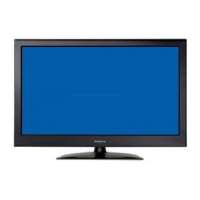
This document is a user manual for the Palsonic TFTV5580M, a 54.6cm (21.5") Full HD LED TV/DVD Combo with DVB-T. Palsonic is an Australian company that has been offering quality products since 1958.
Function Description
The TFTV5580M is a versatile LED television designed to provide a rich audio and video experience. It functions as a broadcast and cable television receiver, a display for VCR, VCD, or DVD players, and can also be connected to a computer for use as a monitor. The integrated DVD player supports DVD, CD-DA, and JPEG formats. The TV includes a DVB-T tuner for digital terrestrial television.
Important Technical Specifications
Display:
- Active screen size: 22 inches
- Aspect ratio: 16:9
- Resolution: 1920x1080 (Full HD)
- Response time: 7ms
- Contrast: 2000:1
- Brightness: 250 cd/m²
- Viewing angle: 176/176 (H/V)
I/O Ports:
- HDMI input: 2
- PC input (VGA): 1
- PC audio input: 1
- YPbPr input (Component): 1
- AV input (Composite): 1
- RF input (Antenna/Coaxial): 1
- USB input: 1 (for media playback and recording)
- SPDIF output (Coaxial Digital): 1
- Headphone output (3.5mm): 1
TV Functions:
- Tuner: 1 (DVB-T)
- Number of channels: 100
- Standards: B/G, D/K
- Color system: PAL, SECAM
- Progressive scan: Yes
- 3:2/2:2 pull down: Yes
- Noise reduction: Yes
Audio:
- Speaker: 2 x 3W (built-in 2 speakers)
- Audio mute: Yes
Power:
Physical:
- Dimensions (WHD): 528.9mm × 385mm × 155.4mm
- Packing size (WHD): 605mm × 445mm × 134mm
- Gross weight: 4.97Kg
- Wall mounting: M4 screw thread
Usage Features
Control and Navigation:
The TV can be controlled using both the convenient control buttons on the front panel and a handy remote control. An On-Screen Display (OSD) menu system provides an easy-to-use interface for adjusting TV settings and customizing preferences.
Front Panel Controls:
- OPEN: To open the disc tray.
- PLAY: To play a disc.
- INPUT: To switch input sources.
- MENU: To enter the OSD menu.
- CH +/-: To increase or decrease channel numbers.
- VOL +/-: To increase or decrease the volume.
- POWER: To turn the TV on or off.
Remote Control Features:
The remote control offers extensive functionality, including:
- POWER: On/Off.
- SOURCE: Select input source.
- TEXT: Start teletext mode.
- CANCEL/REVEAL/ASPECT: Teletext functions and screen ratio adjustment.
- Number Keys (0-9, 10+): Direct channel selection.
- FAV: Display favorite channels list.
- MUTE: Disable audio output.
- VOL +/-: Volume control.
- CH +/-: Channel switching.
- D.SETUP: DVD setup menu.
- EPG: Electronic Program Guide menu.
- TV/R: Select TV/RADIO mode.
- OPEN: Eject button for DVD.
- MENU: Enter/exit OSD menu.
- INFO: Display current channel information.
- OK: Confirm selection.
- REC: Start recording.
- SLEEP: Set sleep timer.
- CH.LIST: Display channel list.
- EXIT: Exit current menu.
- REP: Repetition button (DVD).
- COLOUR KEYS (Red, Green, Yellow, Blue): Context-sensitive functions (e.g., delete, rename, move, skip channels in Programme Edit).
- TITLE/D.MENU/ANGLE/GOTO: DVD navigation buttons.
- NICAM/AUDIO/SUB: Audio and subtitle selection.
- HOLD: Freeze teletext page.
- Playback Controls (<<, >>, |<<, >>|, ||, ■): Play, Fast Rewind, Fast Forward, Previous, Next, Pause, Stop.
- SIZE/SUBPAGE/INDEX: Teletext functions.
- Direction buttons (▲/▼/◄/►): Navigation within menus.
OSD Menu System:
The OSD menu is divided into several sections:
- Channel Adjustment: Auto Tuning, ATV Manual Tuning, DTV Manual Tuning, Programme Edit (delete, rename, move, skip, add/delete favorite channels).
- Picture Adjustment: Picture Mode (Personal, Dynamic, Standard, Mild), Contrast, Brightness, Colour, Tint, Sharpness, Colour Temp (Cold, Normal, Warm), Noise Reduction (Off, Low, Middle, High, Default).
- Sound Adjustment: Sound Mode (Personal, Standard, Music, Movie, Sports), Treble, Bass, Balance, Auto Volume, SPDIF Mode (PCM, Auto, Off), AD Switch.
- Time Adjustment: Clock, Time Zone, Sleep Timer (Off, 10min, 20min, 30min, 60min, 90min, 120min, 180min, 240min), Auto Standby (Off, 3H, 4H, 5H), OSD Timer (5s, 10s, 15s, 20s, 25s, 30s).
- Lock Adjustment: Lock System (Off/On, default password "0000"), Set Password, Block Program, Parental Guidance, Key Lock (Off/On), Hotel Mode.
- Setup Adjustment: OSD Language, TT Language, Aspect Ratio (Auto, 4:3, 16:9, Zoom1, Zoom2), Blue Screen (Off/On), First Time Installation, Reset (to default settings), Software Update (USB).
Media Operation (USB):
The TV supports media playback from a USB device. Users can select PHOTO, MUSIC, MOVIE, or TEXT modes to view files.
Recording (PVR):
The TV supports recording current programs to a connected USB mobile disk.
- Press REC to start recording.
- Press Stop to stop recording.
- A warning message appears if storage space is low.
- Index button to view recorded list.
- Info button to see program details.
DVD Functions:
- Close/Open: Open and close the disc tray.
- Play/Pause/Stop: Standard playback controls.
- Next Chapter, Track or File / Previous Chapter, Track or File: Skip navigation.
- Rep: Select repeat mode.
- DVD Menu/Title: Access DVD menus.
- Audio Track: Select desired audio sound track.
- Angle: Select desired camera angle.
DVD Menu Settings:
- General Setup: TV Type (PAL, Auto, NTSC), Screen Saver (On/Off), TV Display (4:3 pan scan, 4:3 letter box, Wide), Password (default "0000"), Last Memory (On/Off), Default (reset all options).
- Preference Setup: OSD Language, Audio, Subtitle, Disc Menu (select proper language for each).
- Speaker Setup: Dynamic (optimizes sound output by softening high volume outputs).
Maintenance Features
Safety Precautions:
- Grounding: The apparatus must be grounded.
- Product Disposal: Do not dispose with general household waste; contact local authorities for recycling.
- Cleaning: Unplug before cleaning. Use a soft cloth moistened with water; avoid liquid or aerosol cleaners.
- Placement: Avoid unstable surfaces, near water, direct sunlight, or heat sources. Ensure proper ventilation.
- Power Cord: Do not overload wall outlets or extension cords.
- Servicing: Refer all servicing to qualified personnel. Do not attempt to service yourself.
- Antenna: Ensure outdoor antenna system is grounded and located away from power lines.
Handling the LED Screen:
- Avoid direct sunlight exposure.
- Do not push or scratch the screen.
- Do not place heavy objects on the screen.
- Smears in cold places are normal and will disappear as temperature rises.
- Ghosting from still pictures will eventually disappear.
- Warm LED panel during operation is normal.
Broken Glass and Liquid Crystal Leakage:
- If the LED panel is damaged, avoid touching broken glass or crystalline liquid (toxic). Rinse thoroughly and consult a doctor if contact occurs.
Important Notice (Pixel Defects):
- The product may have a few cell defects (up to 2 bright or 2 dark pixels) which are considered acceptable by industry standards and do not mean the panel is faulty. Palsonic will repair units with 6 or more dead pixels within a 12-month period.
Troubleshooting:
- No power: Check power cord connection, remote control POWER button, and front panel indicator.
- LED TV does not operate: External influences (lightning, static electricity) may cause malfunction. Try restarting or unplugging/replugging the AC cord.
- Power cut off suddenly: Check off timer/sleep timer settings. Ensure proper ventilation and clean vents.
- Remote control unit does not operate: Check battery polarity and charge, avoid strong/fluorescent lighting, ensure clear path to sensor.
- Picture cut off/with side bar screen: Check image position and screen mode adjustments.
- Strange color, light color, or color misalignment: Check room brightness and input signal settings.

 Need help?

 To Next Page
 General