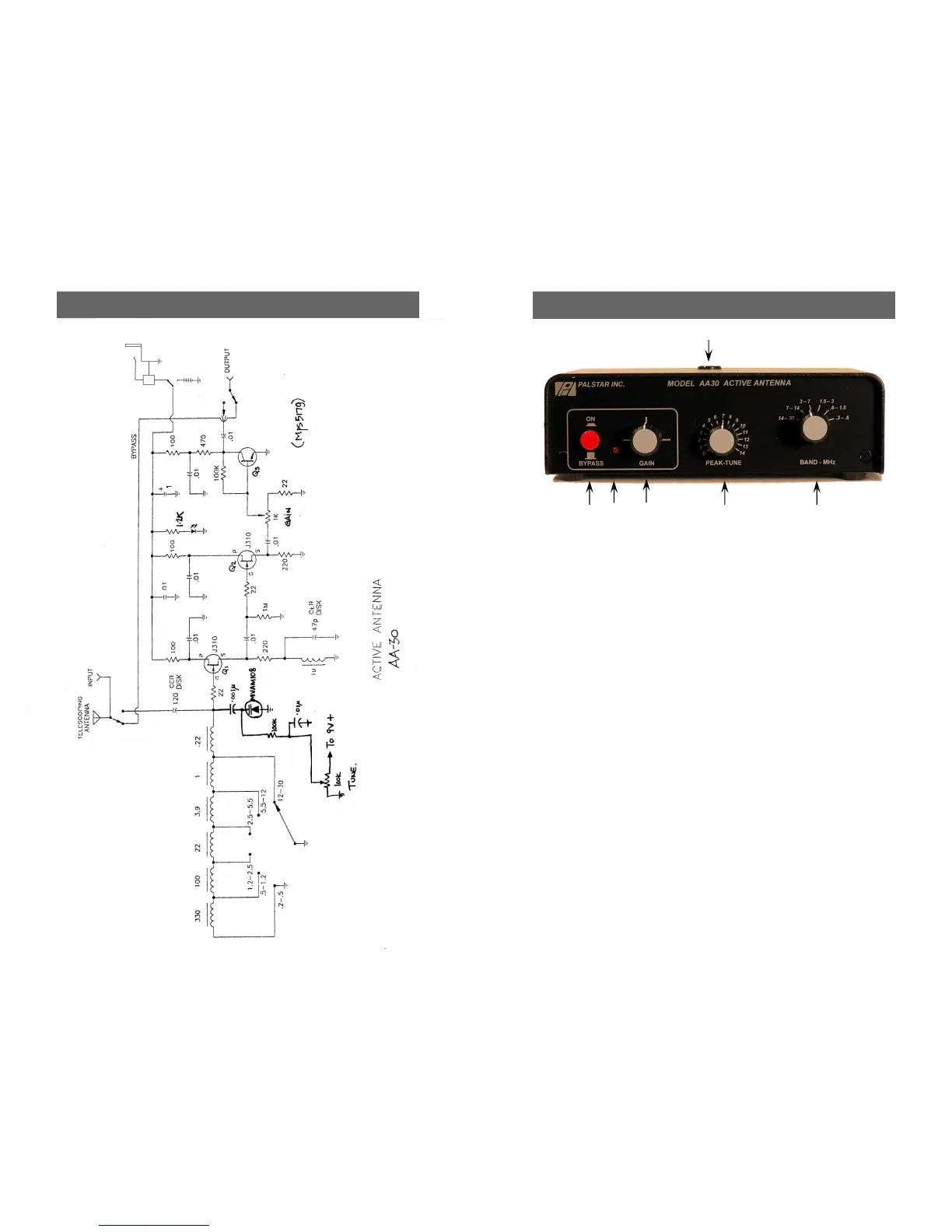
6 AA30 Schematic
LM7410
Power
Jack
9V
Battery
Power Select
Switch
1-8 00-773-7931 WWW.PALSTAR.COM
Front Panel 3
1
2 3 4 5
1. Telescoping Whip Socket. Insert Telescoping Whip
into this hole and screw it down until it is snug. Be care-
ful when starting so not as to cross-thread the fittings.
(Do not mount telescoping whip if you are using an ex-
ternal wire antenna.
2. On/Bypass Switch. Pressing the latching button to
the IN position turns on the pre-amplifier and varactor
tuned pre-selector. When the button is in the OUT po-
sition, active circuits are turned off and antenna (wire or
telescoping) is bypassed directly to the output jack.
3. Indicator LED. Lights when On/Bypass Switch is ON.
4. Gain Control. Adjusts gain of pre-amplifier.
5. Peak Tune. Tunes the varactor controlled pre-
selector.
6. Band Switch. Selects the frequency tuning range of
the pre-selector.
6


 To Next Page
 Loading...