!"
3.0 Connections and Controls
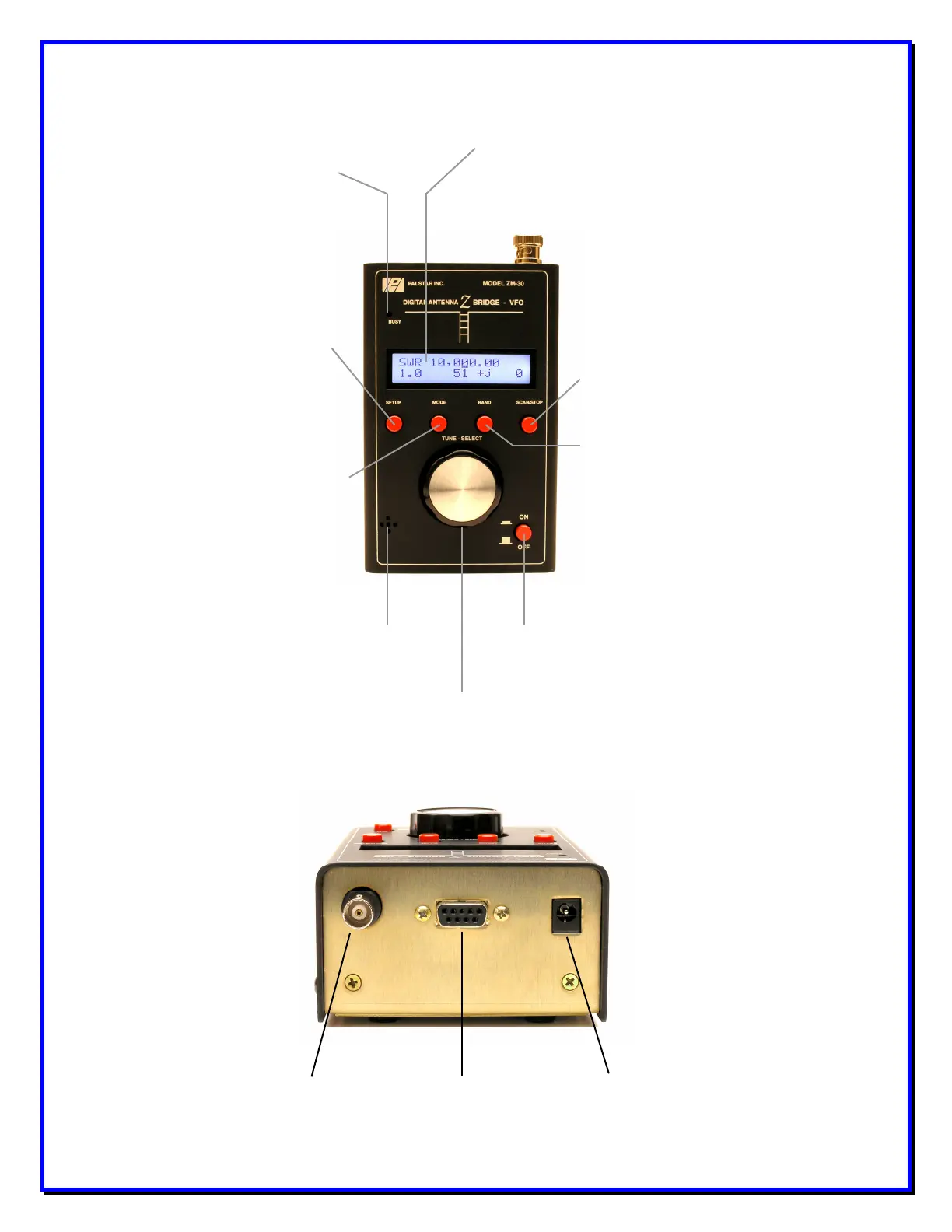
LCD Display 2 lines x 16 characters
Pressing this
control initiates a scan
of the frequencies
selected in the BAND
function. Scan exits to
impedance mode
showing the resonant
point in the antenna
system.
User can select
one of three bands, or a
custom set band, for the
scan operation:
- 1-10 MHz
- 10-20 Mhz
- 20-30 Mhz
- Custom Band
Push-and-hold to
turn unit on or off.
Main part of user interface, used to
select menu items and frequency
settings.
When enabled tones
indicate value of SWR.
User can change
the ZM30 to any of the 4
available operating
modes:
- Impedance (default)
- Capacitance
- Inductance
- VFO
Provides menu of
user configurable settings
and functions:
- Custom Scan settings
- Audio tone
- Software Load
- Calibrate
- Debug Mode
- Power-Off Time
- Backlight control
- View Settings
Turns on
when scanning and when
saving user settings.
Figure One - ZM30 Front Panel
RS-232 Serial
Port Connect to
RF Output
External Power
Jack
Figure Two - ZM30 Top View


 To Next Page