
 Need help?
Do you have a question about the Pan-Globe MG900 Series and is the answer not in the manual?
Covers risks like electric shock and safe wiring practices.
Details precautions for hazardous environments and product handling.
Outlines input, output, control modes, and environmental parameters.
Provides dimensions for panel mounting and physical layout.
Guides through initial setup and common operational sequences.
Explains how to select input signals and configure alarm behaviors.
Lists error codes, their meanings, and recommended solutions.
Details connection procedures and provides diagrams for different models.
Illustrates step-by-step guides for essential functions like input setup and auto-tuning.
Describes the hierarchical structure for accessing and configuring parameters.
Demonstrates output gap configurations for heating and cooling control.
Explains the procedure for setting up a soft start function for output.
Details how to compensate for temperature measurement differences using offset settings.
Covers communication protocol basics, parameters, and message formats.
Provides examples of Modbus function codes and parameter address mapping.
The MG900 Series BI-MODE output - AR Digital Controller is a versatile instrument designed for precise temperature control and monitoring in various industrial applications. This manual provides essential information for its installation, wiring, operation, and maintenance.
The MG900 Series controller offers universal input capabilities, supporting Thermocouple (T/C), PT100, and analog signals, making it adaptable to diverse sensing requirements. It features multiple control modes including PID, PD, PI, P, and Fuzzy (OPAD), allowing for flexible and accurate process control. The controller can transmit Process Value (PV), Set Value (SV), and Manipulated Value (MV) in six different ways, supporting both positive and negative side outputs. It also incorporates a ratio coefficient (KV) menu to configure a double output ratio control system.
A notable feature is the "OPAD" artificial intelligence anti-overshoot coefficient, which enhances control stability and precision. The controller includes a "RUN" parameter setting, allowing users to select between "Work" or "Stop" modes for operational flexibility. Additionally, it offers an output soft start function, ensuring a gradual and controlled start-up of the output, which can be beneficial for protecting connected equipment.
The device supports various alarm modes, including deviation upper/lower, absolute value upper/lower, zone internal/external, and thermocouple breaking alarms. Alarm duration can be configured for most alarm modes, providing customizable alert behavior.
Power and Voltage:
Power Consumption:
Display Precision:
Input:
Control Modes:
Output:
Environment Conditions:
Sampling Time:
Input Type Measurement Ranges:
Communication Protocol:
Panel Cutout Dimensions (mm):
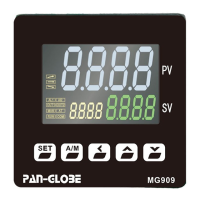
Easy Configuration: The controller features a user-friendly interface with clear symbols and functions for easy navigation and parameter setup. The "SET" key is used for loop/confirmation, "A/M" for auto/manual switching, and arrow keys for shifting digits and adjusting values.
Input Signal Flexibility: Thermocouple and thermal resistance inputs can be switched without hardware modification, simplifying setup for different sensor types. The device also incorporates a slope value compensation for temperature readings.
Advanced Control Algorithms: The inclusion of PID, PD, PI, P, and Fuzzy (OPAD) control modes, coupled with artificial intelligence for anti-overshoot, ensures precise and stable control over various processes.
Auto-Tuning Functionality: The "AT" (Auto-Tuning) feature allows the controller to automatically determine optimal PID parameters, simplifying calibration and improving control performance. Users can initiate auto-tuning by setting the SV value and confirming AT ON.
Alarm Management: Multiple alarm modes are available, including deviation, absolute value, zone, and thermocouple breaking alarms. These can be configured with specific alarm values (AL1, AL2) and hysteresis (HY1, HY2) to suit application needs. The controller also supports program segment ending, running, and ending alarms for more complex control sequences.
Output Soft Start: The "DLY" parameter enables a soft start function for the output, gradually increasing the output value over a specified time (0-30 seconds). This feature helps prevent sudden surges and protects connected equipment.
Temperature Offset Compensation: The controller provides a three-point complement function for temperature offset, allowing users to compensate for differences between surface temperature (actual application area) and T/C measured temperature (actual heating area). This ensures that the control system operates based on the desired actual surface temperature.
MODBUS Communication: The integrated MODBUS communication protocol (RS485) allows the controller to be integrated into larger control systems, enabling data exchange with host computers. It supports read hold register (03), write single register (06), and write multiple registers (10) functions.
Self-Diagnosis: The controller includes a self-diagnosis function that activates all lights, providing a quick visual check of the device's operational status.
Error Code Index: A comprehensive error code index is provided in the manual, detailing common issues such as sensor disconnection, input signal out of range, cold junction compensation failure, and thermocouple circuit disconnection. Each error code is accompanied by instructions for elimination, facilitating quick troubleshooting.
Robust Design: The device is designed for industrial environments, but users are cautioned against using it in places with explosive/combustible gases, extreme temperature changes, high humidity, strong vibrations, corrosive gases/dust, or splashes of water, oil, and chemicals.
Wiring Guidelines: Clear instructions are provided for wiring, emphasizing the importance of turning off power before wiring to prevent electric shock. It also advises against touching terminals or other electric parts after wiring. Specific guidelines are given for thermal couple input (use correct compensation lead), platinum resistance input (leads less than 5ohm and equal resistance), and power supply (600V insulated conductor with >1mm² cross-sectional area).
Parameter Lock (LCK): The "LCK" parameter allows users to lock data, preventing unauthorized changes to settings. This enhances security and helps maintain system integrity.
Regular Checks: The manual implicitly encourages regular checks of wiring and input signals to ensure correct operation and prevent potential damage. It also recommends a time interval of no less than 150 milliseconds between write parameter instructions to avoid instrument failure.
 General
| Brand | Pan-Globe |
|---|---|
| Model | MG900 Series |
| Category | Temperature Controller |
| Language | English |

 To Next Page