Need help?
Do you have a question about the Panacom MP 1124 and is the answer not in the manual?
Advice on safe mobile phone usage while driving and proper placement.
Instructions to switch off the mobile phone before boarding aircraft for flight safety.
Follow rules and switch off phone in or near operation areas of explosion.
Turn off phone at gas stations or near fuels and chemicals.
Follow hospital rules and switch off device near medical equipment.
Information on how mobile phones can interfere with other electronic devices.
Only qualified personnel should install or maintain the mobile phone.
Use only manufacturer-approved accessories and batteries for optimal performance.
Guidance on using the phone in normal conditions, avoiding high temperatures.
How to make emergency calls, including reporting position and condition.
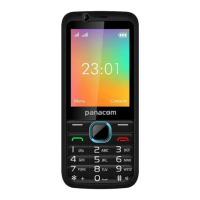
Details the functions of the left soft, right soft, call, end, navigation, and OK keys.
Steps to make the first call, including SIM insertion and charging.
Guide to inserting SIM cards, including warnings about handling and potential issues.
Instructions for installing an SD card for expanded storage, with handling precautions.
Guidance on battery installation, charging, status monitoring, and usage.
Detailed safety instructions for using and handling the phone's battery to prevent damage or hazards.
Instructions for connecting and using the 2-in-1 charger for charging the mobile phone.
Steps to power the mobile phone on and off using the power key.
How to use the hands-free kit for making and answering calls without holding the phone.
How to automatically lock the keypad and how to unlock it.
Information on available languages and input methods supported by the phone.
Steps for making calls using SIM1 or SIM2, and using the clear key for input errors.
Procedure for making international calls, including using the '+' symbol and country codes.
How to dial extension numbers by using a 'P' symbol between numbers.
How to find and dial numbers from the phonebook.
Accessing call logs to redial recent numbers.
How to answer incoming calls, adjust volume, and use call features like mute or hold.
How to reject an incoming call using the slider.
Making emergency calls, even without a SIM card, in areas with network coverage.
Access and configure various phone settings including networks, device, and personal preferences.
Manage contacts, add new entries, search, and organize phone numbers and related information.
Details about WhatsApp, a messaging app for smartphones, and its features.
Core communication functions including making, answering, and managing calls.
How to compose, send, and read text messages, including converting to MMS.
Using the phone's browser for internet access via Wi-Fi, WAP, or GPRS.
Information on using Facebook for social networking and sharing content.
How to play music files from an SD card, organized by artist, album, or song.
Using the camera to take photos, adjust settings, zoom, and view captured images.
Accessing utility functions like Calculator, Notepad, and Alarm.
Managing MP3, video, audio, and e-book files stored on the phone or SD card.
Accessing various settings like free internet, themes, language, SOS, and app management.
Adjusting preferences and removing unwanted applications from the phone.
Enabling and configuring the SOS function for emergency contacts and quick calls.
Viewing and managing picture and video folders, with options to share or delete.
Sending and receiving emails using the Gmail application, requiring internet support.
Accessing net services attached to SIM cards for information like weather or news.
Setting up various Google applications and services on the phone.
Accessing tools like DeskClock and FM Radio within the organizer.
Accessing multimedia features like DeskClock, FM Radio, Torch, and Videos.

 To Next Page
 General