CONTROLS ON PANEL
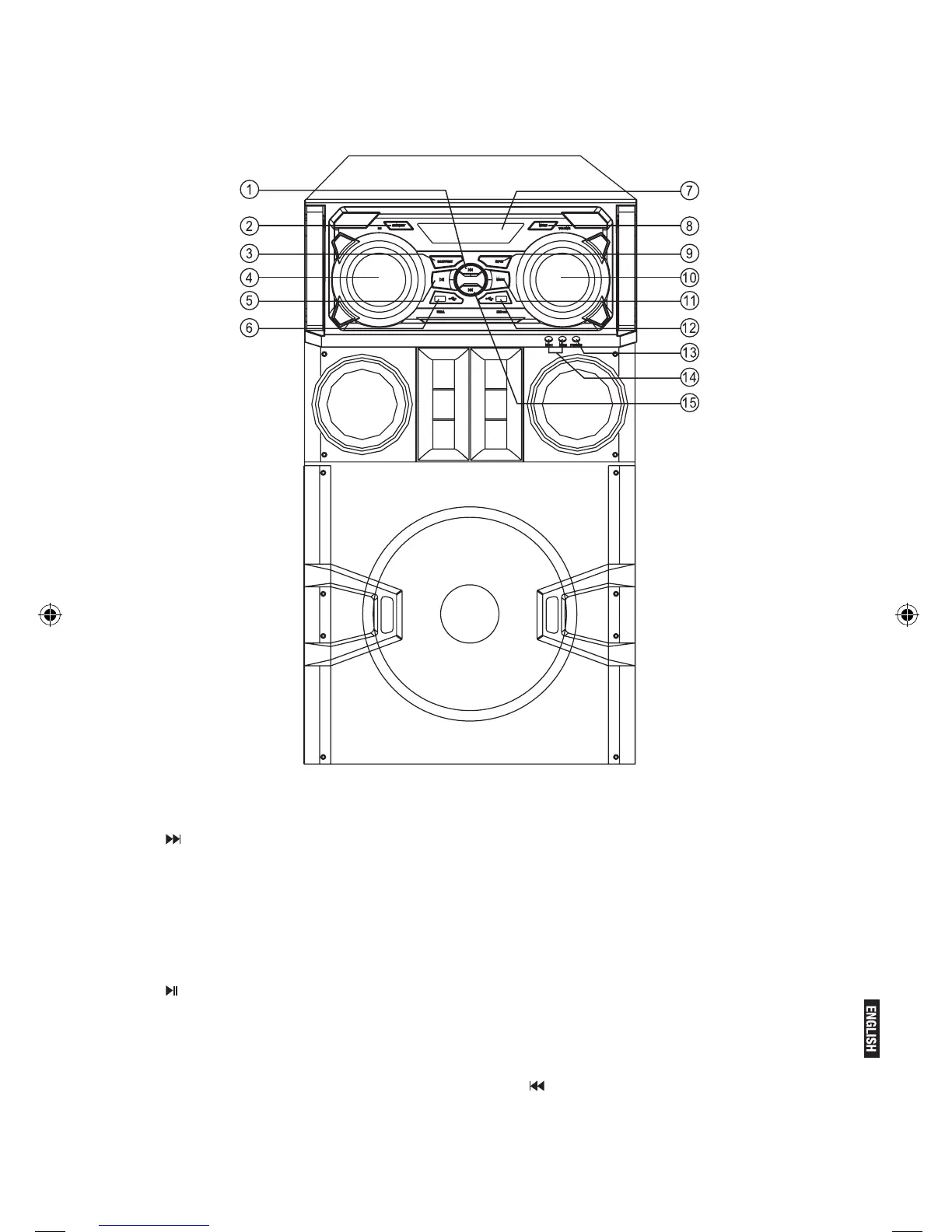
1. (NEXT)
Press this key to choose next song.
2.STANDBY
3.DJ.EFFECT
Press this key to choose diffect music effect.
4.DJ
Adjust the knob to design and change the mu-
sic effect.
5. (PLAY/PAUSE)
Press this key to play or pause.
6.USB A
USB A terminal.
7.LED DISPLAY
8.MENU
This switch selects the menu.
9.lNPUT
Press this key to choose the input mode.
10.VOLUME
Adjust the unit volume level.
11.MUTE
Press this switch to mute,press
again recover.
12.REC-USB
REC-USB terminal.
13.PHONES
phones terminal.
14.MlCROPHONE 1&2
Microphone 1&2 terminal.
15. (PREV)
Press this key to choose previous song.


 To Next Page