34
CQ-C9901W/C9801W
35
English
CQ-C9901W/C9801W
Display Setting
Adjustment to display on the DISPLAY menu
Function Setting, Display Setting
DISPLAY Menu display
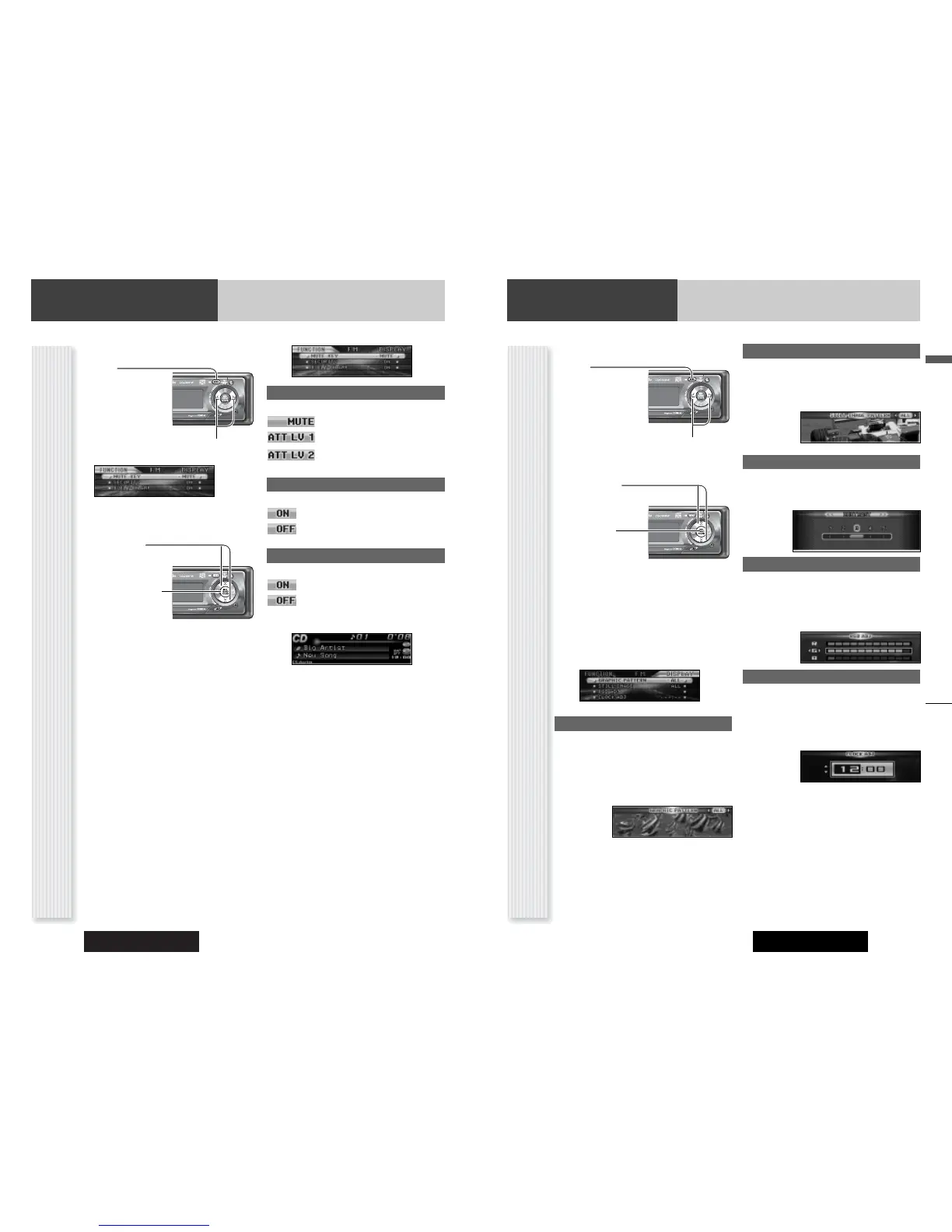
1
Press [MENU] to display the menu dis-
play.
For using the remote
control, hold down
[MENU] for 2 sec. or
more.
2
Press []] or [[] to display the DIS-
PLAY menu.
3
Press [}] or [{] to select a function to
be adjusted.
4
Press [BAND]
(SET) to confirm
the display.
5
Adjust the setting
value.
6
Press [BAND] (SET) to confirm the
adjustment.
7
Press [MENU].
For using the remote control, hold down [MENU]
for 2 sec. or more.
GRAPHIC PATTERN
(Setting range: 5 types (CQ-C9901W)/ 6 types (CQ-
C9801W), Default: ALL)
Switching by []] or [[]
ALL: Sequential display from pattern A to E.
Pattern A-E
Pattern E: CQ-C9801W only
CONTRAST (CQ-C9801W only)
(Setting range: 1 to 5, Default: Contrast 3)
[[]: Tilting up view angle
[]]: Tilting down view angle
CLOCK ADJ
Note: Adjust the clock when “ADJUST” appears on the
display.
[[]: Adjusting minutes
[]]: Adjusting hours
[}]: Forward
[{]: Backward
Note:
¡ The graphic pattern and still image are changeable.
(a page 36)
¡ If corrupted data is selected, “DISPLAY FILE INCOM-
PLETE” appears. (a page 36)
Function Setting
Adjustment to display on the FUNCTION menu
FUNCTION Menu display
1
Press [MENU] to display the menu dis-
play.
For using the remote
control, hold down
[MENU] for 2 sec. or
more.
2
Press []] or [[] to display the FUNC-
TION menu.
3
Press [}] or [{] to select a function to
be adjusted.
4
Press [BAND]
(SET) to adjust.
5
Press [MENU].
For using the remote control, hold down [MENU]
for 2 sec. or more.
MUTE KEY
Setting [MUTE] buttons’ functions
: Volume off (default)
: Volume down by 10 steps
: Volume down by 5 steps
SECURITY
Setting the security function (a page 10)
: ON (default)
: OFF
BUILT-IN AMP
You can toggle the integrated amplifier on and off.
: Amplifier on (default)
: Amplifier off (when the external amplifier is
used)
RGB ADJ (CQ-C9901W only)
(Setting range: 1 to 11 each, Default: 1)
You can adjust the screen color.
[[]: Up
[]]: Down
[}][{]: Select
STILL IMAGE
(Setting range: 11types, Default: ALL)
Switching by []] or [[]
ALL: Sequential display from pattern 1 to 10
No.1-10



 To Next Page