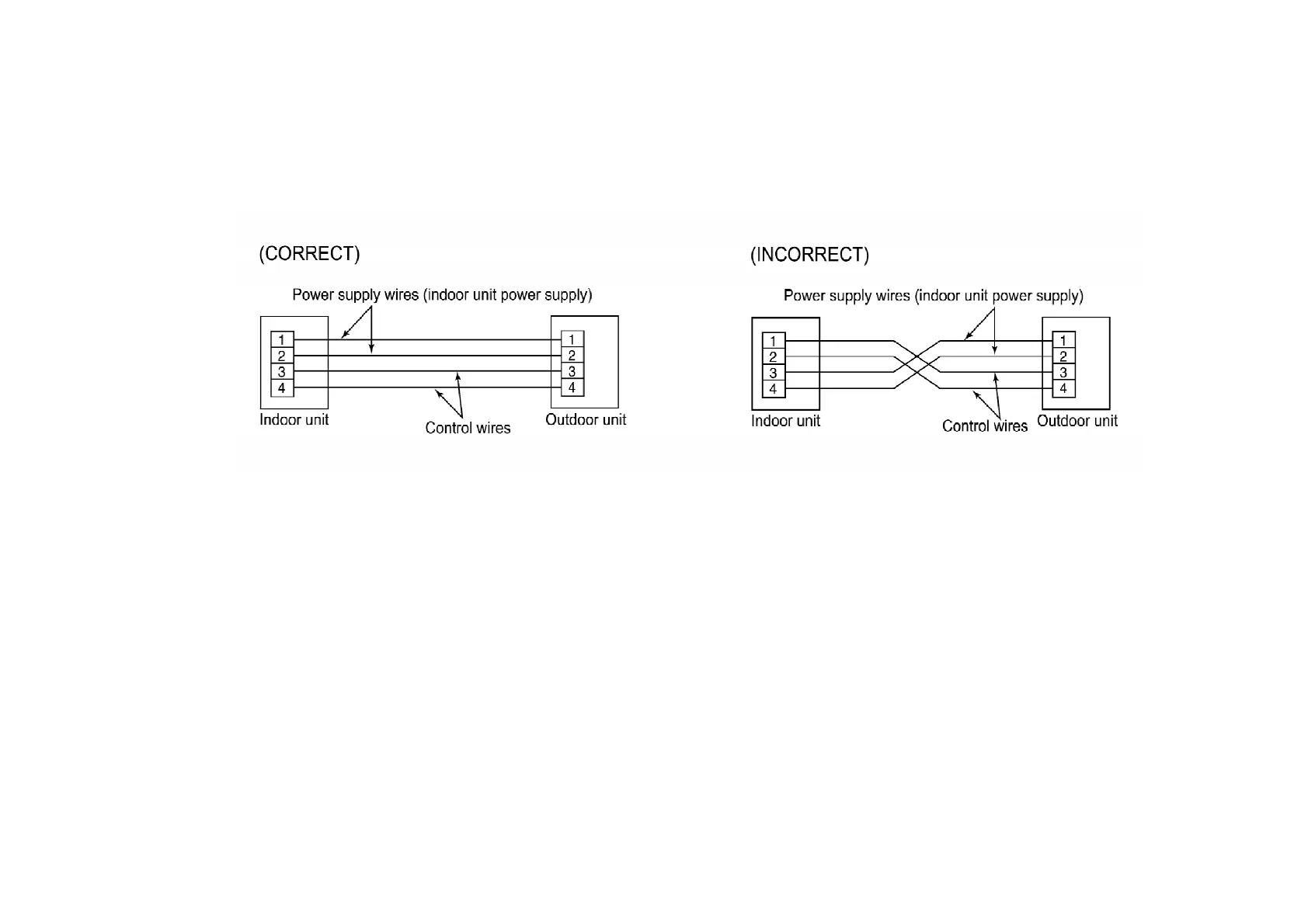
These units are equipped with connection error prevention circuits. If the units do not operate, it is possible that the connection error
prevention circuits have operated. In such cases, check that the power supply wires (connected to terminals [1] and [2] and the control
wires (connected to terminals [3] and [4] ) are connected correctly. If they are connected incorrectly, connnect them correctly. Normal
operation should then commence.
- Do not short the remote control wires to each other. (The protection circuit will be activated and
the units will not operate.) Once the cause of the short is eliminated, normal operation will then be
possible.
NOTE:
- Wait one minute after turning on the indoor unit power supply before operating the remote control.
- If nothing at all appears in the remote control LCD, check the power supply for the indoor unit. /
Refer to “TROUBLE SHOOTING”.
NOTE:
Never do any of the following, as doing so may damage the printed circuit board.
- Do not connect anything except a relay to the timer input or fan speed output (connector CNT1 on
printed circuit board).
- Do not connect U-NET transmission wires to terminals 3 and 4 of the indoor and outdoor units. (*1)
176



 To Next Page