18
How to use
Not used
in normal
operations.
Press to restore
the remote
control to default
setting.
Indicator
POWER
TIMER
nanoe
TECHNOLOGY
ECO
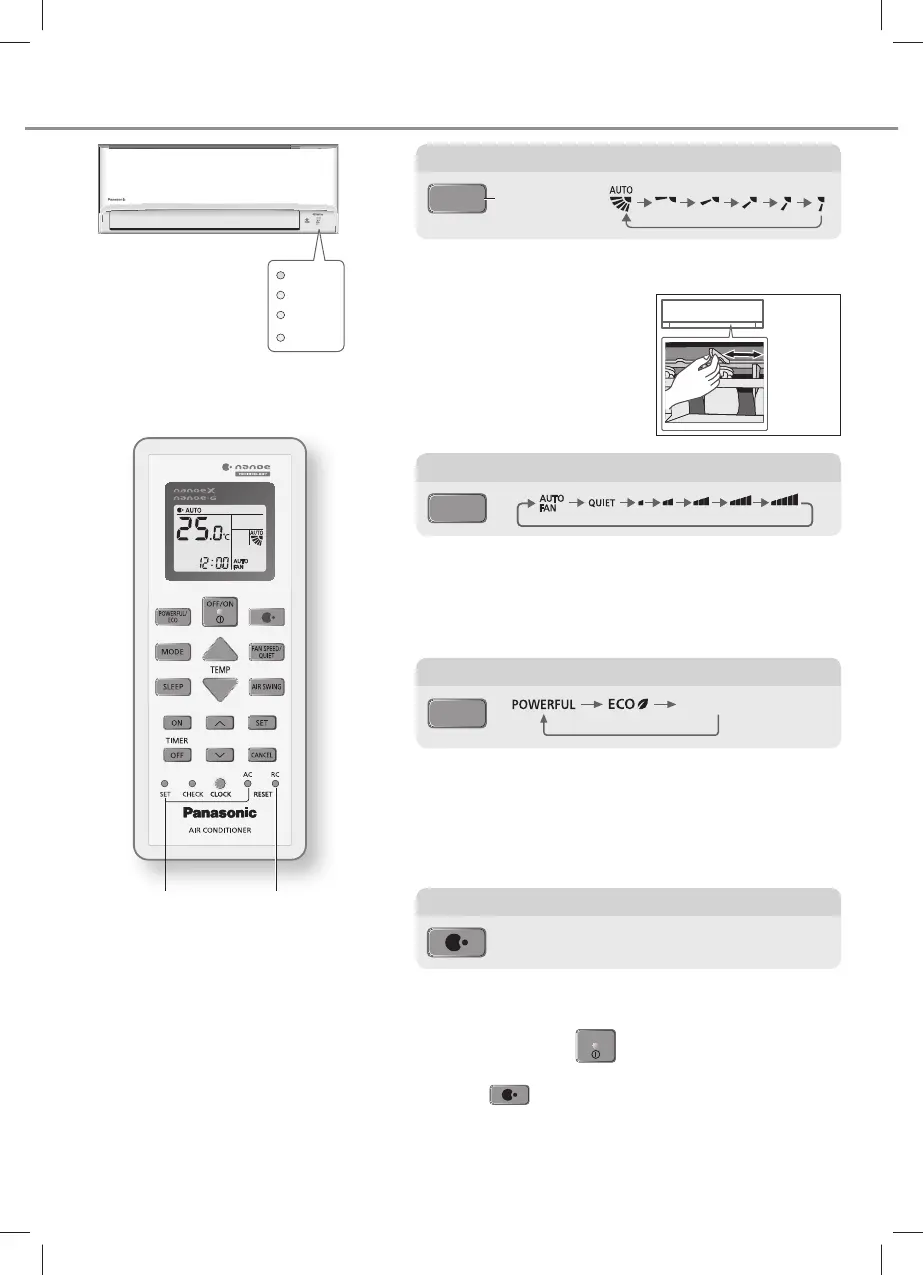
Upper direction:
• Do not adjust the fl ap by hand.
Lateral direction:
• For lateral direction, it is
manually adjustable as shown.
To adjust airfl ow direction
AIR SWING
Upper direction
• This is a combination operation together with nanoe™X
and nanoe™-G (nanoe™ TECHNOLOGY).
• nanoe™ TECHNOLOGY starts automatically when the
unit is turned on with
OFF/ON
OFF/ON
.
• This operation can be turned ON or OFF manually by
pressing
.
• This operation can be activated even when the unit is
turned off. In this condition, the fl ap and fan speed will
operate based on remote control setting.
• If power failure occurs during this operation, this operation
will be resumes immediately after power resumes.
To enjoy freshness and cleaner environment
To adjust FAN SPEED and QUIET condition
FAN SPEED:
• For AUTO, the indoor fan speed is automatically adjusted
according to the operation mode.
QUIET:
• This operation reduces airfl ow noise.
POWERFUL:
To reach set temperature quickly
• This operation stops automatically after 20 minutes.
ECO:
• To reduce power consumption for better energy saving
without sacrifi cing comfort.
FAN SPEED/
QUIET
To switch between POWERFUL/ECO
POWERFUL/
ECO
Lateral
direction
(exit setting)
ACXF55-28250_SS0320-1.indb 18ACXF55-28250_SS0320-1.indb 18 21/2/2020 10:08:02 AM21/2/2020 10:08:02 AM




 To Next Page