Audio Adjustments
1. Press TV SPEAKERS ON button located on
back of set or select TV SPEAKERS ON/
OFF in the AUDIO menu.
2. Set amplifier volume to minimum.
3. Adjust TV volume to desired level.
4. Adjust amplifier volume to match the TV.
5. Press TV SPEAKERS OFF button or select
TV Speakers OFF&VAO from AUDIO menu.
6, Volume and mute are now selected using
the TV controls.
Note: In some models the TV SPEAKERS ON/
OFF is located in the AUDIO menu.
In OFF&FAO the volume is controlled by the
external amplifier.
Ajustes de Audio (Sonido)
1. En la parte posterior, presione el bot6n TV
SPEAKERS ON para encender las bocinas
o seleccionar TV SPEAK_'ON=C_ft -el
mend de SONIDO (AUDIO).
2. Ajuste el volumen del AMP (amplificador)
al m{nimo.
3. Ajuste el volumen de la Televisi6n al
nivel deseado.
4. Ajuste el volumen del AMP hasta igualar el
de la Televisi6n.
5. En la parte posterior, presione el bot6n "IV
SPEAKERS OFF para apagar las bocinas.
6. Ahora puede seleccionar el volumen y el
silencio _"_ando los controles de
la Televisi6n.
En algunos modelos el botSn TV
SPEAKERS ON/OFF esta Iocalizado en el
mend de SONIDO (AUDIO).
El OFF&FAO audio se controla mediat_e el l
control de volumen del sistema del
amplificador extemo.
Nota:
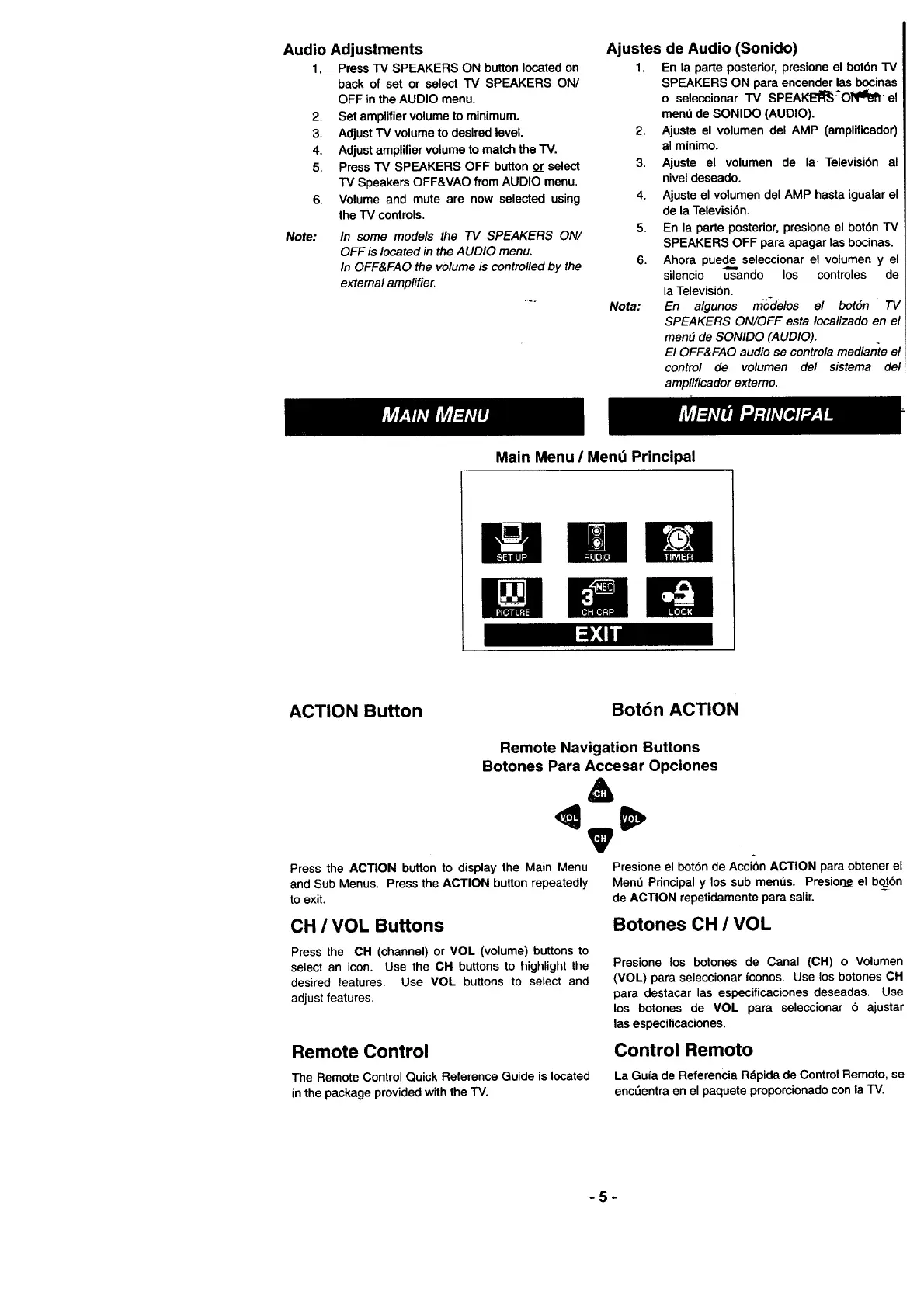
Main Menu / Mend Principal
[ i,:4ild
ACTION Button
Bot6n ACTION
Remote Navigation Buttons
Botones Para Accesar Opciones
&
V
°
Press the ACTION button to display the Main Menu Presione el bot6n de Acci6n ACTION para obtener el
and Sub Menus. Press the ACTION button repeatedly Mend Principal y los sub mends. Presior_ el bot6n
to exit. de ACTION repetidamente para salir.
CH / VOL Buttons
Botones CH / VOL
Press the CH (channel) or VOL (volume) buttons to
select an icon. Use the CH buttons to highlight the
desired features. Use MOL buttons to select and
adjust features.
Presione los botones de Canal (CH) o Volumen
(VOL) para seleccionar iconos. Use los botones CH
para destacar las especificaciones deseadas. Use
los botones de VOL para seleccionar 6 ajustar
las especificaciones.
Remote Control
The Remote Control Quick Reference Guide is located
inthe package provided with the TV.
Control Remoto
La Guia de Referencia Rdpida de Control Remoto, se
encL_entra en el paquete proporcionado con la TV.
-5-








 To Next Page