Need help?
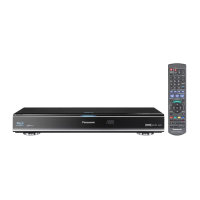
Do you have a question about the Panasonic DMR-BWT700 and is the answer not in the manual?
Standard greeting and introduction to the manual, emphasizing reading instructions.
Details on BD-Video and DVD-Video region code playback compatibility.
Covers fire, shock, laser exposure, and placement hazards for the main unit.
Guidelines for the safe handling and use of the power cord.
Precautions for handling SD cards and batteries to prevent damage or injury.
Highlights key capabilities like 3D video, wireless connection, DLNA, and VIERA CAST.
Lists items included with the product and explains basic remote control operation.
Lists disc types, their symbols, data compatibility, and rewritability.
Explains various recording modes and their impact on media compatibility and time.
Information on SD card and USB memory compatibility, protection, and usage.
Explains the function of each button on the remote control with a diagram.
Describes the physical parts of the unit, including indicators and ports.
Lists and describes the connection ports located on the back of the unit.
Instructions for connecting the unit via HDMI and power supply.
Steps for connecting set-top boxes and other video equipment.
Configuration for wired (LAN) and wireless network connections.
Alternative methods for connecting to a TV using AV or S-Video terminals.
Instructions for connecting the unit to audio amplifiers for 3D and non-3D setups.
Configuring HDMI outputs and connecting digital audio sources.
Procedures for inserting media, turning on the unit, and using the HOLD function.
Explains how to navigate menus, use the function menu, and display information.
Step-by-step guide for the initial setup of the unit, including TV tuning.
Guides for setting up wired and wireless network connections.
Helps resolve issues with wireless and network connections, providing troubleshooting messages.
Tests internet connectivity and provides steps to reconfigure network settings.
Instructions for selecting and managing TV channels from the channel list.
Shows channel information, subtitles, audio, teletext, aspect, and 3D status.
Actions like changing subtitles, audio, teletext, aspect ratio, and 3D mode.
Navigating and utilizing the electronic program guide for broadcast information.
Allows changing the TV Guide screen layout between landscape and portrait.
Explains how to use the live TV pause and rewind features.
Covers managing playback displays, stopping, and controlling playback.
Step-by-step guide for recording live television programs to the internal HDD.
Instructions for monitoring recordings, switching channels, and displaying playback.
Handles multiple recordings, pausing, and stopping recording processes.
Instructions for setting timed recordings using the TV Guide.
Finding programs for timer recording and setting them manually.
Details on various settings available for timer recordings.
Setting timer recordings based on current or next program information.
Procedures for stopping a timer recording that is currently in progress.
Important considerations and notes for successful timer recordings.
Managing scheduled recordings, including confirmation and editing.
Explanation of icons used in the recording screens for status indication.
Basic instructions for playing back BD-Video and DVD-Video discs.
Covers advanced BD-Video features like BD-Live and picture-in-picture.
How to play back video content stored on the HDD or discs.
Features for resuming playback and playing content from created playlists.
Using the tree screen interface to locate video files and folders.
Interface for navigating and selecting video content using labels and icons.
Navigating between Video, Photo, and Music content views.
Managing grouped titles and changing the programme type of video.
Instructions for playing video content using chapter markers.
Procedures for creating and deleting chapter marks within video titles.
Playback controls like stop, search, skip, pause, and slow-motion.
How to advance playback frame by frame.
Functions for skipping to specific titles, chapters, or times.
Changing audio tracks, subtitles, and aspect ratio during playback.
Instructions for connecting and configuring for 3D video playback.
Step-by-step guide for removing recorded video titles from storage.
Procedures for renaming titles, setting protection, and partial deletion.
Final steps for deleting selected video titles.
Procedures for splitting video titles into multiple segments.
Modifying title thumbnails and changing programme type information.
Guides on converting video file formats and recording modes.
Instructions for managing chapter markers within video titles.
Fundamental instructions for copying selected video titles.
Details on copying settings, icons, and methods for copying to HDD.
Specific steps for copying titles to the HDD using the DIRECT NAVIGATOR.
Advanced copying process using lists for multiple titles.
Steps for selecting titles to be copied and managing the copying list.
Functions for editing the list of titles to be copied, like adding or deleting.
Explanation of icons and functions related to the copying list.
Information on media compatibility, region codes, and copy speeds.
Details on copying to discs in normal speed mode, including limitations.
Notes on chapter marks during copying and considerations for 3D programs.
Table detailing copy speeds and recording modes for different disc types.
Steps for copying HD AVCHD video from HDD to discs.
Transferring HD/SD video from cameras or discs to HDD or discs.
Procedure for copying content from a finalised disc.
Basic instructions for playing photos and navigating the photo interface.
Interface for navigating photos and understanding screen icons.
How to switch between Video, Photo, and Music content views.
Customizing photo playback, including play options and rotation.
Configuring slideshow behavior like interval, effects, and background music.
Procedures for editing photo events and individual photos.
Managing photo albums by adding, renaming, and deleting albums or events.
Setting protection for photos and procedures for deleting photos.
Step-by-step guide for selecting and copying photos to different destinations.
How to configure the unit for automatic copying of new photos.
Basic music playback from CDs/USB and copying to HDD.
Using Gracenote for music info and finding folders for MP3 files.
Instructions for accessing and playing music stored on the internal HDD.
Controls for music playback like stop, pause, search, and skip.
Features like Favourites, track information, repeat play, and re-mastering.
How to display a photo slideshow while music is playing.
Procedures for deleting music, renaming albums, and managing playlists.
Guides on recording audio/video from external sources like set-top boxes.
Instructions for transferring HD (AVCHD) and SD (MPEG2) video from cameras or discs.
Managing media by deleting titles, naming discs, and setting protection.
Procedures for formatting discs and memory cards.
Setting up Top Menus, finalizing discs, and deleting BD-Video data.
Guides for inputting text using the remote control for various fields.
Instructions for accessing internet services like YouTube via VIERA CAST.
Explains how VIERA Link enables integrated control between Panasonic devices.
Describes controlling the unit using the TV's remote via VIERA Link.
How to access media stored on other DLNA devices on the network.
How to access the unit's media from other DLNA devices.
General playback operations and accessing the disc menu.
Adjusting disc content playback settings like video and soundtrack.
Configuring repeat play, random playback, and graphic display level.
Adjusting picture quality modes, advanced settings, and progressive output.
Configuring sound effects, dynamic range, downmix, and bilingual audio.
Allows changing the position of the menu screen on the TV.
Accessing and modifying system settings like TV tuning, connections, and PIN.
Managing favorite channels, editing the channel list, and auto setup.
Restarting auto setup and downloading channel information from TV.
Manually tuning channels and updating the channel list.
Checking signal quality and setting parental controls for channels.
Configuring playback for 3D, BD-Live, parental controls, and sound modes.
Configuring aspect ratio, high-speed copy, EP mode, and recording buffers.
Managing HDD content, including deleting titles/photos and formatting.
Adjusting picture quality modes, still mode, seamless play, and NTSC output.
Configuring sound effects, dynamic range, downmix, and bilingual audio.
Configuring PCM down conversion and selecting audio output formats.
Adjusting audio delay and setting priorities for broadcast/recording audio.
Customizing on-screen information, unit display, screen saver, teletext, and LEDs.
Configuring 3D video playback and TV aspect ratio settings.
Detailed configuration options for HDMI connections, including output modes and formats.
Setting up network connections, IP/DNS, proxy, internet content, and volume control.
Configuring the unit as a DLNA server and managing connected devices.
Managing power saving, auto standby, RF output, and remote control settings.
Setting clock, PIN, updating software, DivX registration, and initializing the unit.
Guides on updating the unit's software via broadcast or internet.
Adjusting the screen aspect ratio to fit the TV display.
Using the unit's remote to control basic TV functions.
Explanations for various messages shown on the unit's display during operation.
Lists and explains error codes (Uxx, X HOLD) and their meanings.
Troubleshooting for unit unresponsiveness, disc ejection problems, and power issues.
Addressing issues related to power, dim displays, and clock visibility.
Troubleshooting problems with TV screen display, video distortion, and aspect ratio.
Resolving distorted sound, audio switching, and general operation problems.
Troubleshooting issues with channel tuning, slow startup, and audio output.
Addressing issues related to recording, copying, and timer recording failures.
Troubleshooting playback errors including disc compatibility, PIN, and image smoothness.
Problems with disc playback on other players and HDD space after deletion.
Troubleshooting editing, playlist creation, photo playback, and track copying.
Problems with copying, track copying to HDD, and USB device recognition.
Troubleshooting TV Guide data reception, display, and transfer interruptions.
Addressing picture breakup, auto setup failures, and VIERA Link/Network problems.
Troubleshooting VIERA Link, network connectivity, and unit reset procedures.
Details about DivX video formats, VOD registration, and content playback limitations.
Guides on how to clean the unit, its lens, and precautions for moving it.
Precautions for unit placement, condensation, and safe moving procedures.
Important precautions for handling the HDD to prevent damage or data loss.
Guidelines for handling discs and SD cards to prevent damage or data corruption.
A table detailing which operations can be performed concurrently.
A table showing compatibility when starting timer recordings with other tasks.
Details on unit dimensions, mass, power, TV system, and video/audio formats.
Technical details for HDMI, various terminals, internal HDD, and WLAN connectivity.
Information on recordable discs, their speeds, and region code restrictions.
Details on various playable disc formats including BD-Video, DVD, and CD.
Compatibility and format details for SD cards and USB devices.
Details on audio output terminals and supported formats.
Maximum folder and file limits for JPEG, MP3, and other media file types.
Details on DivX and MKV file formats, including playable media and resolution.
Information on SD (MPEG2) and HD (AVCHD) video file formats and compatibility.
Recording time estimations for the DR mode based on quality and media type.
Recording time estimations for various modes (HG, XP, SP, etc.) and title limits.
Shows the maximum number of titles that can be recorded on different media.
Details about Gracenote's music and video recognition technology.
Legal information, terms of use, and disclaimers for Gracenote software and data.
Details of the product warranty, coverage, and procedures for claiming service.
 General
| Depth | 238 mm |
|---|---|
| Width | 430 mm |
| Height | 59 mm |
| Weight | 3100 g |
| Device type | Blu-Ray recorder |
| HDD capacity | 320 GB |
| Product color | Black |
| Audio decoders | Dolby Digital, Dolby Digital Plus, Dolby TrueHD, DTS-HD |
| AC input voltage | 220 - 240 V |
| Progressive scan | - |
| AC input frequency | 50 Hz |
| Dimensions (WxDxH) | 430 x 238 x 59 mm |
| Disc types supported | BD-R, BD-R DL, BD-RE, BD-RE DL, BD-ROM, CD, CD-R, CD-RW, DVD, DVD+R, DVD+R DL, DVD+RW, DVD-R, DVD-R DL, DVD-RAM, DVD-RW |
| SCART ports quantity | 2 |
| Card reader integrated | Yes |
| USB 2.0 ports quantity | USB 2.0 ports have a data transmission speed of 480 Mbps, and are backwards compatible with USB 1.1 ports. You can connect all kinds of peripheral devices to them. |
| Audio formats supported | HE-AAC, MP3 |
| Compatible memory cards | SD, SDHC, SDXC |
| Image formats supported | JPG |
| Video formats supported | AVCHD, DIVX, H.264, MKV, MPEG2, MPEG4, XVID |
| Digital audio optical out | 1 |
| Power consumption (standby) | 0.2 W |
| Power consumption (typical) | 34 W |
| Portable | No |
| TV tuner type | DVB-T, DVB-T2 |


 To Next Page