Getting started
SQT1109
7
Class II equipment (The construction of the
product is double-insulated.)
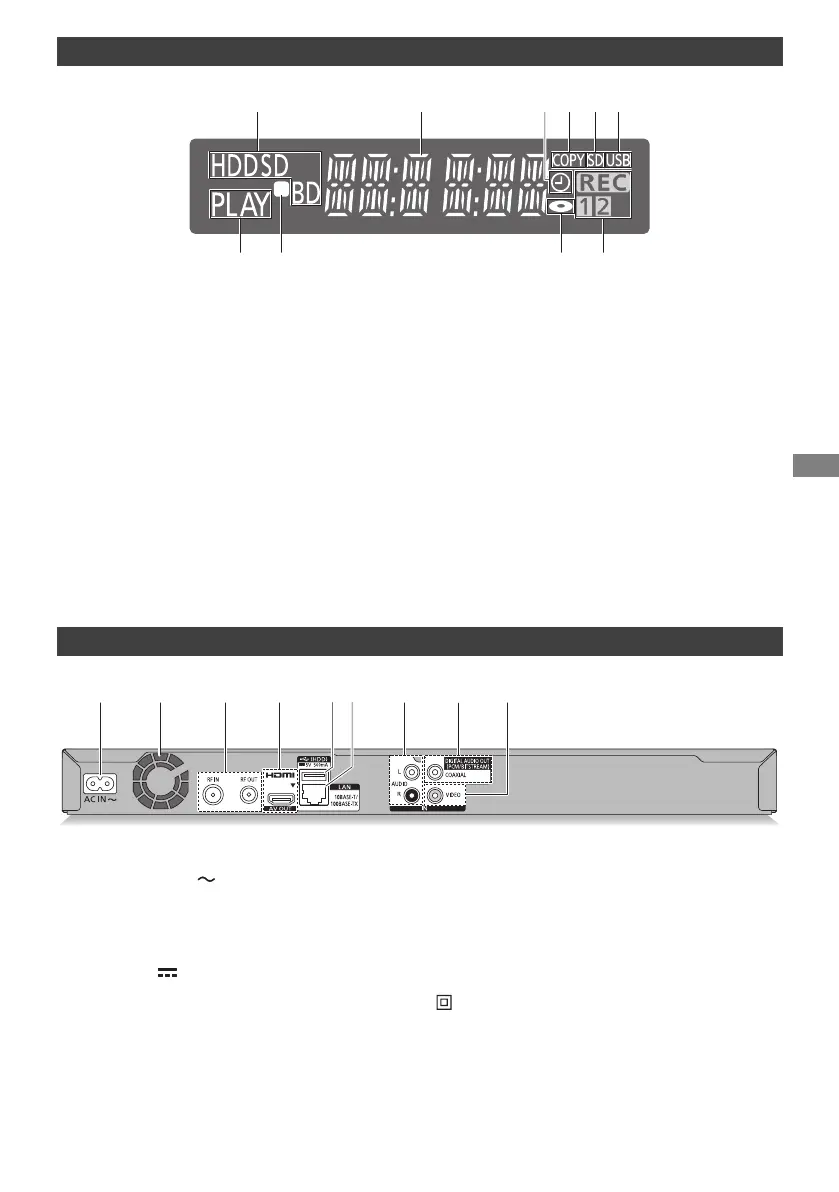
Display
1 Drive (HDD, BD or SD) indicator
2 Main display section indicator
• Messages and other information are
displayed. (> 83)
3 Timer recording indicator
• This indicator lights up when the timer
recording standby or Keyword Recording
standby is activated.
4 Copying indicator
5 SD card slot indicator
6 USB port indicator
7 Playback indicator
8 Remote control signal indicator
9 Disc indicator
: Recording indicator
• “REC” lights up while recording is in
progress.
• “1” flashes when the first timer recording
standby is activated or recording is paused,
and lights up while recording is in progress.
(In the same way as “1”, “2” lights up or
flashes for the second recording.)
Rear
1 AC IN terminal ( )
2 Cooling fan
3 RF IN/OUT terminal
4 HDMI terminal
5 USB port ( DC 5 V 500 mA)
• Connect a USB HDD to this USB port.
6 LAN port
7 AUDIO IN terminal
8 COAXIAL terminal
9 VIDEO IN terminal
DMRBWT760GN_eng.book 7 ページ 2016年4月11日 月曜日 午後3時32分


 To Next Page