Getting started
SQT1109
9
Connection
• Keep the RF coaxial cables as far away as possible from other cables.
3D programmes or 4K images can be played back when this unit is connected to a 3D or 4K
compatible terminal of a 3D or 4K compatible TV.
• Before connection, turn off all equipment and read the appropriate operating instructions.
• Use the High Speed HDMI cables. Non-HDMI-compliant cables cannot be utilized.
It is recommended that you use Panasonic’s HDMI cable.
When outputting 1080p or 24p (4K) signal, please use HDMI cables 5.0 meters or less.
• When the unit is not to be used for a long time
To save power, unplug it from the household mains socket. This unit consumes a small amount of
power, even when the unit is in standby mode. (> 84)
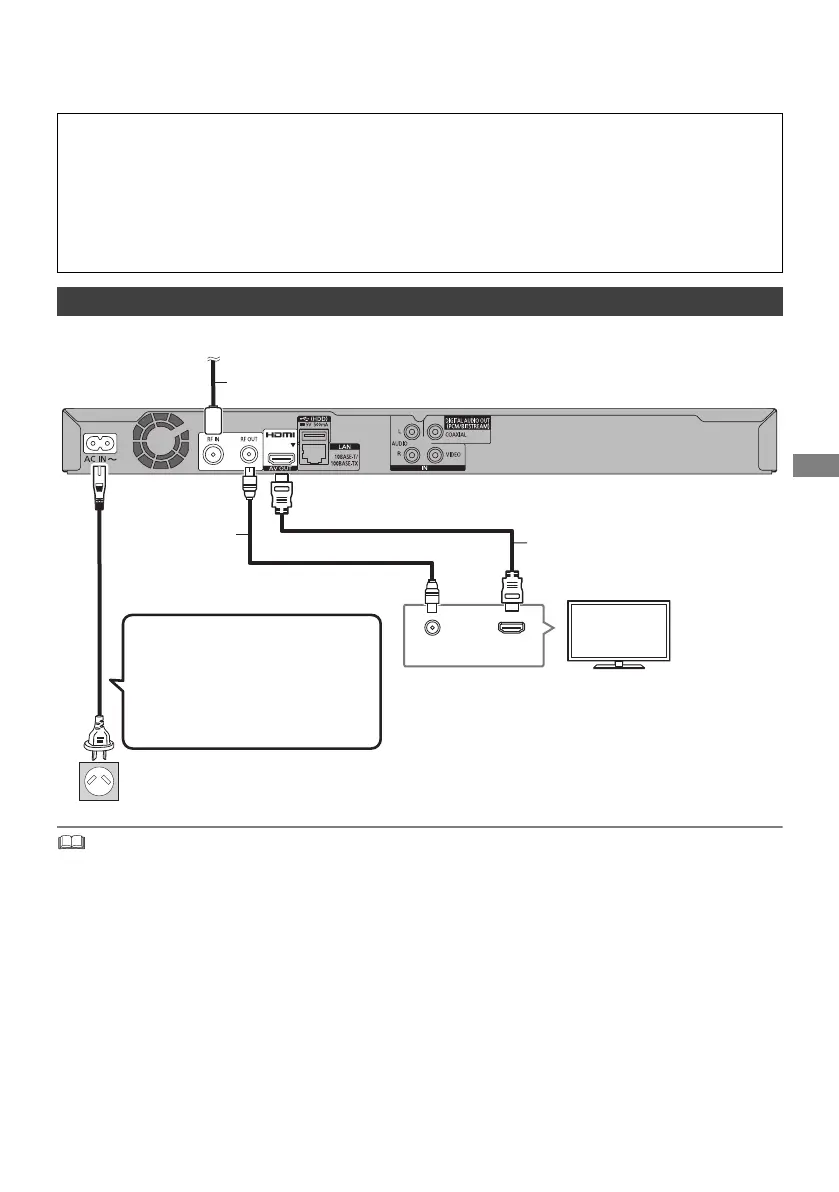
Basic connections
HDMI
VHF/UHF
RF IN
This unit’s rear panel
Household mains socket
(AC 220 to 240 V, 50 Hz)
AC mains lead
(supplied)
• Connect only after all other
connections are complete.
HDMI cable
To the aerial
Aerial cable
RF coaxial cable
(supplied)
DMRBWT760GN_eng.book 9 ページ 2016年4月11日 月曜日 午後3時32分


 To Next Page