
EasyManua.ls Logo

Panasonic DVD-LX9 - User Manual

Panasonic DVD-LX9
49 pages
Print Icon
To Next Page IconTo Next Page
Loading...
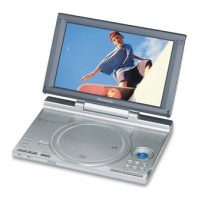
Portable DVD/SD/CD Player
Operating Instructions
Model No. DVD-LX9
®
S
E
A
R
C
H
ENTER
O
F
F
M
E
N
U
R
E
T
U
R
N
T
O
P
M
E
N
U
D
I
S
P
L
A
Y
V
O
L
O
N
A
.S
U
R
R
O
U
N
D
M
O
N
I
T
O
R
M
O
D
E
P
I
C
T
U
R
E
M
O
D
E
D
V
D
/S
D
/A
U
X
O
P
E
N
D
C
I
N
9
V
C
H
G
;
1
:
9
r
s
6
5
1
2
3
4
5
6
7
8
9
0
S
1
0
Í
S
E
T
U
P
T
O
P
M
E
N
U
D
I
S
P
L
A
Y
M
E
N
U
R
E
T
U
R
N
G
R
O
U
P
P
A
G
E
V
O
L
U
M
E
A.S
UR
RO
UN
D
AN
G
LE
A
U
D
I
O
S
U
B
-
T
I
T
L
E
PLA
Y
M
OD
E
DV
D
/S
D
/A
UX
C
A
N
C
E
L
This manual was printed with soy based ink.
AUDIO
/
VIDEO
Region number supported by this player
Region numbers are allocated to DVD players
and software according to where they are sold.
The region number of this player is “1”.
The player will play DVD-Video marked with
labels containing “1” or “ALL”.
RQT6912-Y
F0103CM0
1 ALL
2
4
1
Example:
Dear customer
Thank you for purchasing this product.
For optimum performance and safety, please read these instructions carefully.
Before connecting, operating or adjusting this product, please read these instructions completely.
Please keep this manual for future reference.
For U.S.A. Only
The warranty can be found on pages 48 and 49.
PP
pq
For U.S.A.
As an
ENERGY STAR
R
Partner, Panasonic has determined that this
product meets the
ENERGY STAR
R
guidelines for energy efficiency.

Questions and Answers

  • S
    Stephen TurnerJul 31, 2025
    How to fix Panasonic Portable DVD Player not charging?
    • H
      Heather SanchezJul 31, 2025
      If your Panasonic Portable DVD Player isn't charging, here are a few things to check: * Ensure the connections to the AC adapter are secure. * Remember that the battery pack can only be recharged when the unit is off. * Be aware that charging time increases when the temperature is too hot or too cold, and charging may not be possible under some circumstances. * Also, the battery pack may have reached the end of its service life (it can be recharged about 300 times).
  • K
    knappmatthewAug 7, 2025
    Why Panasonic Portable DVD Player doesn't work when powered by battery?
    • J
      James FaulknerAug 8, 2025
      If your Panasonic Portable DVD Player doesn't work when powered by battery, check the connections to the battery pack. Also, remember that you cannot turn on the unit with the remote control if the unit is powered by the battery pack.
  • R
    Ronald MillerAug 15, 2025
    Why does my Panasonic Portable DVD Player turn off automatically?
    • Y
      yfordAug 15, 2025
      Your Panasonic Portable DVD Player may turn off automatically to conserve power after being stopped for about 15 minutes (5 minutes when powered by the battery pack). To resolve this, simply turn the unit on again. Also, the unit and battery pack have protection circuitry that activate if they become too hot or too cold. They will not work if this occurs. Use the unit and battery pack between 5 oC (41 oF) and 35 oC (95 oF).
  • B
    brian81Aug 22, 2025
    What to do if my Panasonic Portable DVD Player buttons are not responding?
    • D
      Diana StarkAug 23, 2025
      If the buttons on your Panasonic Portable DVD Player are not responding, the unit may have been affected by lightning or static electricity. Try turning the unit off and on again. Alternatively, turn the unit off, disconnect the power source (AC or battery pack), reconnect the power, and turn the unit on again.

Summary

Safety Warnings and Compliance

Electrical and Radiation Safety Cautions

Provides critical warnings regarding electrical shock, laser radiation, and ventilation.

Power and Battery Management

Battery Handling and Safety

Details safe handling, charging, and disposal procedures for various battery types.

Essential Safety Instructions

General Operating Safety Guidelines

Provides fundamental safety rules for operating the apparatus to prevent hazards.

Disc and Media Compatibility

Playable Disc Formats

Lists all supported disc formats, including DVD, CD, and their variations.

Control Layout and Display Adjustment

Main Unit Control Reference

Identifies and describes the function of each button and terminal on the main unit.

Remote Control and LCD Angle

Remote Control Operation Guide

Illustrates the remote control layout and explains button functions.

Battery Pack Operations

Battery Recharging Procedures

Explains how to recharge the battery pack and check its charge status.

Basic Disc Playback

Disc Playback Preparation

Steps to prepare the unit and insert a disc for playback, including language settings.

Starting and Controlling Playback

Instructions on how to start playback and adjust volume.

Disc Playback Controls

Basic Playback Functions

Describes how to use Stop, Pause, and Skip functions during playback.

Advanced Playback Controls

Details functions like Search, Slow-motion, Frame-by-frame, and Menu navigation.

SD Card Operations

Inserting and Selecting SD Card

Instructions for inserting, removing, and selecting the SD card as a source.

Advanced SD Card Playback

DVD-RAM Program Playback

Selecting Programs and Scenes

Details on selecting specific programs or scenes from DVD-RAM discs.

Media Navigation Menus

Customizing Playback Sequence

All Group and Program Play Modes

Details on playing all groups on a disc or programming a custom play order.

Repeat Playback Options

Standard and A-B Repeat Play

Instructions for setting repeat play for entire items or specific sections.

Enhancing Movie Enjoyment

Advanced Surround Sound Setup

Instructions for enabling and configuring the surround sound effect.

Audio and Subtitle Customization

Managing Subtitle Display

Controls for turning subtitles on/off, changing language, position, and brightness.

Changing Soundtracks and Angles

How to select different audio tracks and camera angles during playback.

Monitor and Picture Settings

Picture Quality Adjustments

Settings for Brightness, Color, Sharpness, Gamma, and AI Mode.

Picture Size and Aspect Ratio

How to change the picture aspect ratio (Normal, Full, Zoom, Just) for 4:3 content.

On-Screen Menu Navigation

Common Menu Procedures

General methods for navigating and interacting with on-screen menus.

Disc and Unit Information Displays

Advanced Menu Options

Connecting External Audio Equipment

Enhancing Sound with Amplifiers

Guidance on connecting to amplifiers for more powerful and multi-channel sound.

Recording and System Settings

Common Settings Procedures

General steps to access and change various system settings via the SETUP menu.

Audio and Display Configuration

Audio Output Settings

Configuration options for speaker settings, PCM down conversion, Dolby/DTS, and dynamic range.

Multi-Channel Speaker Setup

Speaker Setup and Size Configuration

Setting speaker presence, size, and subwoofer options for multi-channel audio.

Troubleshooting Common Issues

Power and Basic Operation Problems

Troubleshooting steps for power issues, unit response, and battery charging problems.

Media Playback and Display Errors

Resolving issues with disc playback, SD card display, and remote control operation.

Settings and Reset Troubleshooting

Addressing problems with audio/subtitle language, angles, password, and factory reset.

Troubleshooting Specific Problems

Sound and Picture Malfunctions

Diagnosing and resolving problems with sound distortion, no audio, and picture quality.

Display Messages and Indicators

Error Messages and Codes

Interpreting and responding to various error messages and codes displayed by the unit.

Glossary and Service Information

Product Service and Repair Guidelines

Information on when service is required, replacement parts, and safety checks after repair.

Product Specifications

Main Unit Technical Details

Specifications for disc compatibility, SD card support, signal system, LCD, audio, and speakers.

Limited Warranty (USA)

Warranty Coverage and Period

Outlines the terms of warranty coverage, including parts and labor duration.

Warranty Exclusions and Limitations

Details what is not covered by the warranty, including misuse and cosmetic damage.

Customer Support and Contact

General Product and Service Inquiries

Provides contact numbers and email for product information and customer service.

Panasonic DVD-LX9 Specifications

General IconGeneral
Resolution480 x 234 pixels
Audio OutputStereo
Playback FormatsDVD, CD, MP3, JPEG
Built-in SpeakersYes
Headphone JackYes
Power SourceAC adapter, rechargeable battery
Aspect Ratio16:9
Video OutputComposite video output
DisplayLCD
Supported FormatsDVD-R, DVD-RW, CD, CD-R, CD-RW, MP3