4
English
► Storing the shaver
• Store the shaver in a place with low humidity after use.
• Do not store the shaver where it will be exposed to direct
sunlight or other heat sources.
• Remove the plug from the household outlet when storing the
shaver.
• Do not bend the power cord or wrap it around the AC adaptor.
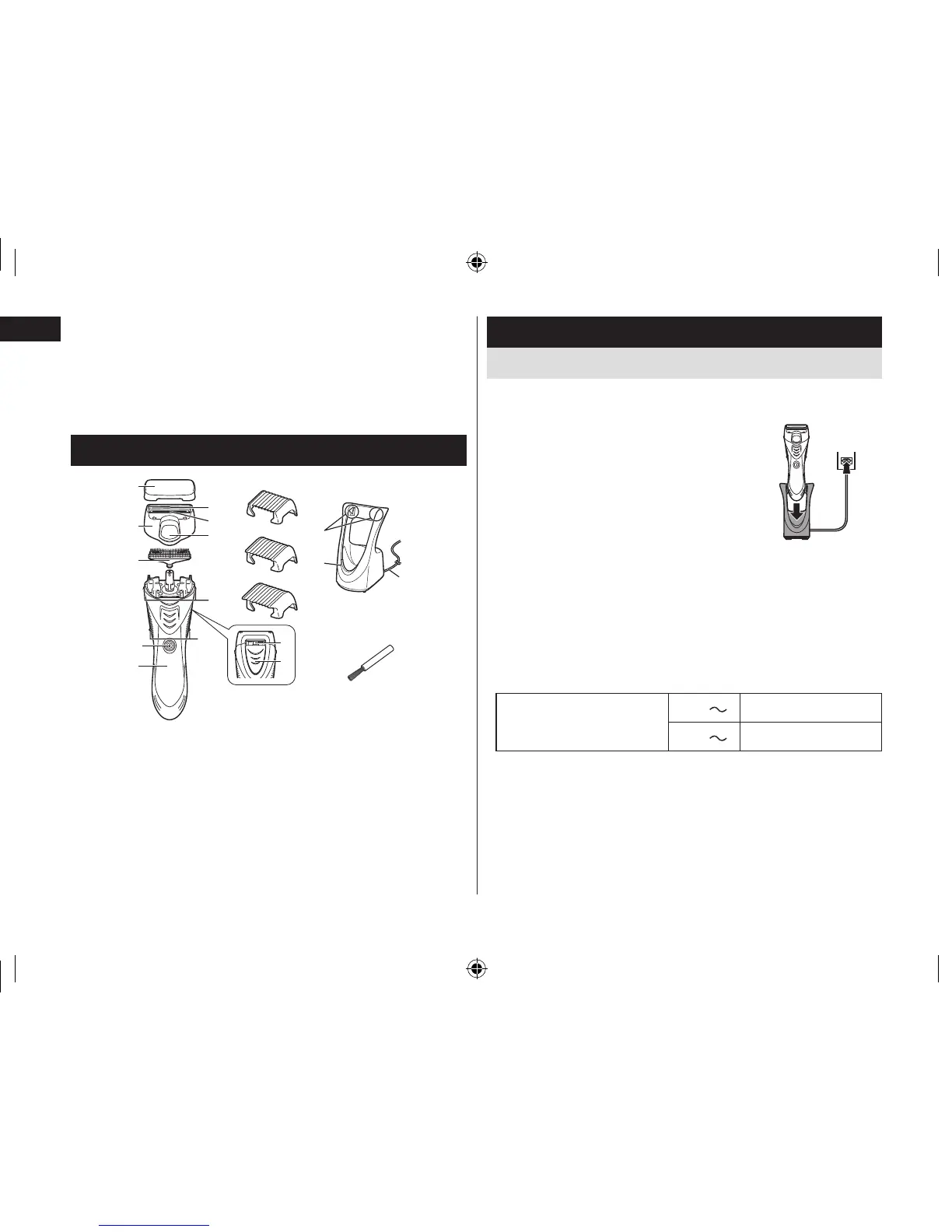
Parts identification
A Protective cap
B Foil frame
1 Outer foil
2 Pop‑up trimmer
3 Pop‑up trimmer switch
C Inner blade
D Main body
4 Foil frame release buttons
5 Side terminals
6 Power switch
7 Water outlet
8 Cleaning shutter
E
3 mm (1/8˝) comb attachment
F
6 mm (1/4˝) comb attachment
G
9 mm (3/8˝) comb attachment
H AC adaptor (RE7‑70)
9 Charging terminals
: Charge indicator lamp
; Power cord
I Cleaning brush
Charge
Charging the shaver
Perform the following steps to charge the shaver if it seems to lose
speed.
1
1
Turn off the shaver and insert
it in the AC adaptor until it
clicks as illustrated.
• The shaver will not charge unless the side
terminals are in contact with the charging
terminals.
• Wipe off any water droplets on the side
terminals.
• If you charge the shaver with power switch
turned on, it will start working when you
remove from the AC adaptor.
2
1
2
2
Put the plug into a household outlet.
The charge indicator lamp glows red.
• Charging time differs depending on the rated voltage.
Charging time
110 V
Approx. 20 hours
120 V
Approx. 15 hours
• When charging the shaver for the first time or when it has not
been in use for more than 6 months, the charge indicator lamp
may not glow for a few minutes, or the operating time may
shorten. Please charge it for more than 30 hours in such cases.
3
3
Disconnect the plug after charging is
completed.
• To keep charging the battery will not affect battery performance.
ER-GK40_AM.indb 4 2013/02/25 19:45:02






 To Next Page