4
English
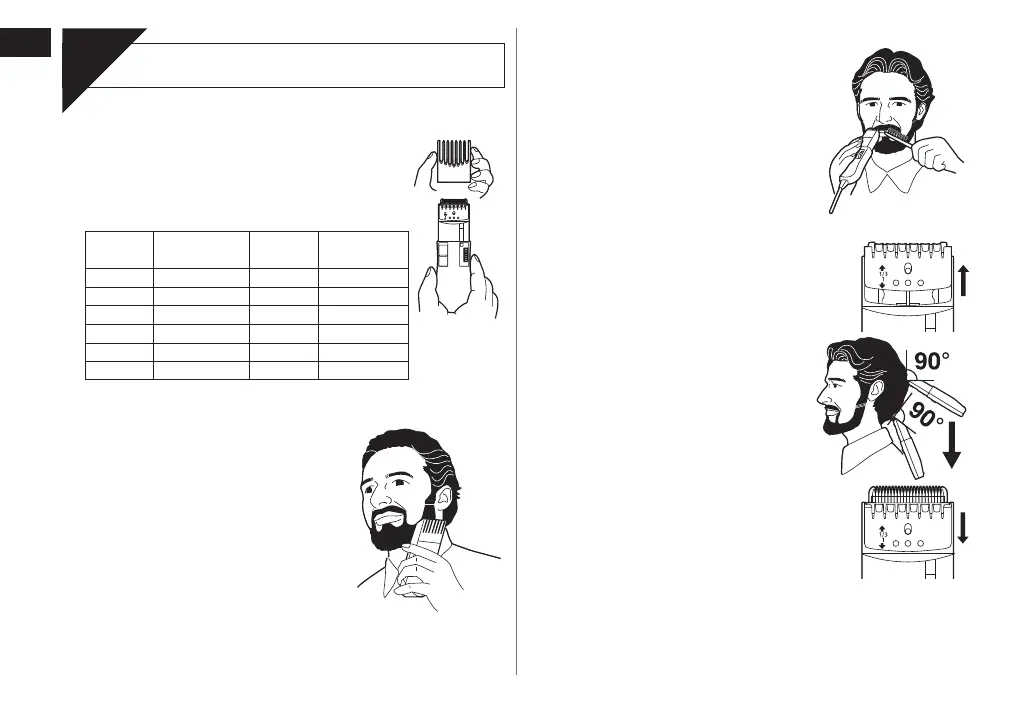
Shaping your moustache
1. Remove the comb attachment.
2. Place the angled edge against the
skin and make the border of the
beard even.
Using the thinning function
1. Slide the thinning plate up to “1/3” until
it clicks.
2. Run the trimmer slowly across the
head as if combing the hair with
applying the blade point at right
angles (90°) to the hair.
Thin the hair gradually while checking
the overall balance.
•
3. Push the thinning plate lock button to
slide the thinning plate back.
►
►
Using the trimmer
Use
Trimming your beard and moustache
1. Apply a few drops of the oil to the blades.
(See page 5.)
2. Turn the dial to move the comb attachment
to the desired trimming length (between
2 mm and 18 mm).
Indicator
Trimming
length
Indicator
Trimming
length
1 2.0
mm 4 10.5 mm
• 3.0
mm • 12.0 mm
2 4.5
mm 5 13.5 mm
• 6.0
mm • 15.0 mm
3 7.5
mm 6 16.5 mm
• 9.0
mm • 18.0 mm
3. Slide the switch on the main body upwards to turn on
the trimmer.
4. Place the angled face of the comb
against the skin and cut the beard
by moving the trimmer in all
directions to obtain a uniform cut.
With curly facial hair, the comb
attachment may not cut all of the hair.
In this case, remove the comb
attachment and use a conventional
comb to draw out the remaining uncut
hair.
•
►


 To Next Page