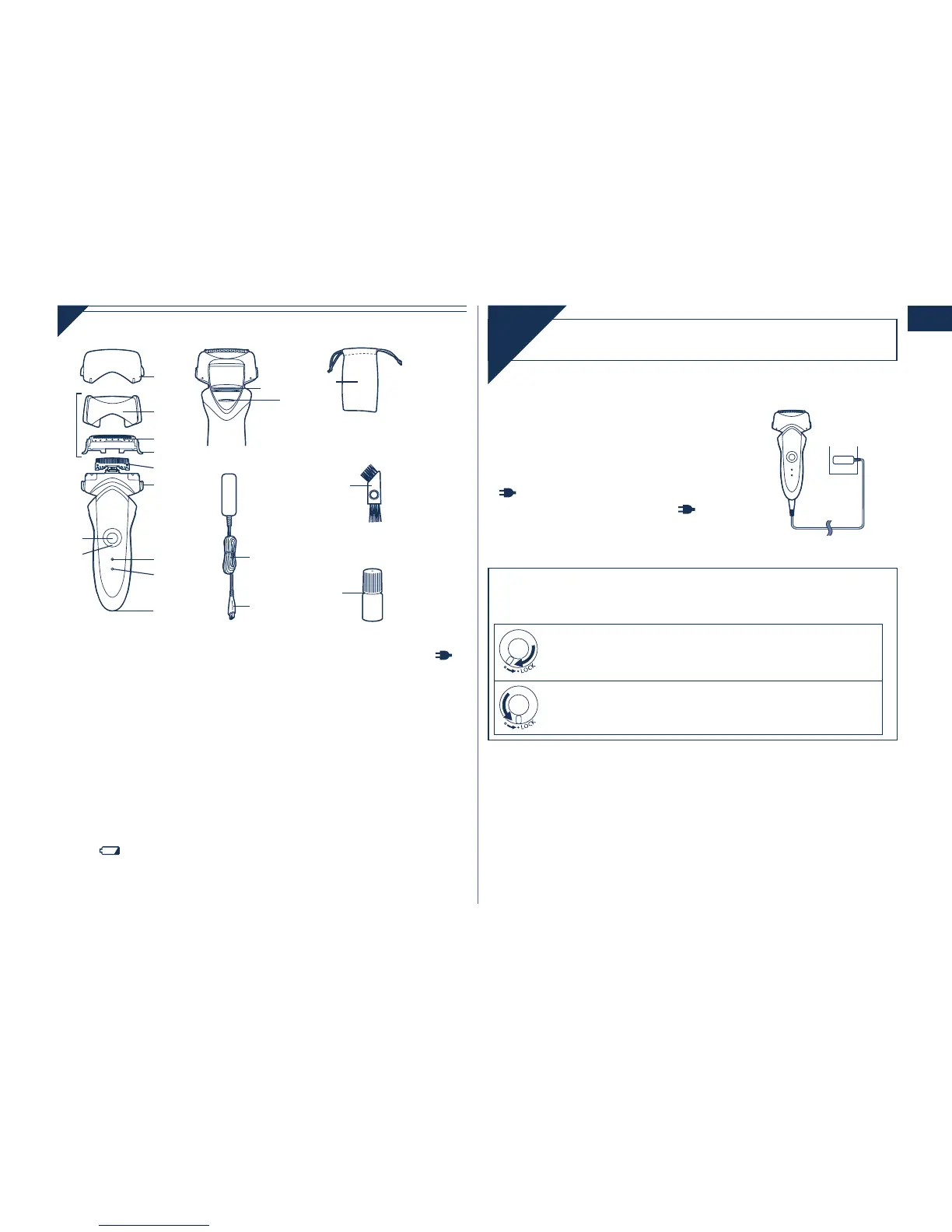
A Protective cap
B Outer foil section
1 Foil frame
2 System outer foil
3 System outer foil release
buttons
C Inner blades
D Main body
4 Foil frame release buttons
5 OFF/ON switch
6 Lock ring
7 Battery capacity lamp
( )
8 Charge status lamp ( )
9 Appliance socket
: Trimmer
; Trimmer handle
E Adaptor (RE7‑51)
Power cord
Appliance plug
F Travel pouch
G Cleaning brush
H Oil
Charging
Charge
1
1
Insert the appliance plug
into the shaver.
2
2
Plug in the adaptor into a
household outlet.
glows and charging starts.
Charging is completed when
blinks.
(Max. 1 hour later)
•
•
Using the lock ring
Use the lock ring to lock or unlock the OFF/ON switch.
1. Rotate the lock ring until it clicks.
Unlock the OFF/ON switch:
For when shaving, washing the shaver, lubricating the
shaver.
Lock the OFF/ON switch:
For when carrying the shaver.







 To Next Page