4
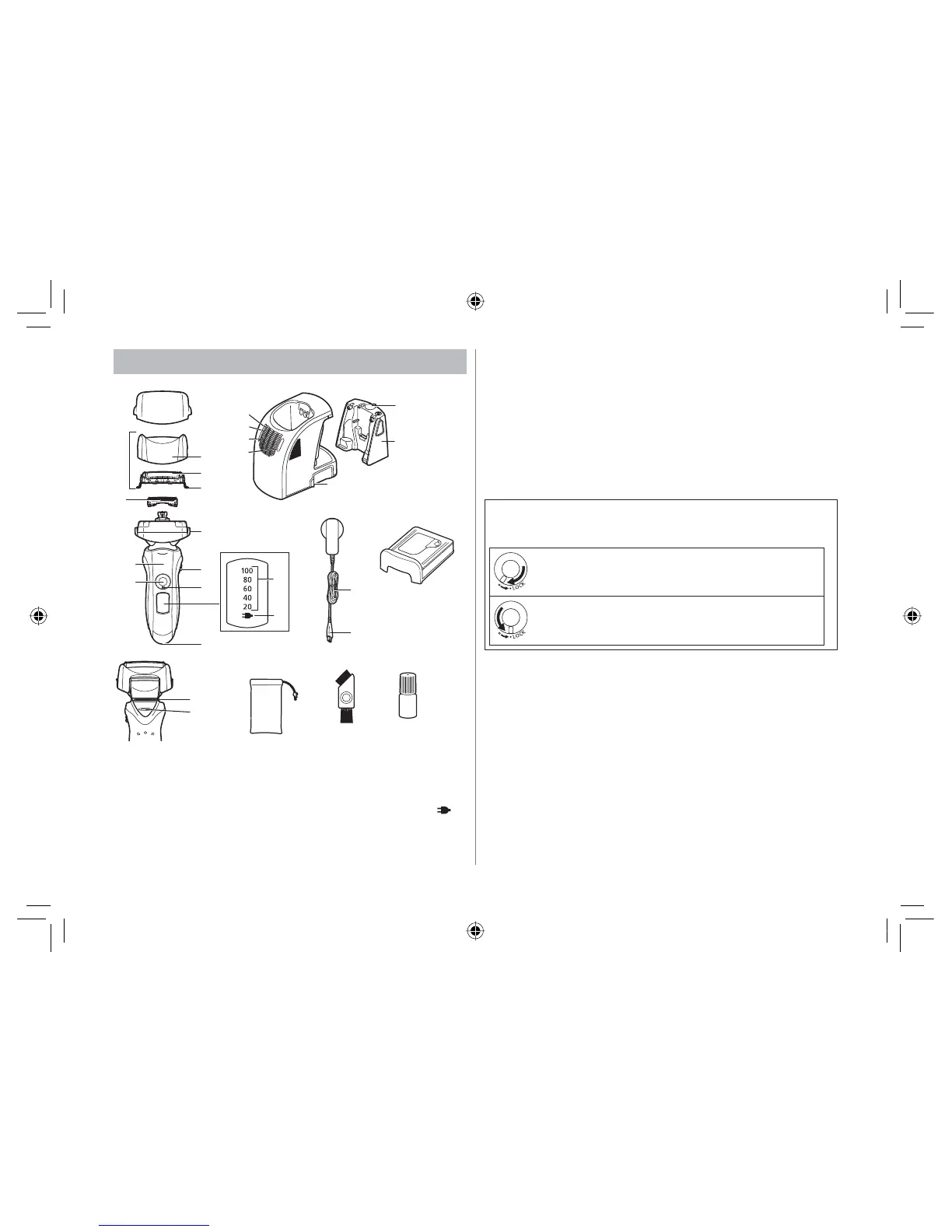
Parts identification
Protective cap
Outer foil section
Foil frame
System outer foil
System outer foil release
buttons
Inner blades
Main body
Foil frame release buttons
Pivot action selector
Lock ring
Battery capacity lamp
Charge status lamp (
)
Appliance socket
Power switch [0/1]
Finger rest
Trimmer
Trimmer handle
Self-cleaning recharger
Water tank cap
Water tank
Socket
SELECT button
STATUS lamp
DRY lamp
CLEAN lamp
AC adaptor (RE7-59)
Power cord
Appliance plug
Detergent cartridge
Travel pouch
Cleaning brush
Oil
Using the lock ring
Use the lock ring to lock or unlock the power switch.
1. Rotate the lock ring until it clicks.
Unlock the power switch:
For when shaving, washing the shaver, lubricating the
shaver.
Lock the power switch:
For when carrying the shaver.
(6/7B$86LQGE






 To Next Page