Clean
Cleaning the shaver
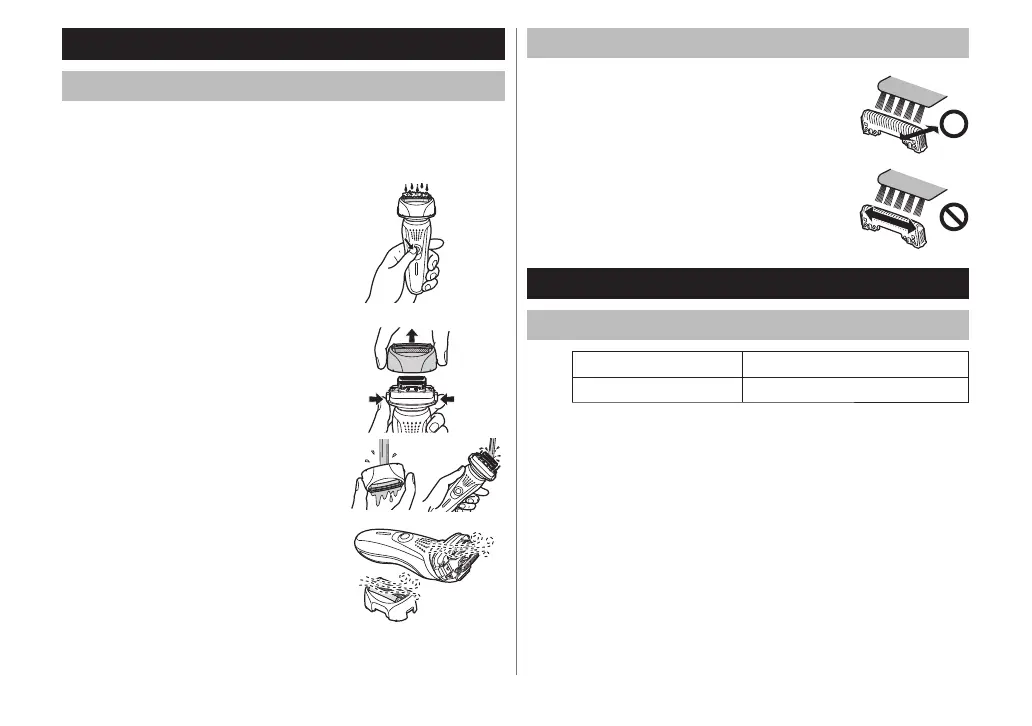
1. Disconnect the power cord from the shaver.
2. Apply some hand soap and some water to the outer foil.
3. Rotate the lock ring [
D5] to unlock the power switch
[D9].
4. T
urn the shaver on.
5. Turn the shaver off after 10‑20 seconds.
6. Remove the outer foil section [B] and
turn the shaver on.
7. Clean the shaver and the outer foil
section [B] with running water.
8. Wipe off any drops of water with a
dry cloth.
9. Dr
y the outer foil section [
B] and the
shaver completely.
10.
Attach the outer foil section [B] to the
shaver.
Cleaning with the brush
Clean the inner blades [C] using the short
brush by moving it in direction (A).
Clean the system outer foil [B2], the
shaver body and the trimmer [D:] using
the long brush.
Do not move the short brush in direction
(B) as it will damage the inner blades [C]
and affect their sharpness.
Do not use the short brush to clean the
outer foils.
•
•
Maintenance
Replacing the system outer foil and the inner blades
system outer foil once every year
inner blade once every two years



 To Next Page