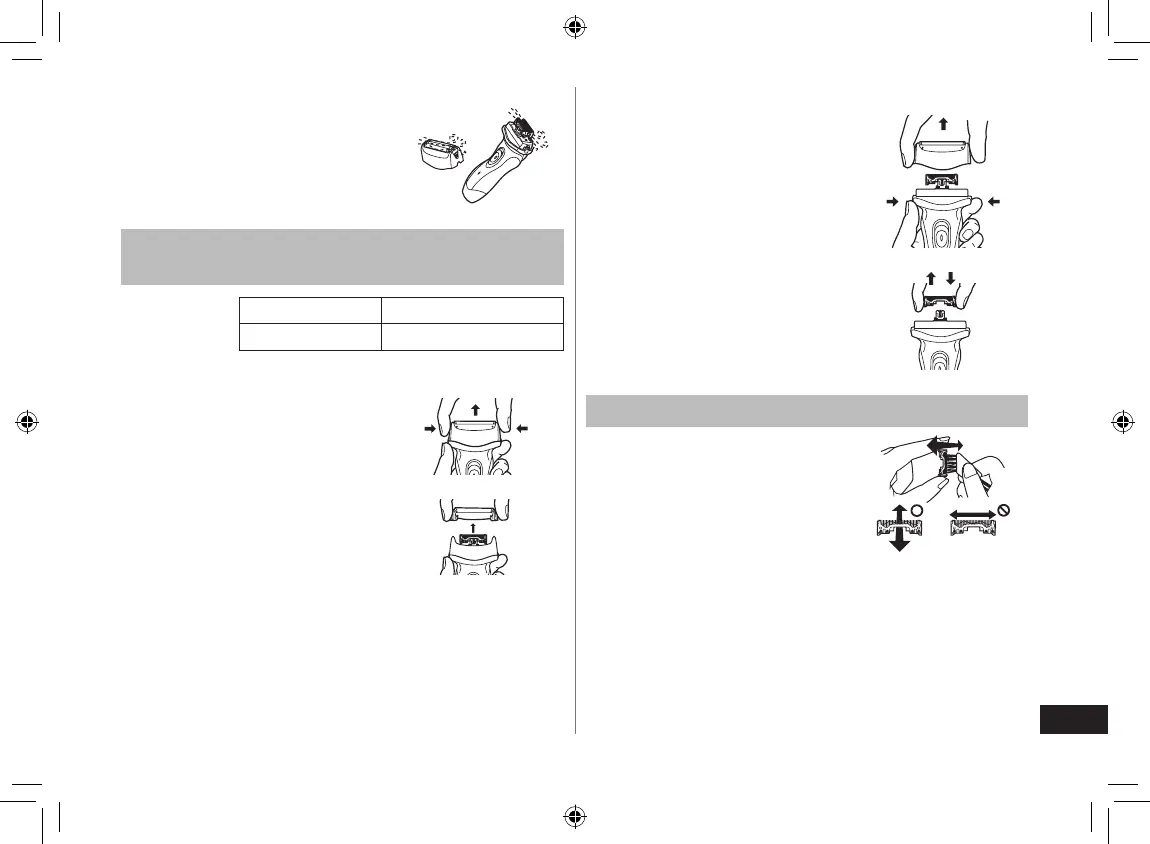
8. Dry the outer foil section and
the shaver completely.
9. Attach the outer foil section to
the shaver.
Replacing the system outer foil and the
inner blades
system outer foil once every year
inner blade once every two years
Replacing the system outer foil
1. Press the system outer foil
release buttons and lift the
system outer foil upwards as
illustrated.
2. Insert the system outer foil by
pushing it downwards until it
clicks.
►
Replacing the inner blades
1. Press the foil frame release
buttons and lift the outer foil
section upwards as illustrated.
2. Remove the inner blades one
at a time as illustrated.
Do not touch the edges
(metal parts) of the inner
blades to prevent injury to
your hand.
3. Insert the inner blades one at
a time until they click as
illustrated.
•
Cleaning with the brush
Clean the inner blades using the
short brush by moving it in
direction (A).
Clean the system outer foil, the
shaver body and the trimmer
using the long brush.
Do not move the short brush in
direction (B) as it will damage
the inner blades and affect their
sharpness.
Do not use the short brush to
clean the outer foils.
•
•
ES-RL21_CH.indb 11 2009/12/25 9:23:02



 To Next Page