7
English
Clean
Cleaning the shaver
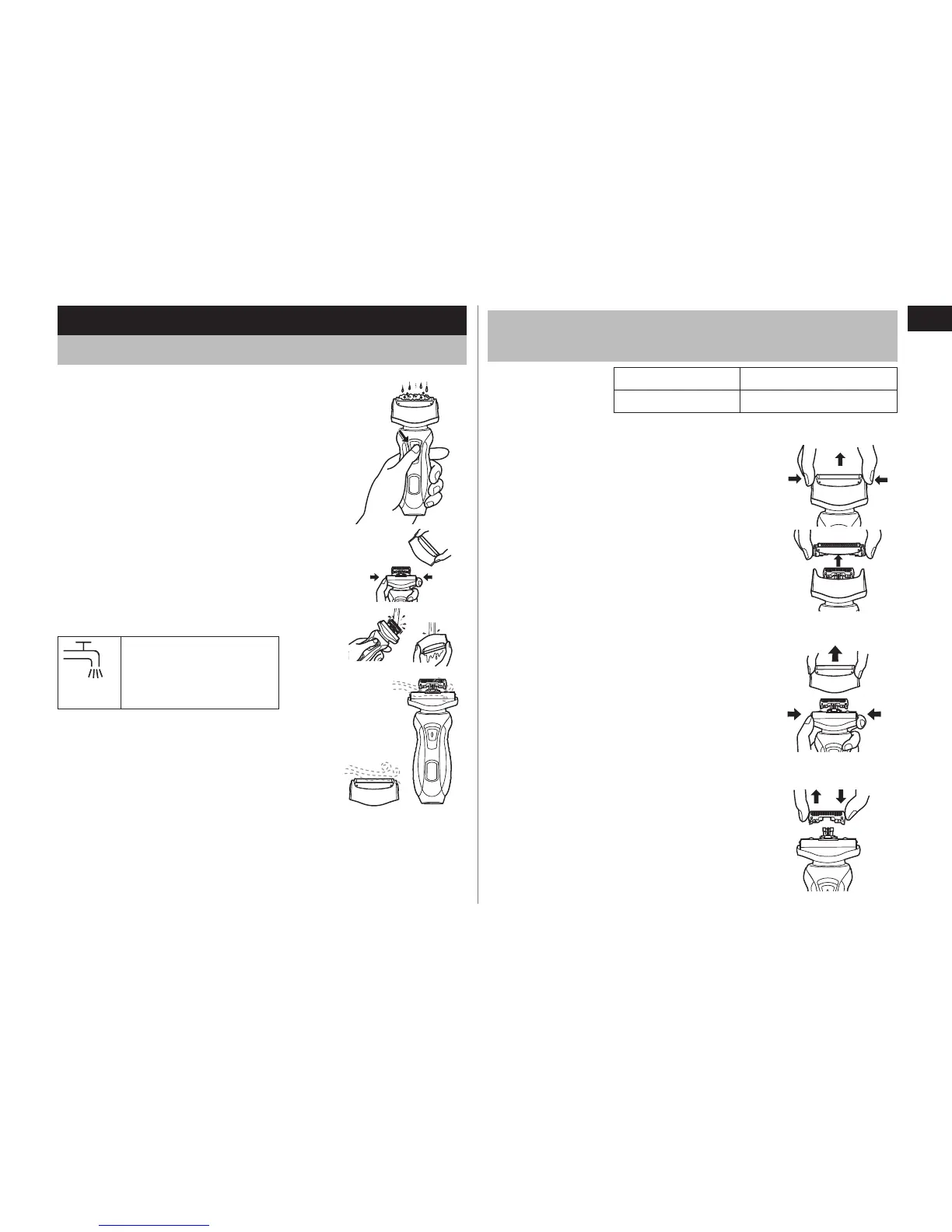
1. Disconnect the power cord from the
shaver.
2. Apply some hand soap and some water
to the outer foil.
3. Turn the shaver on.
4. Turn the shaver off after 10‑20 seconds.
5. Remove the outer foil section and turn the
shaver on.
6. Clean the shaver and the outer foil
section with running water.
7. Wipe off any drops of water with a dry
cloth.
8. Dry the outer foil section and the shaver
completely.
9. Attach the outer foil section to the shaver.
The mark on the left is
for a washable shaver
and indicates it can be
cleaned with water.
Replacing the system outer foil and the inner
blades
system outer foil once every year
inner blade once every two years
Replacing the system outer foil
1. Press the system outer foil release
buttons and lift the system outer foil
upwards as illustrated.
2. Insert the system outer foil by pushing it
downwards until it clicks.
Replacing the inner blades
1. Press the foil frame release buttons and
lift the outer foil section upwards as
illustrated.
2. Remove the inner blades one at a time as
illustrated.
Do not touch the edges (metal parts) of
the inner blades to prevent injury to your
hand.
3. Insert the inner blades one at a time until
they click as illustrated.
•



 To Next Page