11
Using the shaver
• Do not place your fingers on the power switch while using the
shaver. This may cause the shaver to turn off. Place your fingers
on the thumb rest while using the shaver.
• We recommend using the shaver in an ambient temperature
range of 5 – 35 °C (41 – 95 °F). If used outside this range, the
appliance may stop operating.
1
1
Press the power switch.
• The switch on lamp glows.
ES-RT77/ES-RT67
2
2
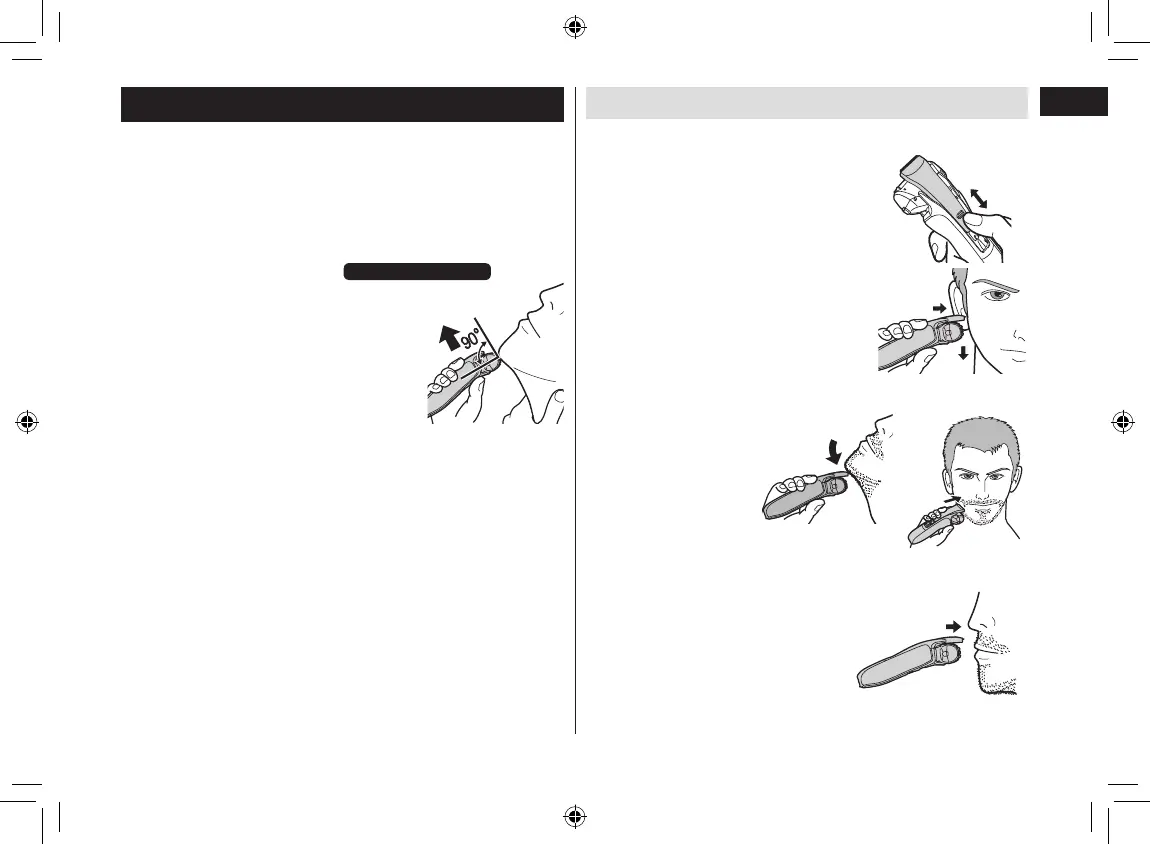
Hold the shaver as illustrated
and shave.
• Start shaving by applying gentle
pressure to your face. Stretch your
skin with your free hand and move the
shaver back and forth in the direction
of your beard. You may gently increase
the amount of pressure as your skin
becomes accustomed to this shaver.
Applying excessive pressure does not
provide a closer shave.
Using the trimmer
►Trimming sideburns
Slide the trimmer handle up. Turn the
shaver on and place at a right angle to
your skin and move downwards to trim
your sideburns.
• Press and hold the lock release button
and slide the trimmer handle down to
lower the trimmer.
►Pre-shave
The trimmer can be used
for a pre‑shave of long
beards.
►Above the lips
Turn the shaver on and place at a right
angle to your skin and trim around your
moustache.
ES-RT77_67_47_37_US.indb 11 2016/03/07 14:34:08




 To Next Page