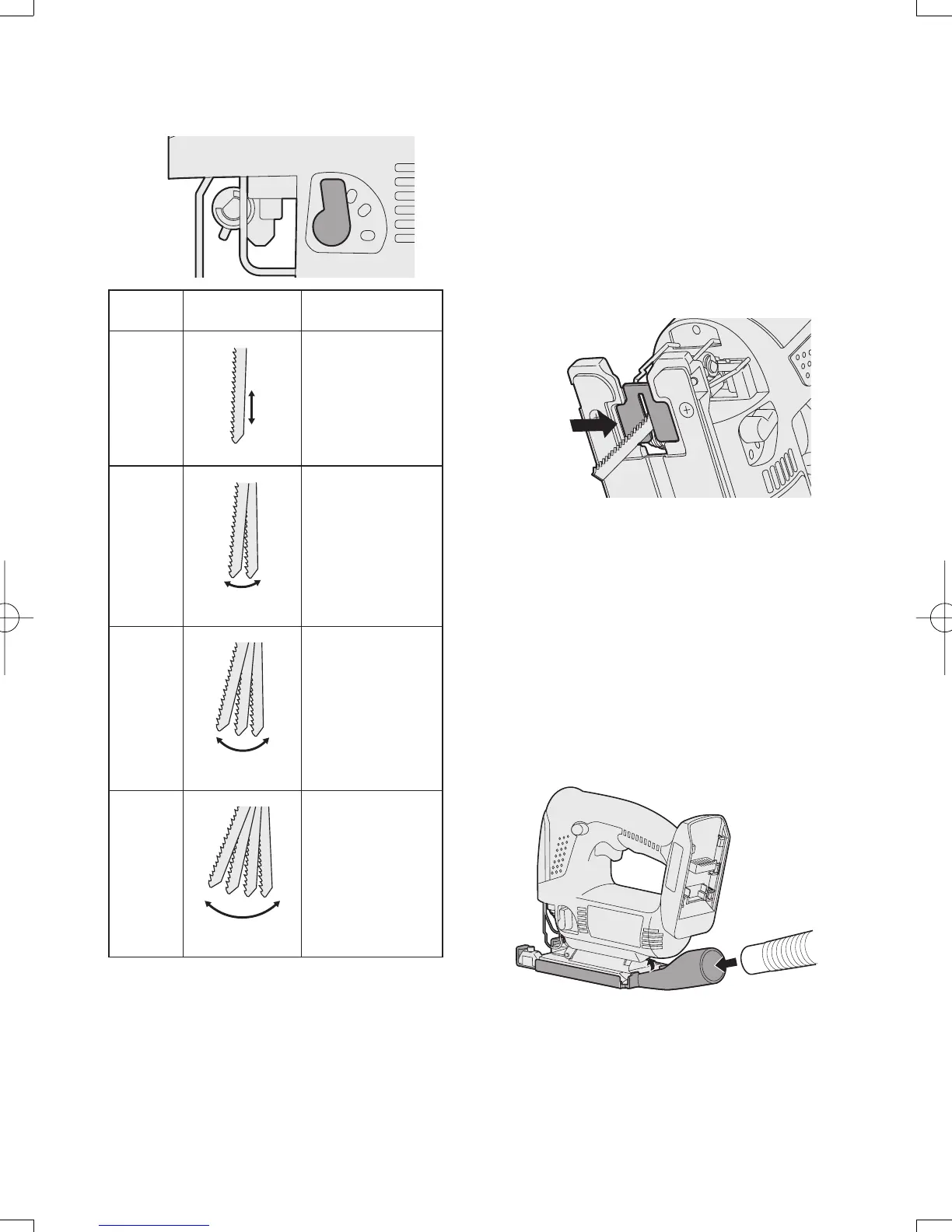
Adjusting the orbital stroke mode
• Adjust the orbital stroke mode to the
object to be cut.
3
2
1
0
Lever
position
Blade
movement
Main
applications
0
Vertical only
• Cutting hard met-
als such as steel
• Smooth cutting of
building materi-
als and plywood
boards
• Cutting around
small curves
1
Low orbital stroke
mode
• Cutting softer met-
als such as alu-
minum and other
non-ferrous metals
• Cutting hardwood,
plywood boards
and plastics
2
Medium orbital
stroke mode
• Cutting fairly soft
materials
• Cutting wood and
composite boards
• High-speed cut-
ting of aluminum
and soft steel
3
High orbital
stroke mode
• Cutting soft mate-
rials
• High-speed cutting
of materials such
as wood, com-
posite boards and
plastics
• If you would like to produce a cleaner
finish, set the orbital stroke mode to a
lower level.
Anti-splintering plate
Use the anti-splintering plate to re-
ducing splinter while cutting wood.
Installation
1. Set the base at 90 degree position.
2. Place the anti-splintering plate on the
underside of the base, and gently
push it to be installed.
• Install so that the beveled edge of the
slot in the middle of the anti-splinter-
ing plate is facing toward the jigsaw.
Dust adapter for vacuum cleaner
(EY9H009E) (Available as an
accessory, not included)
You can use a vacuum cleaner to col-
lect cutting dust while cutting.
Installation
1. Attach the hook of the dust collec-tion
adapter to the front of the base.
2. Snap the rear to install it.
3. Attach the hose of the vacuum
cleaner.
• It is recommended to use a dust adapt-
er for reducing the risk of damaging the
surface of the object being cut.
-
11
-



 To Next Page