EasyManua.ls Logo

Panasonic EYFLA9P - User Manual

Panasonic EYFLA9P
76 pages
Print Icon
To Next Page IconTo Next Page
Loading...
EYFLA4A EYFLA9C
IMPORTANT
This manual contains safety information. Read manual completely before first using this product and save this
manual for future use.
IMPORTANT
Ce mode d’emploi contient des informations sur la sécurité. Lisez-le en entier avant d’utiliser le produit et
conservez-le pour référence.
IMPORTANTE
Este manual contiene información de seguridad. Lea completamente este manual antes de utilizar por primera
vez este producto, y guárdelo para poder consultarlo en el futuro.
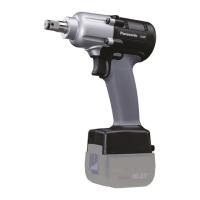
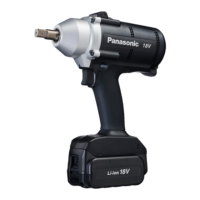
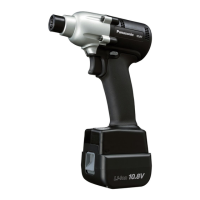
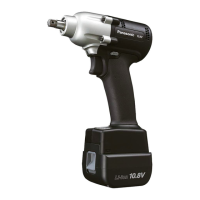
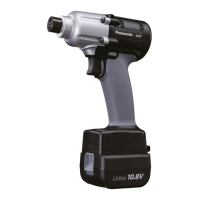
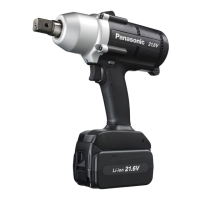
Cordless Mechanical Pulse Driver / Cordless Mechanical Pulse Wrench
Visseuse à impulsions mécaniques sans fil / Clé de serrage à impulsions mécaniques sans fil
Atornillador de impulso mecánico inalámbrico / Llave de impulso mecánico inalámbrica
Model No : EYFLA4A / EYFLA4AR
EYFLA5A / EYFLA5AR
EYFLA5P / EYFLA5PR
EYFLA5Q / EYFLA5QR
EYFLA6J / EYFLA6JR
EYFLA6P / EYFLA6PR
EYFLA7A / EYFLA7AR
EYFLA8A / EYFLA8AR
EYFLA8C / EYFLA8CR
EYFLA8P / EYFLA8PR
EYFLA9C / EYFLA9CR
EYFLA9P / EYFLA9PR
EYFMA1J / EYFMA1JR
EYFMA1P / EYFMA1PR
EYFMA2C / EYFMA2CR
EYFMA2P / EYFMA2PR
Operating Instructions
Instructions d’utilisation
Manual de instrucciones

Other manuals for Panasonic EYFLA9P

Question and Answer IconNeed help?

Do you have a question about the Panasonic EYFLA9P and is the answer not in the manual?

Summary

General Safety and Product Introduction

Important Safety Warnings

Crucial safety information to read before using the product for the first time.

Functional Description of Tool Components

Operation and Control Panel Features

Control Panel Indicators and Torque Settings

Torque Setting Level Guidance

Visual representation and explanation of torque setting levels.

Torque Charts and Setting Levels

Tightening Torque Charts

Charts illustrating tightening torque values based on torque setting levels.

Snug Point Detection Level Settings

Information on setting the snug point detection level for accurate fastening.

Tool Setup and Configuration

Setting Torque Stages

Procedure for selecting and adjusting the torque setting stage.

Adjusting Detection Levels

Steps to adjust flush detection levels for improved tightening accuracy.

General Safety Rules and Precautions

Work Area and Electrical Safety

Guidelines for safe work environment and preventing electrical hazards.

Personal Safety and Tool Use

Advice on personal safety, proper attire, and responsible power tool operation.

Safety, Intended Use, and Service

Battery Safety and Tool Care

Safety measures for battery use and proper tool maintenance.

Intended and Improper Use Guidelines

Defines the proper application of the tool and prohibits misuse.

Additional Safety Rules and Residual Risks

Battery Pack Safety and Maintenance

Battery Pack Handling and Recycling

Safety warnings for battery packs, including storage, heat, and recycling.

Operation and Remote Control

Switch Operation and Control Panel

Torque Control and Power Functions

Torque Control Function Details

Explanation of how the torque control function works and its influencing factors.

Tool Configuration and Settings

Torque Clutch and Snug Point Settings

How to select and adjust torque clutch and snug point detection levels.

Advanced Setting Adjustments

Error Detection and Time-Based Settings

Tool Settings Management and Checking

Confirming Tool Setting Statuses

Error Display and Battery Pack Usage

Error Display Codes and Troubleshooting

Identifying error codes and their corresponding corrective actions.

Technical Specifications

Main Unit Specifications

Detailed technical specifications for various main unit models.

Summary

General Safety and Product Introduction

Important Safety Warnings

Crucial safety information to read before using the product for the first time.

Functional Description of Tool Components

Operation and Control Panel Features

Control Panel Indicators and Torque Settings

Torque Setting Level Guidance

Visual representation and explanation of torque setting levels.

Torque Charts and Setting Levels

Tightening Torque Charts

Charts illustrating tightening torque values based on torque setting levels.

Snug Point Detection Level Settings

Information on setting the snug point detection level for accurate fastening.

Tool Setup and Configuration

Setting Torque Stages

Procedure for selecting and adjusting the torque setting stage.

Adjusting Detection Levels

Steps to adjust flush detection levels for improved tightening accuracy.

General Safety Rules and Precautions

Work Area and Electrical Safety

Guidelines for safe work environment and preventing electrical hazards.

Personal Safety and Tool Use

Advice on personal safety, proper attire, and responsible power tool operation.

Safety, Intended Use, and Service

Battery Safety and Tool Care

Safety measures for battery use and proper tool maintenance.

Intended and Improper Use Guidelines

Defines the proper application of the tool and prohibits misuse.

Additional Safety Rules and Residual Risks

Battery Pack Safety and Maintenance

Battery Pack Handling and Recycling

Safety warnings for battery packs, including storage, heat, and recycling.

Operation and Remote Control

Switch Operation and Control Panel

Torque Control and Power Functions

Torque Control Function Details

Explanation of how the torque control function works and its influencing factors.

Tool Configuration and Settings

Torque Clutch and Snug Point Settings

How to select and adjust torque clutch and snug point detection levels.

Advanced Setting Adjustments

Error Detection and Time-Based Settings

Tool Settings Management and Checking

Confirming Tool Setting Statuses

Error Display and Battery Pack Usage

Error Display Codes and Troubleshooting

Identifying error codes and their corresponding corrective actions.

Technical Specifications

Main Unit Specifications

Detailed technical specifications for various main unit models.

Panasonic EYFLA9P Specifications

General IconGeneral
Battery TypeLi-ion
Speed Settings2
Chuck Size1/4 inch
Charging Time60 minutes
TypeCordless

Related product manuals