11
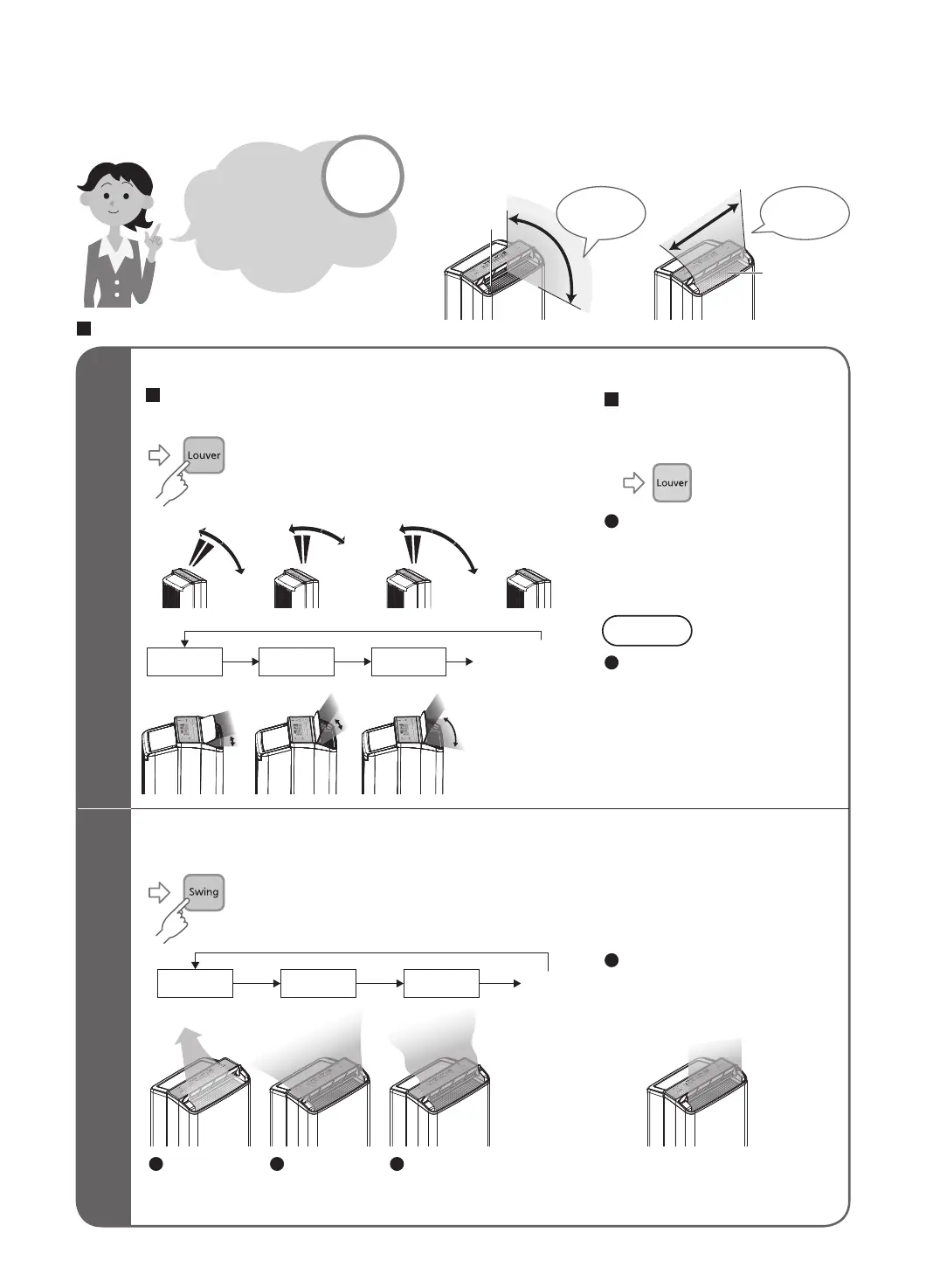
Air Direction Selection
YWP33N
Down Up Auto
WaveWideSpot
To swing louver
Running
(normal)
Please refer
to pages below
for air direction
selection!
P.12
Louver
Vertical
swing
Horizontal
swing
outlet
Operation
(Press to select)
Running
(Press to select)
The louver direction indicator
lights off and the louver stops
swinging and starts blowing
in one direction.
Note
(stop swinging)
Vertical swing Horizontal swing
Send air in
center as well
as left hand and
right hand side
Send air in
wide range
from left to
right
Focus air
in one
direction
Select operation mode P8~P10 before selecting air direction.
To fix the louver
The swing can be set to match the width of the place where you would like the air to reach.
The swing can be set to match the height of the place where you would like the air to reach.
Select Auto to enable louver
swing. When it reaches the
desired location, press the
again.
Do not move the louver while
swinging operation is in
progress.
(The swing range will change.)
If you do not select a
horizontal swing setting, the
dry air outlet will expel air
along its entire width.


 To Next Page