This document describes the Panasonic Interchangeable Lens for Digital Camera, specifically models H-HSA12035PP, H-HSA12035E, and H-HSA12035GK. This service manual provides technical information for experienced repair technicians.
Function Description
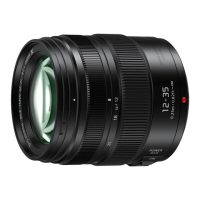
This is an interchangeable lens designed for digital cameras, featuring a LUMIX G X VARIO 12-35 mm/F2.8 II ASPH./POWER O.I.S. designation. It is equipped with Optical Image Stabilizer (O.I.S.) to help reduce blur from camera shake, and a Nano Surface Coating to minimize ghosting and flare. The lens is also designed to be splash/dust proof, enhancing its durability in various shooting conditions.
Important Technical Specifications
- Focal Length: 12 mm to 35 mm (35 mm film camera equivalent: 24 mm to 70 mm).
- Aperture Type: 7 diaphragm blades/circular aperture diaphragm.
- Maximum Aperture: F2.8.
- Minimum Aperture Value: F22.
- Lens Construction: 14 elements in 9 groups (including 4 aspherical lenses, 1 UED lens, and 1 UHR lens).
- Nano Surface Coating: Yes.
- In Focus Distance: 0.25 m (0.82 feet) to ∞ (from the focus distance reference line).
- Maximum Image Magnification: 0.17x (35 mm film camera equivalent: 0.34x).
- Optical Image Stabiliser: Available, with an [O.I.S.] switch for ON/OFF control.
- Mount: "Micro Four Thirds Mount."
- Angle of View: 84° (Wide) to 34° (Tele).
- Filter Diameter: 58 mm.
- Max. Diameter: Approx. 67.6 mm (2.7 inch).
- Overall Length: Approx. 73.8 mm (2.9 inch) (from the tip of the lens to the base side of the lens mount).
- Mass: Approx. 305 g (0.67 lb).
- Operating Temperature: -10 °C to 40 °C (14 °F to 104 °F).
- Dust-proof and Splash-proof: Available.
Usage Features
The lens includes a focus ring for manual focusing and a zoom ring for adjusting the focal length. The O.I.S. switch allows users to enable or disable the optical image stabilization.
Safety Precautions:
- Electromagnetic Interference: Keep the lens away from cell phones, radios, and other high-voltage lines to avoid noise or adverse effects on pictures.
- Power Supply: Always remove the battery and/or disconnect the AC adaptor before attaching or detaching the lens.
- Compatibility: The lens is designed for "Micro Four Thirds System" cameras.
- Lens Care: This lens has a dust-proof and splash-proof construction. While designed for durability, it is not waterproof. Avoid direct contact with water. If the lens gets wet, wipe it with a soft, dry cloth.
- Condensation: Condensation can lead to mold and malfunction. To prevent condensation, allow the lens to acclimatize to the ambient temperature before use, especially when moving from a cold to a warm environment.
- Physical Handling: Avoid dropping or knocking the lens, and do not apply excessive pressure. When carrying the camera with the lens attached, hold both the camera and the lens.
- Chemicals: Do not allow pesticides or other volatile substances to get onto the lens, as they can damage the exterior case or cause paint to peel.
- Light Exposure: Do not point the lens at the sun or other strong light sources, as this can cause excessive light collection, leading to fire and malfunction.
- Storage: Avoid storing the unit in direct sunlight, high temperatures, high humidity, dusty environments, near fire/heaters, or in a vibrating vehicle. For prolonged storage, use a desiccant (silica gel) and check the unit's operation periodically.
- Contact Points: Do not touch the lens contact point, as this can cause unit failure.
- Disassembly/Alteration: Do not disassemble or alter the unit.
- Low Temperatures: In cold environments (below 0°C/32°F), prolonged direct contact with metal parts of the lens may cause skin injury. Use gloves in such conditions.
- Cleaning Agents: Do not use benzine, thinner, alcohol, or similar cleaning agents on the lens glass or exterior cabinet, as they can cause damage or paint peeling. Use a soft, dry cloth to wipe off dust or fingerprints. For the lens mount rubber, zoom ring, or focus ring, use a dry, dust cloth. Avoid household detergents or chemically treated cloths.
- Normal Operation Sounds: A sound heard when the camera is turned on/off or when taking a picture of a bright subject is normal and indicates lens or aperture movement.
Maintenance Features
Accessories:
The lens comes with:
- Lens Pouch (VFC4456)
- Lens Cap (DVZE1008Z)
- Lens Rear Cap (VFC4605)
- Lens Hood (VYC1084)
The lens rear cap and lens cap are attached to the interchangeable lens at the time of purchase.
Service Fixture & Tools:
For checking and servicing, the following tools are recommended:
- Lens Cleaning Kit (BK) (VFK1900BK)
- Torque Driver (RFKZ0542) (Spec: 2-30N-cm, Equiv. 0.1-3kgf/cm)
- Driver (VFK1390)
Clean Box:
- Repair work should be performed in an environment with a clean level of less than class 10,000 (Federal Standard 209D) to prevent dust and dirt from contaminating the lens. A Clean Hood (Part No. RFKZ0429) is available for this purpose.
Disassembly and Assembly Instructions:
- Dust Prevention: Always work in a clean box environment and keep the lens unit covered with lens caps (front & rear) when not actively working on it.
- Handling: Avoid touching lens glass surfaces with fingers. Use a blower brush to remove dust.
- Screws: When installing screws, use a torque driver (RFKZ0542) and tighten to the specified torque.
- LENS MAIN UNIT (Ref. 220): This unit is not supplied due to transportation difficulties and critical lens adjustments. If confirmed defective, order "LENS Unit" (Ref. 200) and replace REAR FRAME UNIT (Ref. 210) to maintain the original serial number.
- 5th Lens Frame Unit: Never touch the inside of the 5th Lens Frame Unit, as it has a Nano Surface Coating. This area should not be wiped with cleaning material; only air blow is permitted. If a fingerprint stain occurs, the lens unit must be replaced.
- Cleaning Procedures:
- Outer Casing: Blow off dust first, then sweep out dust from narrower spaces with a soft cleaning brush. Wipe the outer casing part with a dry fuzz-free cloth.
- Lens Glass (Outside): Blow off dust gently. Wipe off dirt with the Lens Cleaning Kit (VFK1900BK).
- Inside Surface (1st / 5th Lens Frame Unit): Remove the 1st / 5th Lens Frame Unit for cleaning. Never touch the inside of the 5th Lens Frame Unit due to the Nano Surface Coating. Only use air blow for cleaning this area. If a fingerprint stain remains, the lens unit must be replaced. Do not exchange 1st / 5th Lens Frame Units from other lenses.

 Need help?
 General



 To Next Page