EasyManua.ls Logo

Panasonic KX-TG585SK - User Manual

Panasonic KX-TG585SK
100 pages
Print Icon
To Next Page IconTo Next Page
Loading...
Operating Instructions
Link-to-Cell Bluetooth Convergence Solution
Model No.
KX-TGF372
KX-TGF373
KX-TGF374
KX-TGF375
KX-TG585SK
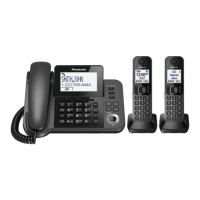
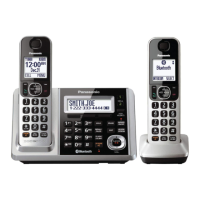
Model shown is KX-TGF372.
Before initial use, see “Getting Started”
on page 11.
Thank you for purchasing a Panasonic product.
Please read these operating instructions before using the unit and save them for
future reference.
Consulte “Guía Rápida Española”, página 83.
For assistance, visit our Web site: www.panasonic.com/support for customers in
the U.S.A. or Puerto Rico.
Please register your product: www.panasonic.com/prodreg
TGF37x(en)_1128_ver032.pdf 1 2014/11/28 16:08:38

Table of Contents

Other manuals for Panasonic KX-TG585SK

Questions and Answers

  • V
    Vincent BlackwellSep 10, 2025
    What to do if my Panasonic Telephone unit does not work?
    • S
      Stephanie GuzmanSep 10, 2025
      If your Panasonic Telephone unit isn't working, try the following: 1. Ensure the batteries are correctly installed. 2. Fully charge the batteries. 3. Check all connections. 4. Unplug the base unit’s AC adaptor to reset it, then reconnect and try again. 5. Ensure the handset is registered to the base unit.
  • F
    fromanAug 22, 2025
    Why I cannot hear a dial tone on my Panasonic Cordless Telephone?
    • G
      gregory59Aug 22, 2025
      If you cannot hear a dial tone on your Panasonic Cordless Telephone, ensure the CELL 1 or CELL 2 indicator is lit. Check that the base unit’s AC adapter and telephone line cord are properly connected. You can also test the telephone line by connecting it to a known working telephone to determine if the issue is with the phone or the line.
  • T
    Thomas CrawfordAug 25, 2025
    What to do if my Panasonic Cordless Telephone handset beeps and/or flashes?
    • Y
      Yolanda BellAug 25, 2025
      If the handset of your Panasonic Cordless Telephone beeps and/or flashes, it usually indicates that the battery charge is low. You should fully charge the batteries.
  • E
    eherreraAug 26, 2025
    Why Panasonic Cordless Telephone base unit beeps?
    • M
      mmunozAug 27, 2025
      The Panasonic Cordless Telephone base unit beeps to indicate that new messages have been recorded. You should listen to the new messages.
  • R
    Rhonda FlynnAug 27, 2025
    Why is my Panasonic Telephone base unit beeping?
    • G
      Gary LynchAug 28, 2025
      If your Panasonic Telephone is beeping, it indicates that new messages have been recorded. To stop the beeping, listen to the new messages.
  • J
    Jerry MeyersAug 29, 2025
    Why does my Panasonic KX-TG585SK handset beep and/or flash?
    • L
      Lori ConradAug 29, 2025
      If your Panasonic Telephone handset is beeping and/or flashing, it usually means the battery charge is low. To resolve this, fully charge the batteries.
  • J
    jmendozaSep 18, 2025
    What to do if I cannot pair a cellular phone to my Panasonic KX-TG585SK?
    • D
      Darrell AllenSep 18, 2025
      If you are unable to pair a cellular phone to the Panasonic Telephone base unit, it could be due to compatibility issues. Confirm that your cellular phone supports the hands-free profile (HFP) specification. Also, ensure that the Bluetooth feature of your cellular phone is turned on. Try turning off and on your cellular phone. If your cellular phone is already connected to another Bluetooth device, turn it off or disconnect it. Some cellular phones may require you to enter the Bluetooth PIN to pairing; confirm that you entered the correct PIN.
  • P
    phamchristopherSep 12, 2025
    What to do if Panasonic Cordless Telephone display is in a language I cannot read?
    • A
      Angela LeblancSep 12, 2025
      If the display on your Panasonic Cordless Telephone is in a language you cannot read, you should change the display language.
  • C
    christopherdaySep 8, 2025
    What to do if I cannot register a handset to a Panasonic Cordless Telephone base unit?
    • T
      Timothy ProctorSep 8, 2025
      If you cannot register a handset to a Panasonic Cordless Telephone base unit, it may be because the maximum number of handsets (6) is already registered. Cancel unused handset registrations from the base unit.
  • W
    Wendy KhanSep 5, 2025
    What to do if I cannot pair a cellular phone to Panasonic Cordless Telephone base unit?
    • S
      sandra71Sep 5, 2025
      If you cannot pair a cellular phone to the Panasonic Cordless Telephone base unit, first confirm that your cellular phone supports the hands-free profile (HFP) specification. Ensure that the Bluetooth feature on your cellular phone is turned on. If your cellular phone is already connected to another Bluetooth device, turn it off or disconnect it. Some cellular phones may require you to enter the base unit PIN to pair; confirm that you entered the correct PIN. If the Bluetooth technology on your cellular phone may not be functioning normally, turn off and on your cellular phone.

Summary

Introduction

Model composition

Details the base unit and handset models included in different series.

Accessory information

Lists the supplied accessories and their quantities for each model.

Getting Started

Setting up

Provides step-by-step instructions for connecting the base unit and charger.

Battery installation

Explains how to install the rechargeable batteries correctly.

Link to Cell

Link to cell feature

Explains how to connect base unit and cellular phone via Bluetooth for calls.

Pairing a cellular phone

Step-by-step guide for pairing a cellular phone to the base unit.

Making;Answering Calls Using the Handset

Making cellular calls

Guides on how to make calls using a cellular phone via the handset.

Making landline calls

Provides steps for making calls using the landline connection.

Making;Answering Calls Using the Base Unit

Making cellular calls

Explains how to make cellular calls using the base unit.

Making landline calls

Details how to make landline calls using the base unit.

Intercom

Making an intercom call

Instructions for initiating an intercom call between units.

Answering an intercom call

How to receive and answer an intercom call.

Call Block

Using the [CALL BLOCK] button

Explains how to disconnect calls and add numbers to the block list.

Storing unwanted callers

Describes methods for blocking specific numbers or number ranges.

Phonebook

Adding phonebook entries

Guides on how to add new names and phone numbers to the phonebook.

Storing a redial list number to the phonebook

Instructions on saving numbers from the redial list into the phonebook.

Programming

Menu list

Overview of accessing features via display menus or direct command codes.

Link to cell

Settings for managing cellular phone connections via Bluetooth.

Speed dial

How to assign phone numbers to speed dial keys for quick dialing.

Alarm

Handset

Instructions for setting alarms on the handset, including options and memos.

Silent mode

Turning silent mode on;off

How to activate or deactivate silent mode for handsets and base units.

Baby monitor

Setting the baby monitor

Guides on configuring the baby monitor feature for monitoring rooms.

Registering a unit

Registering a handset to the base unit

Steps to re-register a handset if it loses its connection to the base unit.

Caller ID Service

Using Caller ID service

Information on subscribing to and using the Caller ID service.

Using Bluetooth Devices

Copying phonebook from a cellular phone (phonebook transfer)

Steps to copy contacts from a cellular phone to the unit's phonebook.

Link to Cell app

Instructions for integrating Android phones using the Link to Cell app.

Text message (SMS) alert

How to receive SMS alerts from iPhone/BlackBerry phones on the DECT phone.

Using a Bluetooth wireless headset (optional) for landline calls

Guide to pairing and using a Bluetooth headset for hands-free landline calls.

Answering System for Landline

Answering system for landline

Overview of the answering system's ability to answer and record calls.

Advanced new message alerting features

Features for alerting users about new messages, including audible alerts and call notifications.

Remote operation

How to remotely access the answering system using a touch-tone phone.

Useful Information

Voicemail service for landline

Explains the voicemail service offered by phone providers and its interaction with the unit.

Error Messages

Troubleshooting

General use

Provides solutions for general problems with the unit's operation.

Bluetooth Device Troubleshooting

FCC and other information

Appendix

Customer services

Information on how to get support, find accessories, and contact customer service.

Warranty (For United States and Puerto Rico)

Details the limited warranty coverage, terms, and mail-in service procedures.

Panasonic KX-TG585SK Specifications

General IconGeneral
BrandPanasonic
ModelKX-TG585SK
CategoryTelephone
LanguageEnglish

Related product manuals