Note:
R The AC adaptor must remain connected at all times. (It is normal for the adaptor
to feel warm during use.)
R Make sure that the wall and the fixing method are strong enough to support the
weight of the unit.
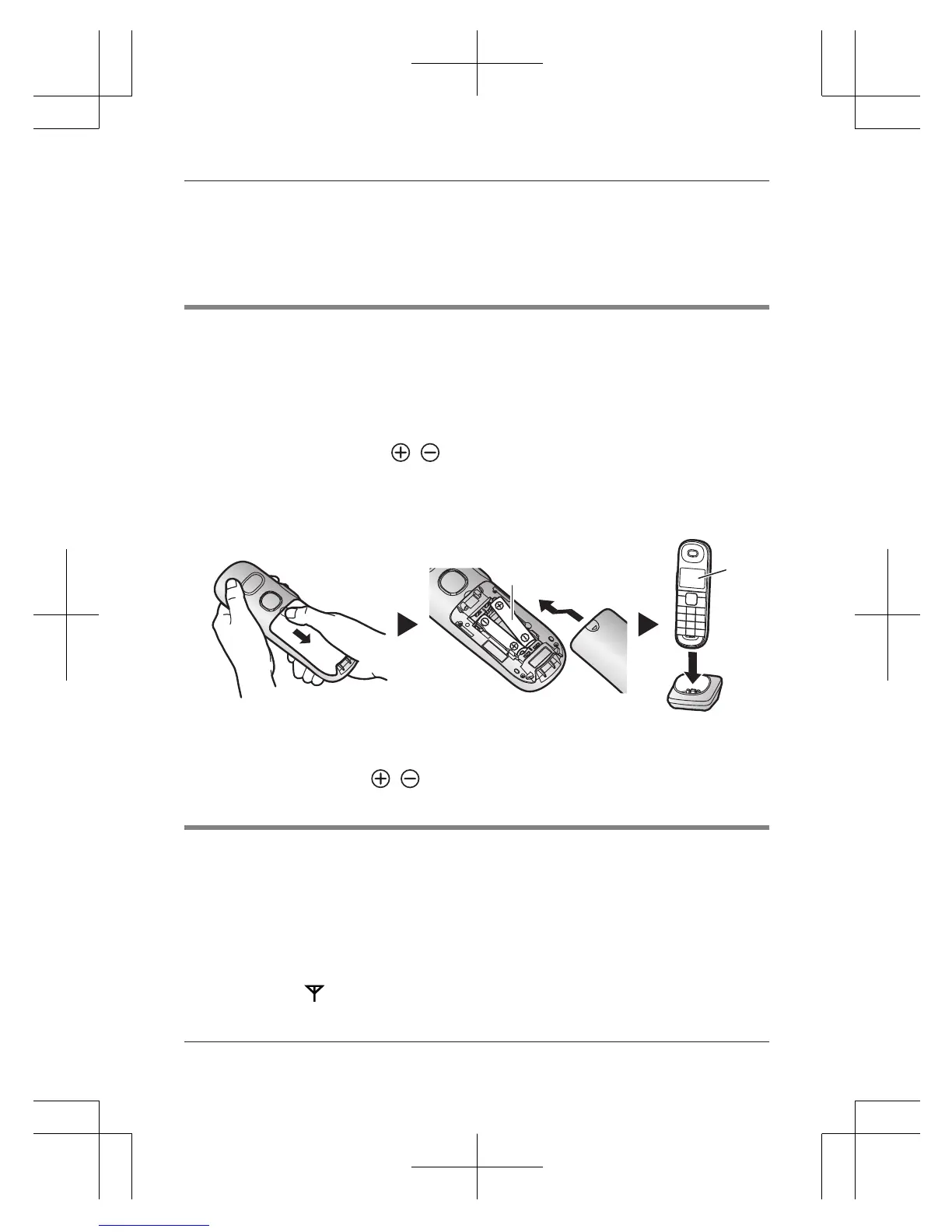
Battery installation/Battery charging
Important:
R Use the supplied rechargeable batteries. For replacement, we recommend using
the Panasonic rechargeable batteries noted on page 2.
R USE ONLY rechargeable Ni-MH batteries AAA (R03) size (
).
R Do NOT use alkaline/manganese/Ni-Cd batteries.
R Confirm correct polarities (
, ).
Charge for about 7 hours.
R Confirm “Charging” is displayed (
).
R When the batteries are fully charged, “Fully charged” is displayed.
Note:
R If the batteries are fully charged, but the operating time seems to be shorter,
clean the battery ends ( , ) and the charge contacts with a dry cloth and
charge again.
Registering a handset to a base unit
1 Base unit:
Press and hold MLOCATORN for about 5 seconds.
R If all registered handsets start ringing, press MLOCATORN again to stop,
then repeat this step.
2 Handset:
Place the handset on the base unit or charger, then wait until a long beep
sounds and is displayed.
For assistance, please visit http://shop.panasonic.com/support
5
Installation




 To Next Page