➢
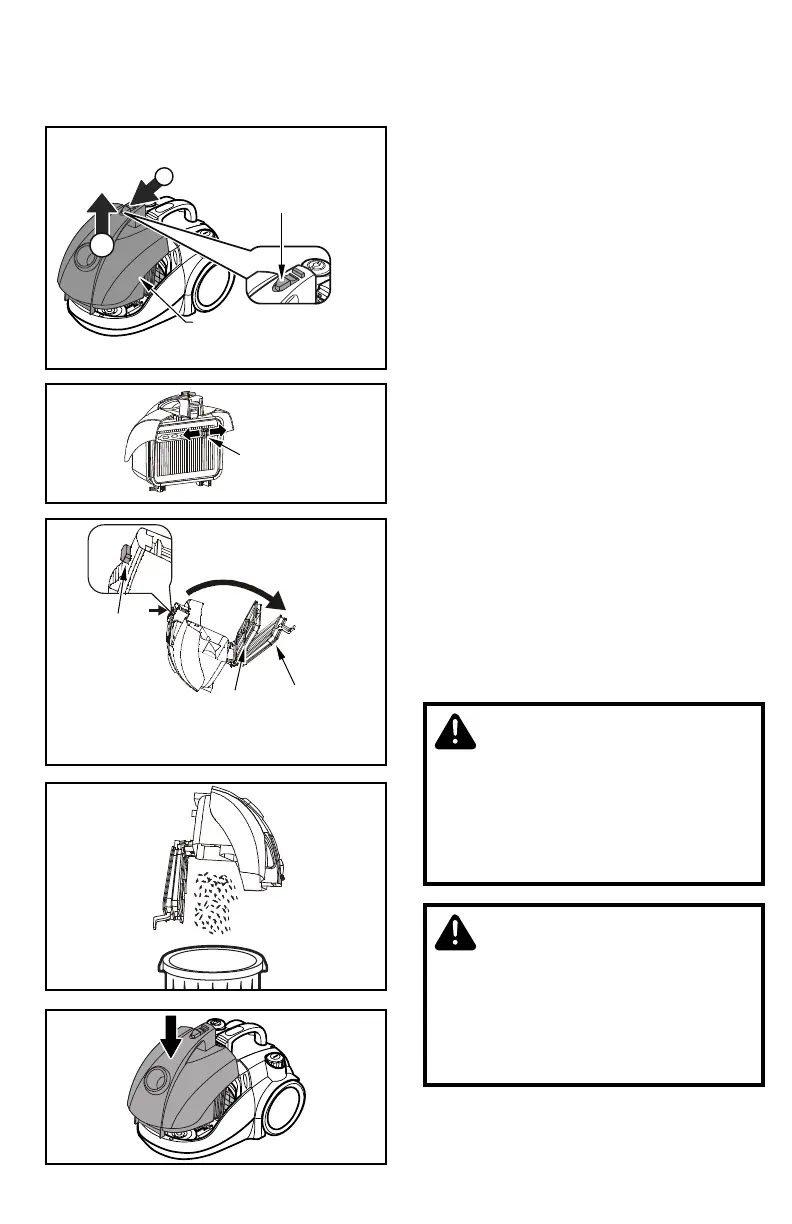
Push the dust bin release button and
lift off the dust bin.
Presionar el botón de liberación del
contenedor de polvo y levante el
contenedor de polvo.
➢
Slide the lever in the direction of the
arrow to remove the embedded dust.
Desliza la palanca en dirección de la
flecha para remover el contenedor de
polvo.
➢
Push the release button, open the
dust bin and then open the filter.
Presionar el botón de liberación, abrir el
contenedor de polvo y remover el filtro.
➢
Empty the dust bin into a trash
container.
Vaciar el contenido del contenedor de
polvo en el depósito de basura.
➢
Close the dust bin and reinstall as
shown.
Cerrar el contenedor de polvo y reinstale
como se muestra.
Emptying Dust Bin / Vaciar el contenedor de polvo
CAUTION
Product Damage Hazard
Do not use the vacuum cleaner without
dust bin, otherwise it may damage the
motor.
CUIDADO
El producto puede sufrir daños
No utilicé la aspiradora sin el contenedor
de polvo, podría dañar el motor.
- 21 -



 To Next Page