EN16
<Settingwaterhardness>
Before using the espresso machine for the first time, it should be set to the appropriate water hardness for your area.
1
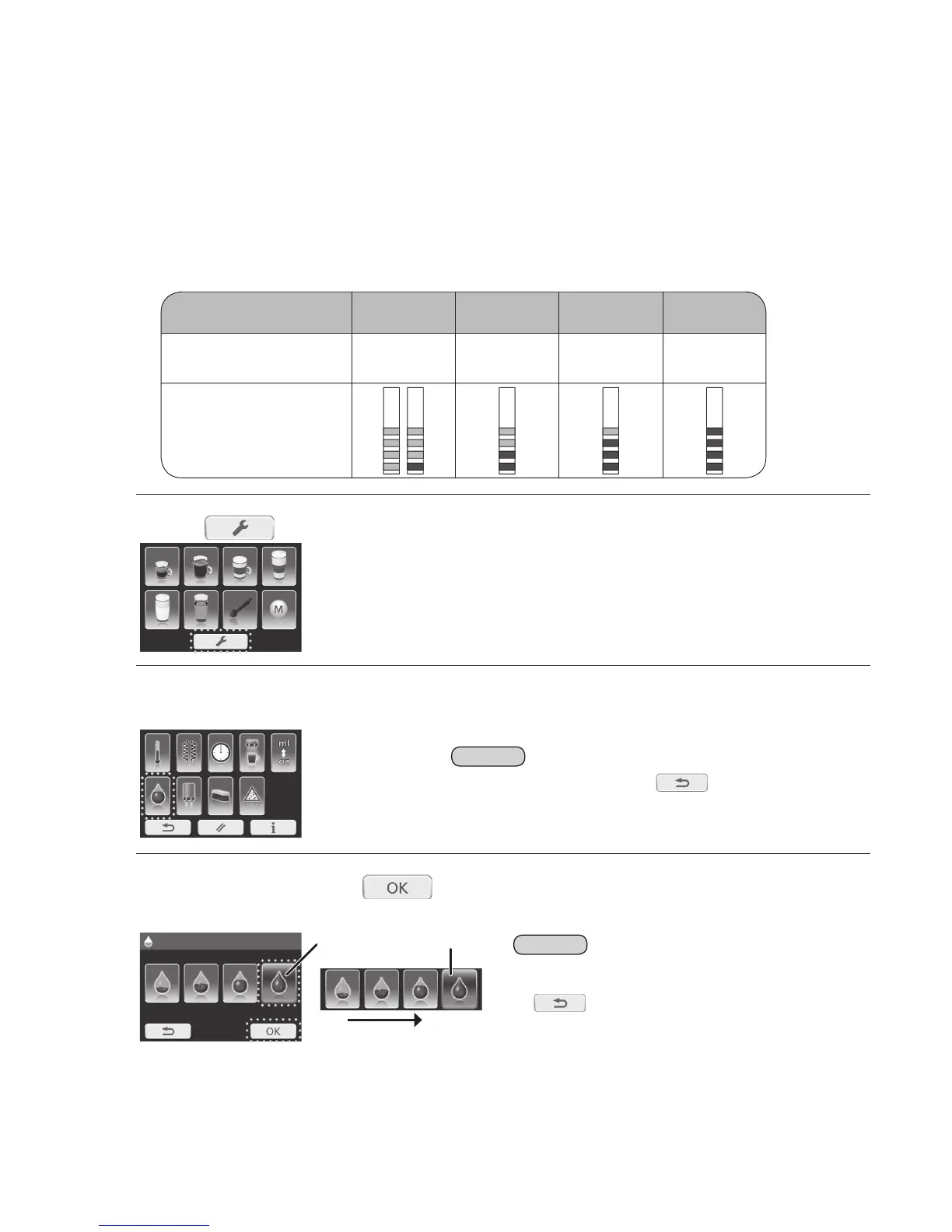
Determinethewaterhardness.
1
Dip the test strip into cold water for 1 second and shake off the excess water.
2
Read the water hardness from the pink-coloured areas on test strip after approximately 1 minute.
2
Press .
3
Select“waterhardnesslevel”.
Note
• If the no action for 30 seconds or is pressed, the display will
return to the main menu.
4
Selectlevelandpress tosavethesetting.
(e.g. for very hard)
Soft
The selected setting will light up
in blue.
Very hard
Note
• If the no action for 30 seconds, the display will return to the
main menu without saving the settings.
• If
is pressed, the display will return to the previous
display without saving the setting.
BeforeUse(Continued)


 To Next Page