EN23
4
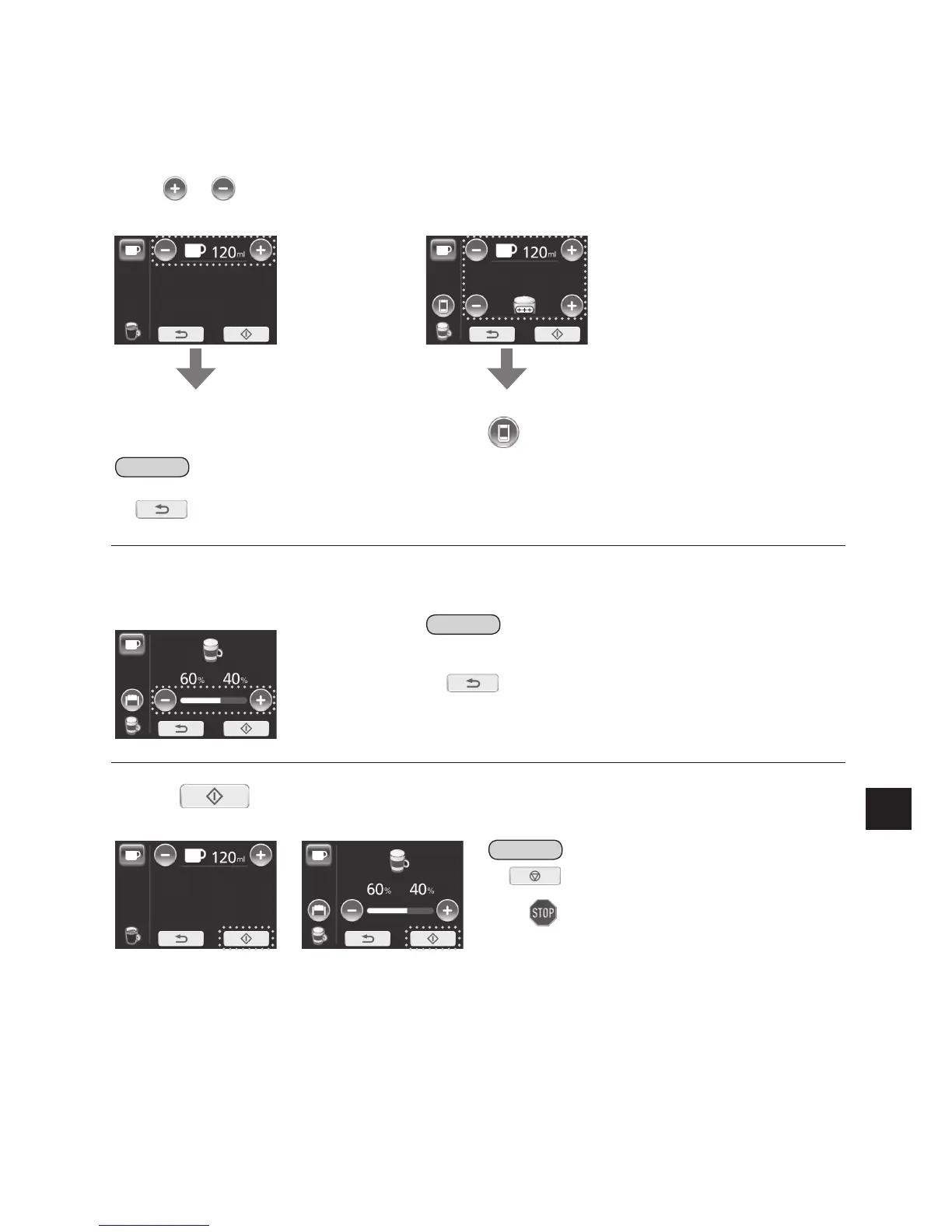
Adjustcupfillingquantityand/ormilkfoamasdesired.
• If adjustment is unnecessary, move on to the step 6.
• Press
or repeatedly to adjust quantity for coffee and/or milk foam. (P. EN13)
(e.g.: Espresso/Coffee) (e.g.: Cappuccino/Latte Macchiato)
Tostart,moveontostep6. Toadjustcoffeeandmilkratio,
press
andmoveontostep5.
Note
• Only one cup can be prepared with this function.
• If
is pressed, the display will return to the select drink menu (step 2). At same time the Espresso machine release
the coffee powder into the waste container. Refill the powder coffee at step 3.
5
Adjustcoffeeandmilkratio.
(
e.g.: Cappuccino
60% : 40% = milk : coffee
Note
• When “Latte Macchiato” is selected, the cup filling quantity will be
displayed as 80% and 20%.
• If
is pressed, the display will return to the select drink menu.
6
Press tostartbrewing.
(e.g.: Espresso/Coffee) (e.g.: Cappuccino)
Note
• If is pressed during the brewing process, it
immediately stops the process.
After
flashes, the display will return to the main menu.
O When brewing is completed, display will return to the main menu.
Wait until display shows the main menu to remove the cup(s).
Q Toturnoffthepowerafteruse«P.EN25
)


 To Next Page
 Loading...