– 7 –
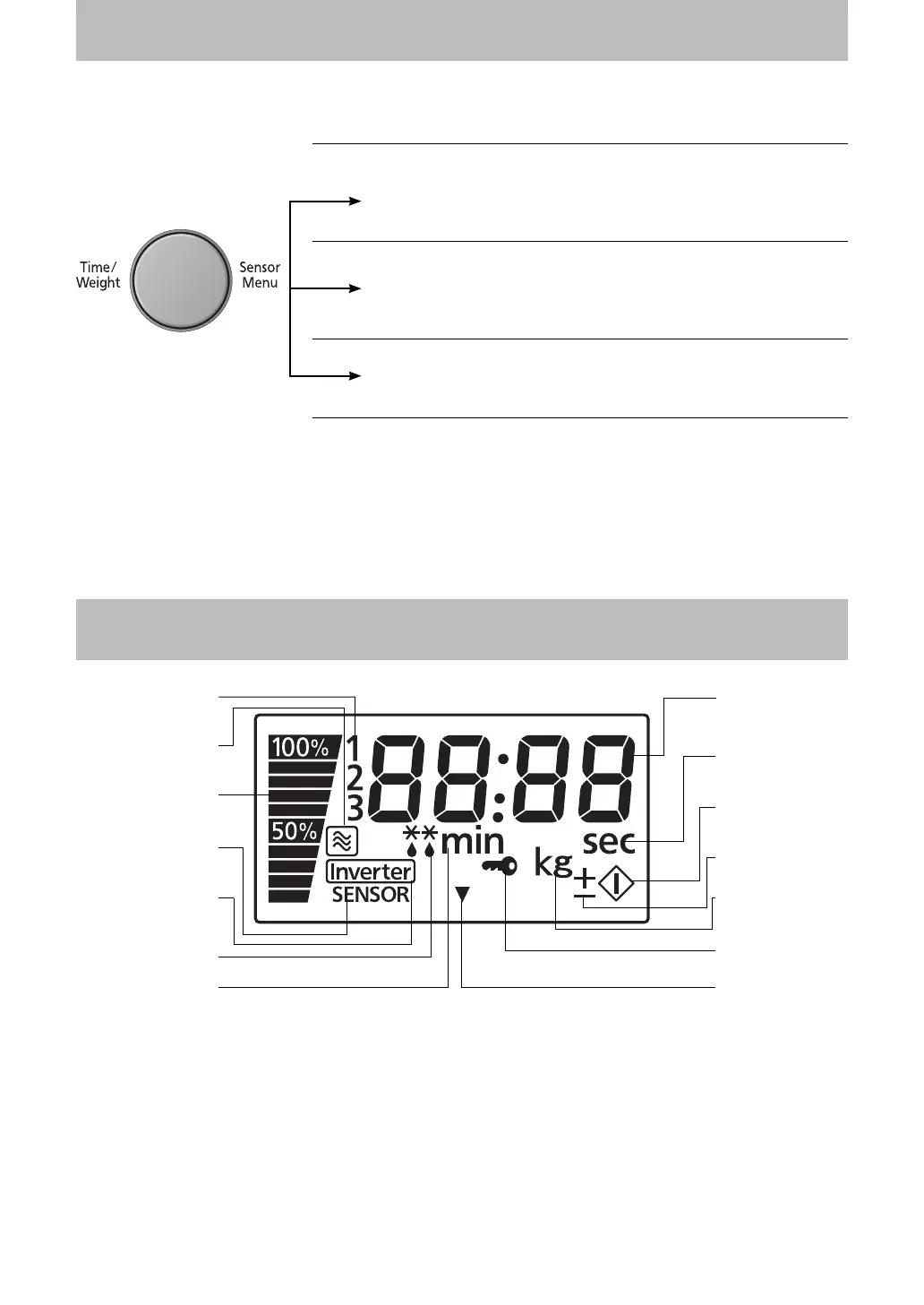
Dial Features
TIME CHOICE
Push then rotate the dial. Rotate the dial clockwise to increase
the cooking time and rotate the dial counter-clockwise to
decrease the cooking time.
WEIGHT CHOICE
Push then rotate the dial. Rotate the dial clockwise to increase
the weight and rotate the dial counter-clockwise to decrease
the weight setting.
SENSOR MENU CHOICE
Push then rotate the dial. Dial can be rotated in either direction
to select the Sensor Menus.
NOTE:
The maximum programmable time using Time Dial is up to 90 minutes.
Press and release dial to expand (pop-out). After setting desired program, push dial in to avoid accidental
changing of the Programmed time.
Display Window
Power Level
Inverter
Display
Stage Display
Timer (Minute)
Number (Time/
Weight/Menu)
Weight (
g
/k
g
)
Timer
(Second)
Child Safety
Lock Setting
Keep Warm
Start
Micro Power
Defrost
Feature
Sensor
Feature
More/Less
Feature
F00039Y40QP_OI.indd 7F00039Y40QP_OI.indd 7 2011-7-4 9:48:052011-7-4 9:48:05




 To Next Page