Before using
16
LSQT0891
Adjusting LCD monitor/viewfinder
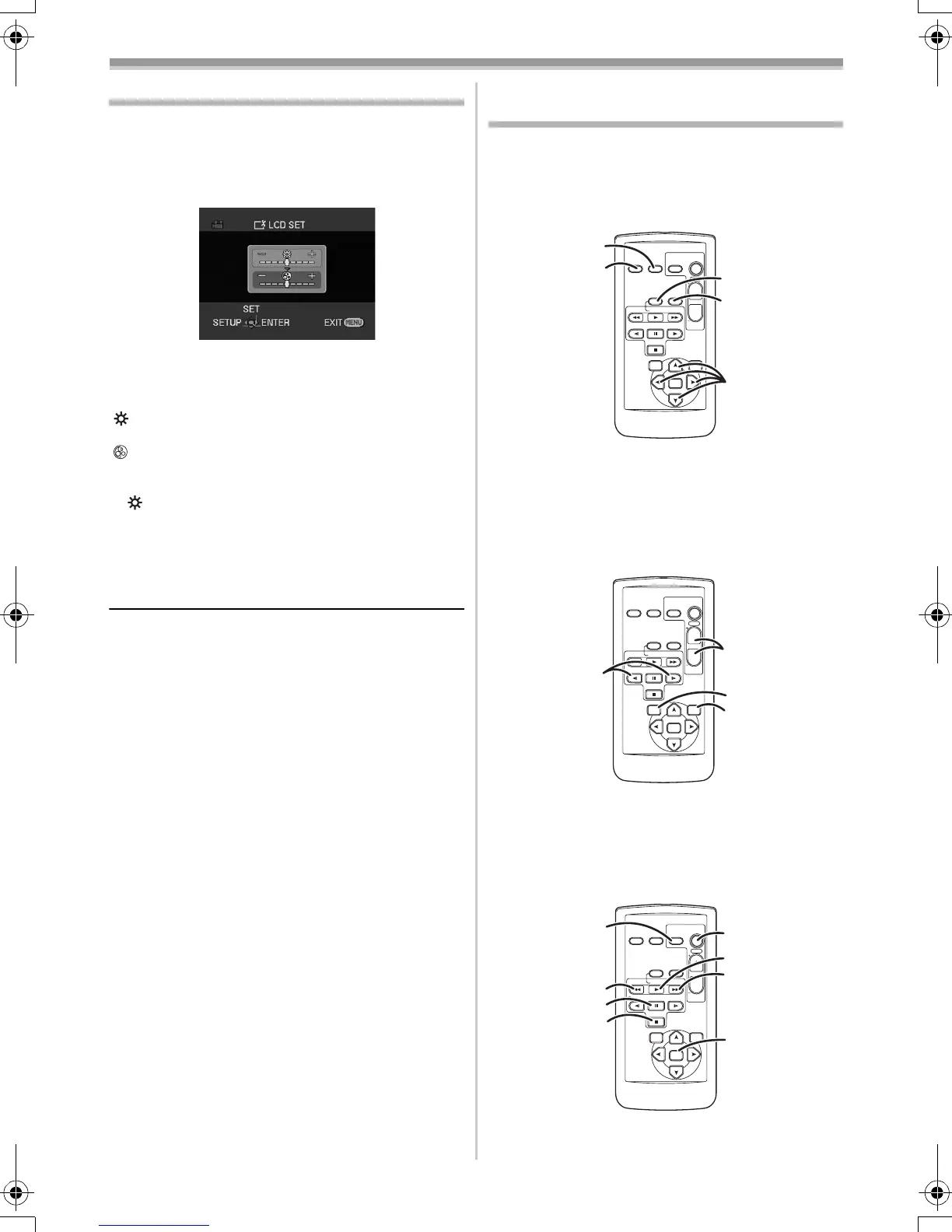
ª Adjusting the brightness and colour
level
1
Set [SETUP] >> [LCD SET] or [EVF SET] >>
[YES].
2 Move the joystick up or down in order to
select the item to be adjusted.
[LCD SET]
:Brightness of the LCD monitor
:Colour level of the LCD monitor
[EVF SET]
:Brightness of the viewfinder
3 Move the joystick left or right to move the
bar indication representing the brightness.
4 Press the [MENU] button or the joystick to
complete the settings.
≥In order to adjust the brightness of the
viewfinder, close the LCD monitor, and the
viewfinder will be activated.
≥When the LCD monitor is rotated by 180°
towards the lens, the brightness of the LCD
monitor cannot be adjusted.
≥These settings will not affect the images actually
recorded.
Using the remote control
(NV-GS35 only)
ª Remote control
Using the remote control supplied will enable
controlling almost all the functions of this camera
to be controlled.
(1) Date/time button [DATE/TIME] -40-
(2)
On-screen display button [OSD] -33-
(3)
Record button [¥REC]
(not available)
(4) Audio dubbing button [A.DUB] -38-
(5)
Direction buttons [π, ∑, ∏, ∫] -15-
(6)
Slow/frame-by-frame forward button
[E, D] (E: reverse, D: forward)
-31-
(7)
Zoom/volume button [ZOOM/VOL] ¢
(8) Search button [VAR. SEARCH] -32-
(9)
Menu button [MENU] -15-
(10)
Photoshot button [PHOTO SHOT] ¢
(11) Rewind/review button [6]
EVF
STOP
OSD
V
/REW
STILL ADV
DATE/
TIME
VOL
ZOOM
¥REC
PHOTO
SHOT
START/
STOP
A.DUB
PLAY
PAU SE
FF/
W
STILL ADV
ENTER
VAR .
SEARCH
MENU
T
W
(1)
(2)
(3)
(4)
(5)
STOP
OSD
V
/REW
STILL ADV
DATE/
TIME
VOL
ZOOM
¥REC
PHOTO
SHOT
START/
STOP
A.DUB
PLAY
PAU SE
FF/
W
STILL ADV
VAR .
SEARCH
MENU
ENTER
T
W
(6)
(7)
(8)
(9)
STOP
OSD
V
/REW
STILL ADV
DATE/
TIME
VOL
ZOOM
¥REC
PHOTO
SHOT
START/
STOP
A.DUB
PLAY
PAU SE
FF/
W
STILL ADV
VAR .
SEARCH
MENU
ENTER
T
W
(10)
(14)
(17)
(15)
(16)
(11)
(12)
(13)
GS35_21_17EB.book 16 ページ 2005年1月20日 木曜日 午前10時59分




 To Next Page