7 SERVICE NOTES (PLEASE READ)
7.1. SERVICE NOTES
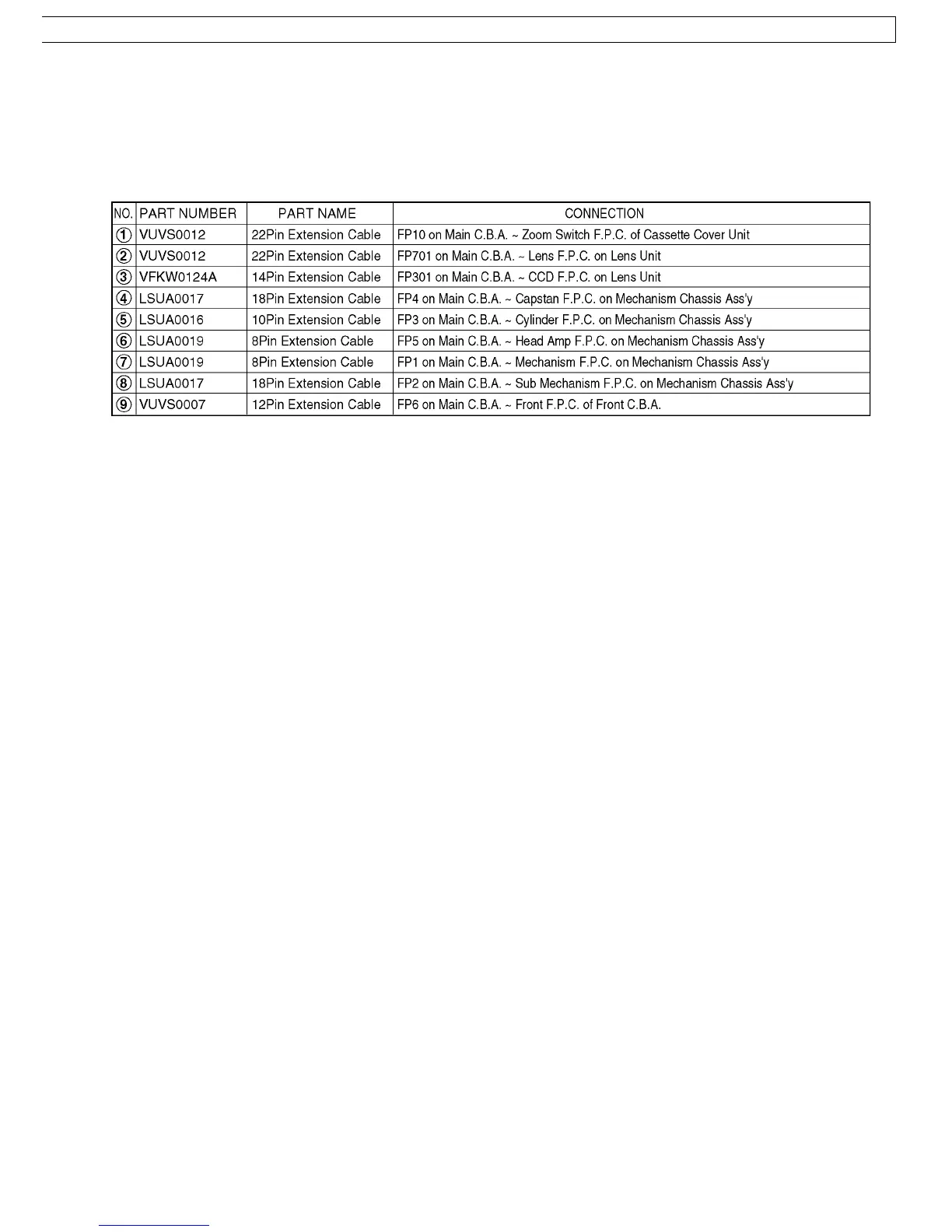
7.1.1. EXTENSION CABLES FOR SERVICE POSITION
Using the following Extension Cables, place the unit as shown for check and service.
Note :
1. The LCD open/close SW. is for changing between LCD Display or EVF Display. When turning on EVF Display, place some
paper or tape, etc. on LCD open/close SW. so that this SW. stays ON.
2. To eject the Mechanism, hold down the Eject Switch on the Jack C.B.A. for a short time.
3. Use a grounded ESD wrist strap while disassembling the Lens portion.
4. Connect the F.P.C.s to the connectors, verifying the direction of F.P.C as shown.
5. Use extreme care when unplugging or plugging in connectors.
23




 To Next Page