19
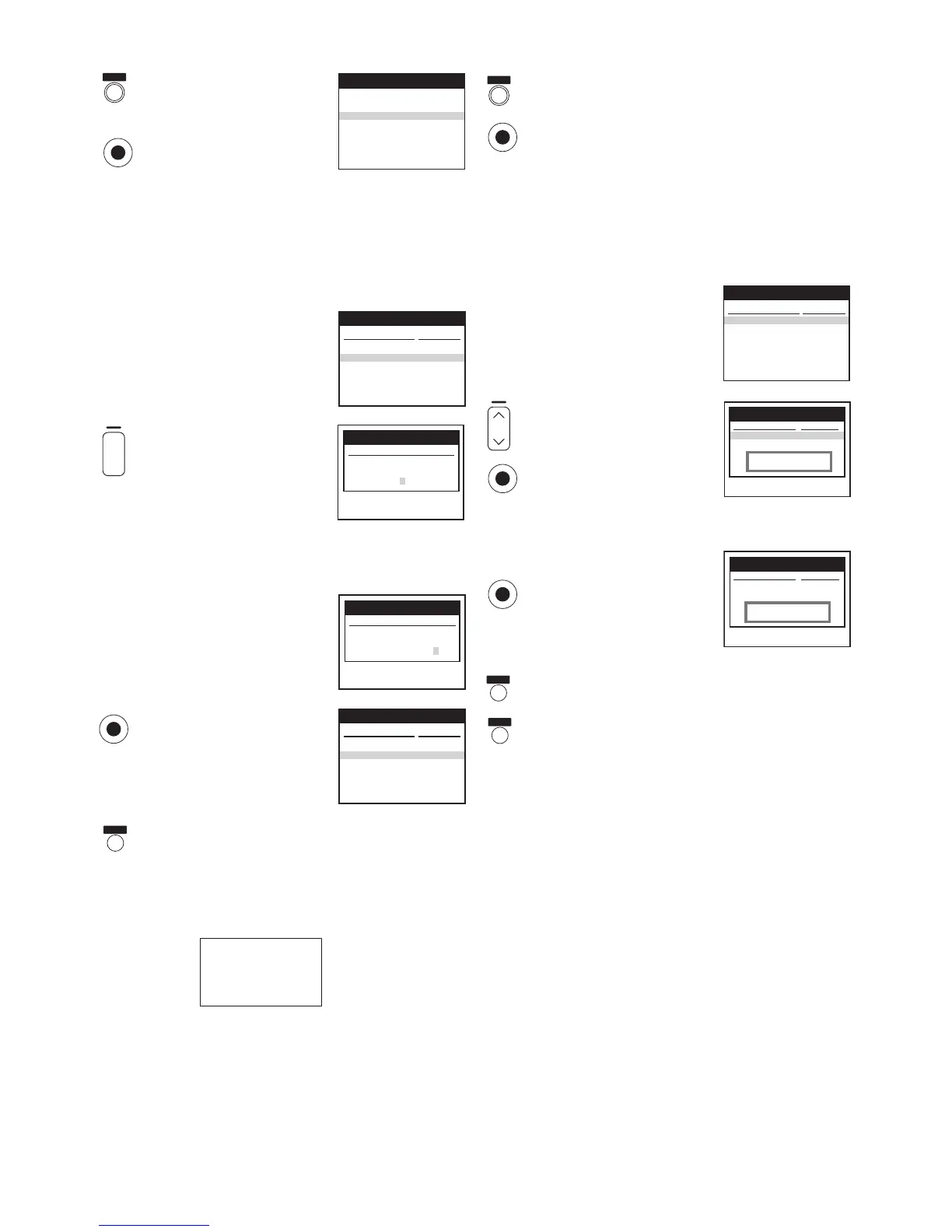
To Manually Enter or Editing a Title
Press the [MENU] button and
then press the [Cursor] buttons
34 to select [Tape Library].
Press the [OK] button.
If you press the [LIBRARY/SEARCH] button, operation steps
above are not necessary. In this case, start from the following
operation.
Press the [Cursor] buttons 21 to display the contents
of each cassette one after another, and search for the
programme whose title you want to enter (or change).
Press the [Cursor] buttons 34
to select the desired
programme.
Press the [Green] button.
– The menu for entering (or
changing) the title appears.
Press the [Cursor] buttons 3421 to enter (or
change) the title.
– Up to 15 characters can be entered for one title.
– To correct an input error,
press the [Cursor] button 2
and enter the correct
charactor.
Press the [OK] button.
– When you enter (or change)
the title, the recording start
time, which was displayed
before, disappears.
Press the [EXIT] button to exit the On Screen Display.
Hints:
– The letters which can be used for entering (or changing)
the title are the following:
– If the title needs a blank space, select the blank between
[Z] and [¢].
To Delete the Tape Library Data
Press the [MENU] button and then press the [Cursor]
buttons 34to select [Tape Library].
Press the [OK] button.
If you press the [LIBRARY/SEARCH] button, operation steps
above are not necessary. In this case, start from the following
operation.
Press the [Cursor] buttons 21 to search for the
cassette whose Tape Library data you want to delete.
Press the [Cursor] buttons 34
to select the desired
programme.
Press the [Red] button.
If you are sure to delete the
programme, press the [OK]
button.
If you want to delete all the programmes, repeat above
procedures.
When no programme is left and
the message appears, press the
[OK] button.
– The cassette’s Tape Library
data are now deleted from the
VCR’s Tape Library.
– If you want to keep the cassette number, press the
[EXIT] button instead of the [OK] button.
Press the [EXIT] button to exit the On Screen Display.
Hint:
– Even if you delete a cassette’s contents from the Tape
Library while that cassette is in the VCR, this does not
erase the actual programmes recorded on the cassette.
Old title : A2 AV2 ( 9:18)
New title :
Library Edit
Tape 1
Panasonic VCR
1 ARD ( 9:07) Th 18.01.01
A2 AV2 ( 9:18) Th 18.01.01
A2 AV2 ( 9:23) We 7.02.01
4 ¢¢¢04 ( 0:01) Sa 6.01.01
Title
Date
Panasonic VCR
Library for tape: 1 1/1
Tape 1
Panasonic VCR
Library Edit
Old title : A2 AV2 ( 9:18)
New title : FOOTBALL
MENU
OK
EXIT
OK
A2 AV2 (10:52) Th 18.01.01
1
ARD ( 4:04) Fr 2.02.01
3
¢¢¢03 ( 4:15) Fr 2.02.01
1
ARD (11:20) Tu 6 . 02.01
Title
Date
Panasonic VCR
Library for tape: 5 1/1
Panasonic VCR
Library for tape: 5 1/1
Title
Date
A2 AV2 (10:52) Th 18.01.01
1 ARD ( 4:04) Fr 2.02.01
Are you sure you want to
delete this title ?
Panasonic VCR
Library for tape: 5 1/1
Title
Date
Really delete tape
from library ?
MENU
OK
OK
EXIT
Timer recording
Tape Library
Tuning
Clock setting
Other settings
Main menu
Panasonic VCR
1 ARD ( 9:07) Th 18.01.01
FOOTBALL Th 18.01.01
A2 AV2 ( 9:23) We 7.02.01
4 ¢¢¢04 ( 0:01) Sa 6.01.01
Title
Date
Panasonic VCR
Library for tape: 1 1/1
DATE
r
s
OK
A B C D E F G H I J
K L M N O P Q R S T
U V W X Y Z ¢ s r
0 1 2 3 4 5 6 7 8 9
EXIT




 To Next Page