16
Memory back-up battery
The back-up battery (CR2032, not included)
saves the clock and alarm settings in the event
of a power interruption.
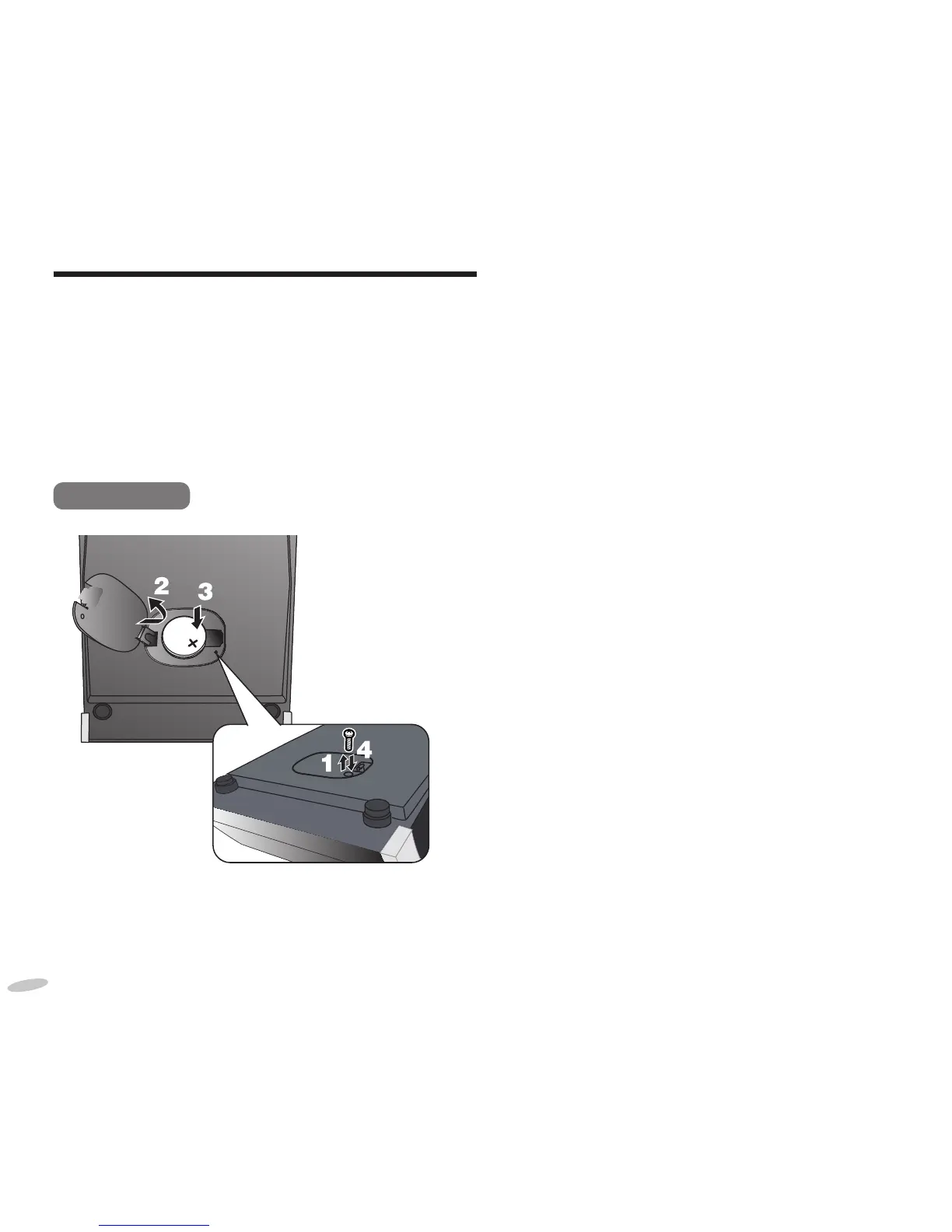
Inserting the battery
When there is no battery, the battery-weak
indicator will be displayed until a battery is
inserted.
Bottom view
1
Keep the AC adaptor connected to
the household mains socket when
unscrewing the screw on the cover of the
battery holder using a screwdriver.
2
Open the cover of the battery holder.
3
Insert a new battery with the (+) side
facing up.
4
Close the cover of the battery holder and
secure it with the screw.
Replacing the battery
The service life of this battery is approximately
1 month.
When the battery is weak, the battery-weak
indicator will blink constantly on the display.
Note:
• Do not heat or expose to fl ame.
• Do not leave the battery(ies) in an automobile
exposed to direct sunlight for a long period of
time with doors and windows closed.
• Remove the battery if the clock radio is not
going to be used for a long period of time.
Store in a cool, dark place.
RQTX1210-1B_gb.indd 16RQTX1210-1B_gb.indd 16 6/15/2010 10:24:27 AM6/15/2010 10:24:27 AM



 To Next Page