9
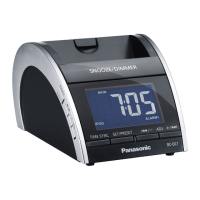
A [SNOOZE/DIMMER]
Snooze: To stop the alarm for 9 minutes.
Dimmer: To adjust the display panel’s
brightness (High (default), Medium or Low).
B [ALARM OFF]
To turn off the alarm.
C [ALARM 1], [ALARM 2]
To activate either alarm 1 or alarm 2 function.
To display alarm 1 or alarm 2 setting.
D [SLEEP]
To activate sleep function.
To activate daylight saving time
(summer time) in clock mode.
E [2/–, ADJ], [+/6 , ADJ]
To adjust clock, radio and alarm settings.
To skip to previous or next track.
To backward or forward search through a
track.
F [SET/PRESET]
To set the clock.
To perform automatic presetting or to view
preset channels in radio mode.
G [TIME SYNC]
To synchronise the main unit with an iPod or
iPhone’s time.
H [+, VOL], [–, VOL]
To adjust the volume.
To select a 12-hour or 24-hour clock display.
I [
4/9
]
To start music playback from an iPod or
iPhone and to pause during playback.
J [SOURCE]
To select clock, “IPOD” or “RADIO FM”
mode.
RQTX1210-1B_gb.indd 9RQTX1210-1B_gb.indd 9 6/15/2010 10:24:27 AM6/15/2010 10:24:27 AM


 To Next Page