EasyManua.ls Logo

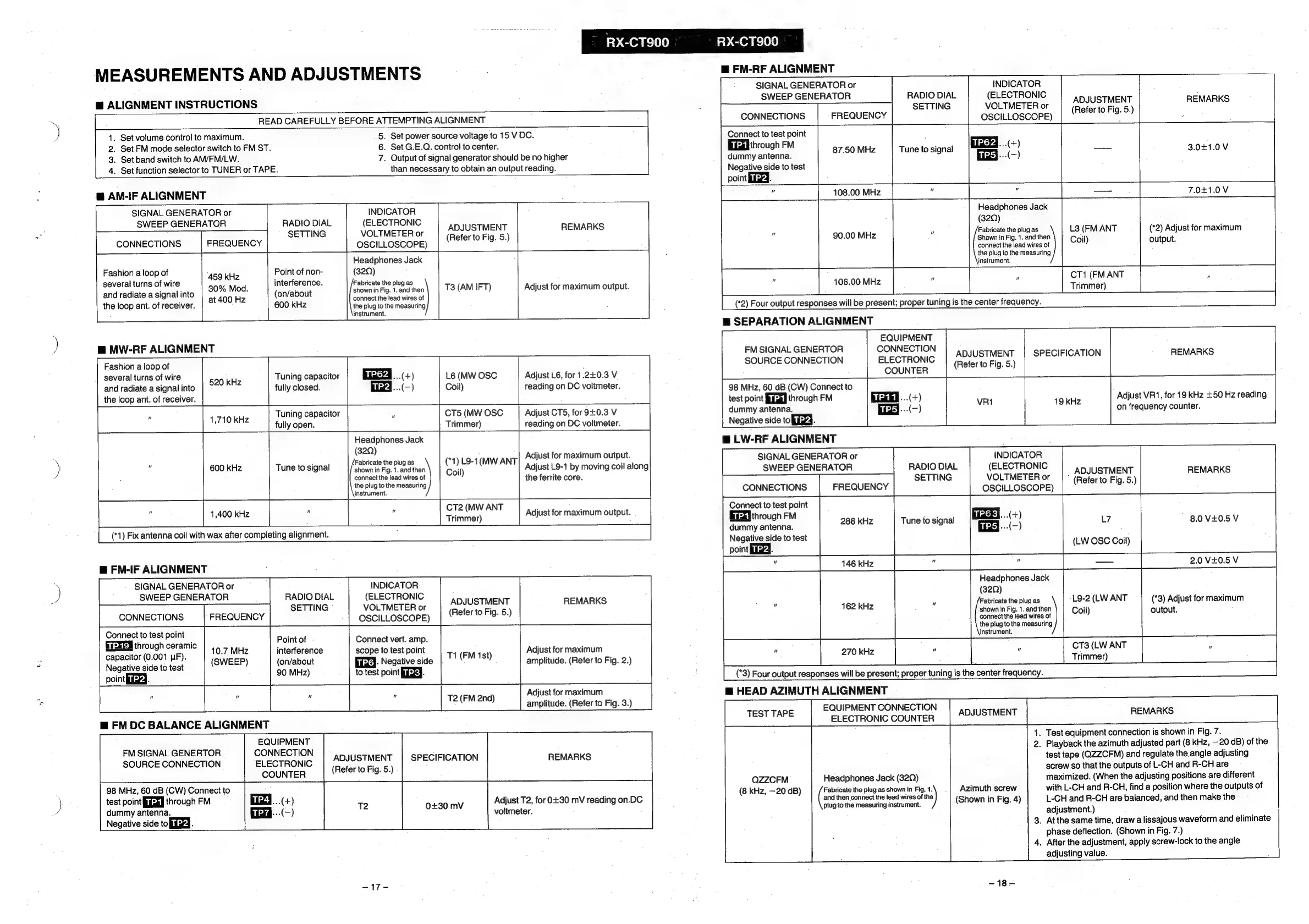
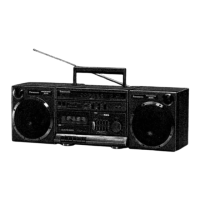
Panasonic RX-CT900 - Measurements and Adjustments; General Alignment Instructions; Radio Frequency and IF Alignment

Panasonic RX-CT900
26 pages
Print Icon
To Next Page IconTo Next Page
To Previous Page IconTo Previous Page
Loading...
Penne
RX-CT900
RX-CT900
MEASUREMENTS
AND
ADJUSTMENTS
@
ALIGNMENT
INSTRUCTIONS
READ
CAREFULLY
BEFORE
ATTEMPTING
ALIGNMENT
5.
Set
power
source
voltage
to
15
V
DC.
6.
Set
G.E.Q.
control
to
center.
7.
Output
of
signal
generator
should
be
no
higher
than
necessary
to
obtain
an
output
reading.
.
Set
volume
control
to
maximum.
.
Set
FM
mode
selector
switch
to
FM
ST.
.
Set
band
switch
to
AM/FM/LW.
.
Set
function
selector
to
TUNER
or
TAPE.
koh
=
@
AN-IF
ALIGNMENT
SIGNAL
GENERATOR
or
INDICATOR
SWEEP
GENERATOR
RADIO
DIAL
(ELECTRONIC
—|
“seTTING
VOLTMETERor
|
(Noter
to
ala
REMARKS
CONNECTIONS
FREQUENCY
OSCILLOSCOPE)
9.
9
Headphones
Jack
Fashion
a
loop
of
:
Point
of
non-
(32Q)
several
turns
of
wire
ene
interference
Fabricate
the
pl
a
i
abricate
the
plug
as
.
3
and
radiate
a
signal
into
30%
Mod.
(on/about
shown
in
Fig.
1.
and
then
T3
(AM
IFT)
Adjust
for
maximum
output.
;
at
400
Hz
connect
the
lead
wires
of
the
loop
ant.
of
receiver.
600
kHz
the
plug
to
the
measuring
instrument.
m@
MW-RF
ALIGNMENT
m@
FM-RF
ALIGNMENT
ADJUSTMENT
(Refer
to
Fig.
5.)
REMARKS
3.041.0V
7.041.0V
L3
(FM
ANT
*
Coil)
SIGNAL
GENERATOR
or
INDICATOR
SWEEP
GENERATOR
RADIO
DIAL
(ELECTRONIC
SETTING
VOLTMETER
or
CONNECTIONS
FREQUENCY
OSCILLOSCOPE)
te
to
test
point
aiag
through
FM
:
Macys...(+)
dummy
antenna.
87.50
MHz
Tune
to
signal
ry
(-)
Negative
side
to
test
point
fied.
Headphones
Jack
(32Q)
u
90.00
MHz
Seine,
ee
connect
the
lead
wires
of
the
plug
to
the
measuring
instrument.
;
hues
ie
i
(*2)
Four
output
responses
will
be
present;
proper
tuning
is
the
center
frequency.
m@
SEPARATION
ALIGNMENT
EQUIPMENT
FM
SIGNAL
GENERTOR
SOURCE
CONNECTION
CONNECTION
ELECTRONIC
COUNTER
(*1)
Fix
antenna
coil
with
wax
after
completing
alignment.
98
MHz,
60
dB
(CW)
Connect
to
test
point
[GXI
through
FM
dummy
antenna.
Negative
side
to
fy.
m@
LW-RF
ALIGNMENT
ADJUSTMENT
(Refer
to
Fig.
5.)
CT1
(FM
ANT
Trimmer)
SPECIFICATION
(*2)
Adjust
for
maximum
output.
REMARKS
Fashion
a
loop
of
:
several
turns
of
wire
520
kHz
Tuning
capacitor
er
...(+)
L6
(MW
OSC
Adjust
L6,
for
1.2+0.3
V
and
radiate
a
signal
into
fully
closed.
a4
...(—)
Coil)
reading
on
DC
voltmeter.
the
loop
ant.
of
receiver.
"
4.710
kHz
Tuning
capacitor
i
CT5
(MW
OSC
Adjust
CT5,
for
9+0.3
V
,
fully
open.
Trimmer)
reading
on
DC
voltmeter.
Headphones
Jack
(32Q)
.
F
;
A
Adjust
for
maximum
output.
”
.
f
1
oS
.
.
A
600
kHz
Tune
to
signal
coke.
anche
ean
TANT
Adjust
L9-1
by
moving
coil
along
connect
the
lead
wires
of
the
ferrite
core.
the
plug
to
the
measuring
instrument.
"
"
;
CT2
(MW
ANT
.
‘
1,400
kHz
Trimmer)
Adjust
for
maximum
output.
@
FN-IF
ALIGNMENT
SIGNAL
GENERATOR
or
SWEEP
GENERATOR
CONNECTIONS
FREQUENCY
Connect
to
test
point
EE-ZEM
through
ceramic
capacitor
(0.001
JF).
Negative
side
to
test
point
iG.
10.7
MHz
(SWEEP)
RADIO
DIAL
SETTING
©
Point
of
interference
(on/about
90
MHz)
m@
FM
DC
BALANCE
ALIGNMENT
FM
SIGNAL
GENERTOR
SOURCE
CONNECTION
98
MHz,
60
dB
(CW)
Connect
to
test
point
GX]
through
FM
dummy
antenna.
Negative
side
to
fiigd.
EQUIPMENT
INDICATOR
(ELECTRONIC
VOLTMETER
or
OSCILLOSCOPE)
Connect
vert.
amp.
scope
to
test
point
Biixa-
Negative
side
to
test
point
GK.
T1
(FM
1st)
T2
(FM
2nd)
ADJUSTMENT
(Refer
to
Fig.
5.)
CONNECTION
ELECTRONIC
COUNTER
Enzd..(-+)
fad
-..(-)
ADJUSTMENT
(Refer
to
Fig.
5.)
SPECIFICATION
0+30
mV
=17=
REMARKS
Adjust
for
maximum
amplitude.
(Refer
to
Fig.
2.)
Adjust
for
maximum
amplitude.
(Refer
to
Fig.
3.)
REMARKS.
Adjust
T2,
for
0+30
mV
reading
on.DC
voltmeter.
Connect
to
test
point
Eisi
through
FM
dummy
antenna.
Negative
side
to
test
point
fia.
"
288 KHz
Tune
to
signal
146
kHz
162
kHz
270
kHz
@
HEAD
AZIMUTH
ALIGNMENT
TEST
TAPE
QZZCFM
(8
kHz,
—20
dB)
EQUIPMENT
CONNECTION
ELECTRONIC
COUNTER
Headphones
Jack
(320)
Fabricate
the
plug
as
shown
in
Fig.
1.
and
then
connect
the
lead
wires
of
the
plug
to
the
measuring
instrument.
INDICATOR
Adjust
VR1,
for
19
kHz
+50
Hz
reading
on
frequency
counter.
Headphones
Jack
(32Q)
Fabricate
the
plug
as
shown
in
Fig.
1.
and
then
connect
the
lead
wires
of
the
piug
to
the
measuring
instrument.
”
q
bo
(*3)
Four
output
responses
will
be
present;
proper
tuning
is
the
center
frequency.
ADJUSTMENT
L7
(LW
OSC
Coil)
L9-2
(LW
ANT
Coil)
CT3
(LW
ANT
”
Trimmer)
SIGNAL
GENERATOR
or
SWEEP
GENERATOR
RADIO
DIAL
(ELECTRONIC
:
SETTING
VOLTMETER
or
|
(Heterte
hig
5)
REMARKS
CONNECTIONS
FREQUENCY
OSCILLOSCOPE)
oy
'
8.0
V+0.5
V
(*3)
Adjust
for
maximum
output.
1.
Test
equipment
connection
is
shown
in
Fig.
7.
Azimuth
screw
(Shown
in
Fig.
4)
~18—
2.
Playback
the
azimuth
adjusted
part
(8
kHz,
—-20
dB)
of
the
test
tape
(QZZCFM)
and
regulate
the.
angle
adjusting
screw
so
that
the
outputs
of
L-CH
and
R-CH
are
maximized.
(When
the
adjusting
positions
are
different
with
L-CH
and
R-CH,
find
a
position
where
the
outputs
of
L-CH
and
R-CH
are
balanced,
and
then
make
the
adjustment.)
3.
At
the
same
time,
draw
a
lissajous
waveform
and
eliminate
phase
deflection.
(Shown
in
Fig.
7.)
.
After
the
adjustment,
apply
screw-lock
to
the
angle
adjusting
value.