EasyManua.ls Logo

Panasonic SC-AKX50 - User Manual

Panasonic SC-AKX50
28 pages
Print Icon
To Next Page IconTo Next Page
Loading...
RQTX1097-1B
EB
Operations in these instructions are described mainly using the remote control, but you can perform
the operations on the main unit if the controls are the same.
Your unit may not look exactly the same as illustrated.
Note:
“EB” on the packaging indicates the United Kingdom.
Dear Customer
Thank you for purchasing this product.
For optimum performance and safety, please read
these instructions thoroughly before connecting,
operating or adjusting this product.
Please keep this manual for future reference.
Supplied Accessories
Please check and identify the supplied
accessories.
Use numbers indicated in parentheses when
asking for replacement parts. (As of March
2010)
Operating Instructions
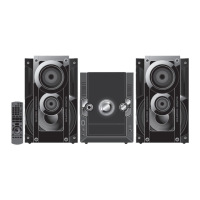
CD Stereo System
Model No. SC-AKX50
1 x AC power supply cord
(K2CZ3YY00005)
1 x FM indoor antenna
(RSAX0002)
1 x AM loop antenna
(N1DYYYY00010)
1 x Antenna plug adaptor
(K1YZ02000013)
1 x Remote control
(N2QAYB000503)
2 x Remote control batteries
AKX50_EB_EN.indd 1AKX50_EB_EN.indd 1 6/8/2010 5:25:22 PM6/8/2010 5:25:22 PM

Questions and Answers

  • W
    William Davis Jr.Sep 17, 2025
    What does 'DEVICE FULL' mean on my Panasonic SC-AKX50 Stereo System display?
    • C
      crystalhaysSep 17, 2025
      If your Panasonic Stereo System displays 'DEVICE FULL', it means you cannot record because the USB device's remaining recording time is less than the music source's total time. Use a USB device with sufficient recording time.
  • P
    patricia90Aug 25, 2025
    What to do if my Panasonic SC-AKX50 Stereo System is producing distorted sound or noise, and the stereo indicator flickers?
    • P
      pgrantAug 25, 2025
      Use an optional outdoor antenna for FM radio. The antenna should be installed by a competent technician.
  • A
    Alyssa ReyesAug 25, 2025
    Why does my Panasonic SC-AKX50 Stereo System have distorted sound or no sound?
    • M
      Michael CarterAug 26, 2025
      If your Panasonic Stereo System is producing distorted or no sound, it might be due to straining the speakers with excessive volume or power, or using the unit in a hot environment. Try turning the volume down or off. Then, identify and correct the cause before turning the unit back on.
  • M
    Melanie PowellAug 27, 2025
    What to do if my Panasonic Stereo System remote control buttons are not responding?
    • D
      Deborah Campbell MDAug 27, 2025
      Check that the batteries are installed correctly in the remote control.
  • J
    James FlynnSep 18, 2025
    Why does my Panasonic Stereo System make a beat sound?
    • C
      Carlos MartinSep 18, 2025
      If you hear a beat sound from your Panasonic Stereo System, turn off the television or move it away from the unit. When in AM tuner mode, switch to either BP 1 or BP 2.
  • E
    erica75Sep 23, 2025
    What to do if my Panasonic SC-AKX50 has an incorrect display?
    • J
      jose38Sep 23, 2025
      If your Panasonic Stereo System is displaying an incorrect display or play will not start, ensure that you have inserted the disc correctly. If the disc may be dirty, wipe it clean. Replace the disc if it is scratched, warped, or non-standard. If condensation has formed, wait 1 to 2 hours for it to evaporate.
  • M
    Melanie PatelSep 9, 2025
    Why is my Panasonic SC-AKX50 USB device operating slowly?
    • J
      Jonathan JohnsonSep 9, 2025
      A large file size or high memory USB flash drive takes longer time to read.
  • T
    Thomas CamachoSep 10, 2025
    What does 'PLAYERROR' mean on my Panasonic SC-AKX50 Stereo System?
    • A
      Adam GordonSep 10, 2025
      An unsupported MP3 format is being played. The unit will skip that track and play the next one.
  • M
    marquezdanielSep 3, 2025
    What does 'ERROR' during recording mean on my Panasonic Stereo System?
    • D
      David FosterSep 3, 2025
      You are not able to select another playback source (example: radio, USB and etc.) or press [2/3] or [5/6] during recording. Stop the recording function. You are not able to open the disc tray when recording from AM source. Select a suitable recording mode (128 KBPS or 192 KBPS) and resume recording.
  • T
    Tiffany TurnerSep 1, 2025
    How to stop a humming sound during play on my Panasonic SC-AKX50?
    • P
      Patrick HillSep 1, 2025
      A humming sound during playback may be due to an AC mains lead or fluorescent light being near the unit. Try keeping other appliances and cords away from the unit.

Summary

Caution for AC Mains Lead

Safety precautions

Placement

Instructions for positioning the unit to ensure optimal performance and longevity.

Voltage

Guidelines regarding the use of appropriate power sources and avoiding electrical hazards.

AC mains lead protection

Information on handling and maintaining the AC power cord to prevent shocks or fires.

Foreign matter

Precautions against foreign objects and liquids entering the unit.

Placement of speakers

Making the connections

Antenna connections

Guidance on connecting FM and AM antennas for optimal radio reception.

Speaker connections

Instructions for connecting the main unit to the speakers.

AC mains lead connection

Details on connecting the power supply cord and associated precautions.

Discs

Basic play

Instructions for inserting a disc and starting playback.

Advanced play

Using the FM;AM radio

Manual tuning

Steps to manually tune and select radio stations.

Memory preset

USB and internal memory

Connecting a USB mass storage device

Procedure for connecting USB devices and important preparatory notes.

Recording to a USB mass storage device or the internal memory

Basic recording

Steps for recording audio from various sources to USB or internal memory.

Recording of MP3 tracks

Advanced recording functions

Erasing the recorded tracks

Using the clock and timers

Using the play or record timer

Setting timers for waking up or recording from sources.

Using sound effects

Enjoying the bass: D.BASS

Using the microphone

Using other optional Equipments

Troubleshooting guide

Common problems

Solutions for general issues like standby mode display or unit response.

Discs

Troubleshooting steps for disc playback errors and read failures.

Radio

Solutions for radio reception problems like noise or stereo indicator issues.

USB Troubleshooting

Unit Displays Troubleshooting

Specifications

Panasonic SC-AKX50 Specifications

General IconGeneral
BrandPanasonic
ModelSC-AKX50
CategoryStereo System
LanguageEnglish

Related product manuals