9
TQBJ2117
9
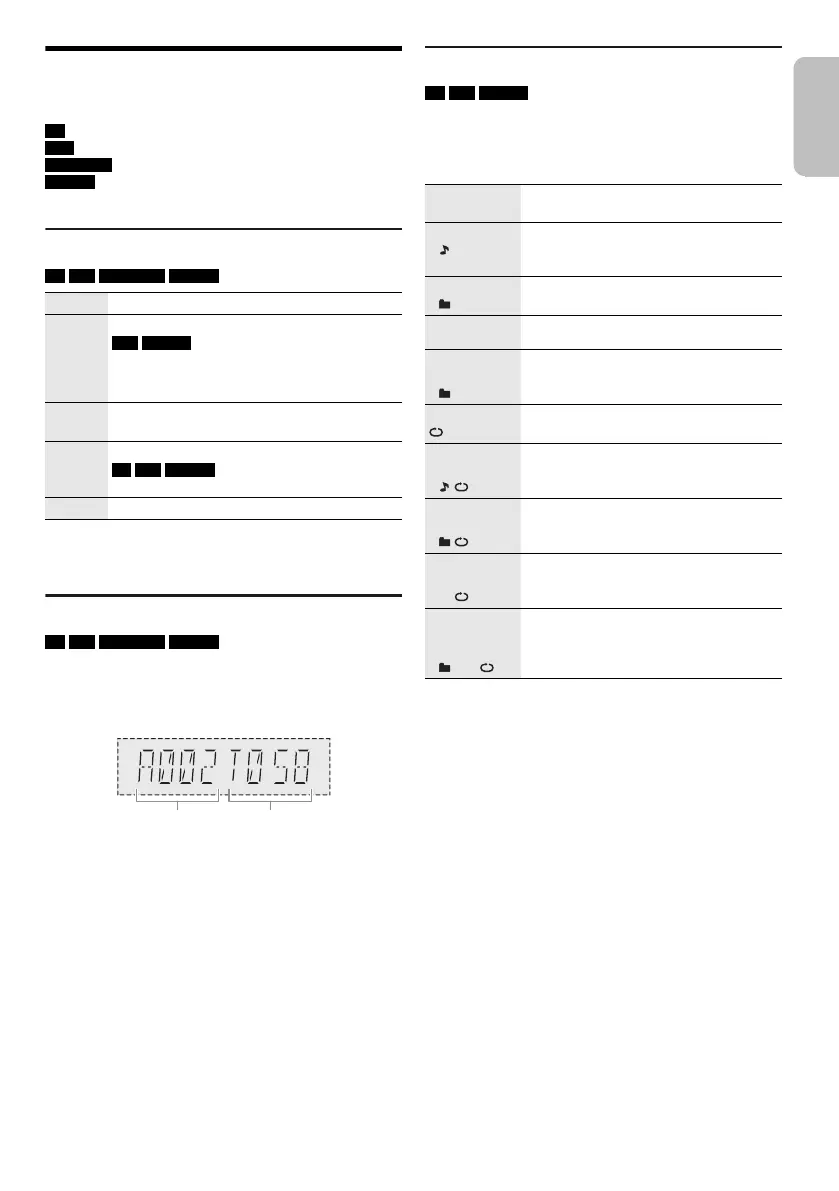
Media playback
The following marks indicate the availability of the feature.
Basic playback
CD USB BLUETOOTH MEMORY
Note:
Depending on the Bluetooth
®
device, some operations may not
work.
Viewing available information
CD USB BLUETOOTH MEMORY
You can view the available information, such as MP3
album and track number, on the display panel.
Press [DISPLAY] repeatedly.
Example: MP3 album and track number display.
Note:
• Maximum characters that can be shown: Approximately 32
• This system supports ver. 1.0, 1.1 and 2.3 ID3 tags.
• Text data that the system does not support can show
differently.
Play menu
CD USB MEMORY
1 Press [PLAY MENU].
2 Press [Y, U] to select the setting and then press
[OK].
Note:
• During random playback, you cannot skip to tracks which
have been played.
• The setting is cancelled when you open the disc tray or
disconnect the USB device.
CD :
USB :
BLUETOOTH :
MEMORY :
CD-R/RW in CD-DA format or with MP3 files.
USB device with MP3 files.
Bluetooth
®
device.
Internal memory (refer to “Recording” on page
11 for adding tracks to the internal memory).
Play Press [4/9].
Stop Press [8].
USB MEMORY
The position is memorised.
“RESUME” is shown.
Press again to stop fully.
Pause Press [4/9].
Press again to continue playback.
Skip Press [2/3] or [5/6] to skip track.
CD USB MEMORY
Press [R, T] to skip MP3 album.
Search Press and hold [2/3] or [5/6].
OFF
PLAYMODE
Cancel the setting.
1-TRACK
1
Play one selected track.
Press the numeric buttons to select the
track.
1-ALBUM
1
Play one selected MP3 album.
Press [R, T] to select the MP3 album.
RANDOM
RND
Play all tracks randomly.
1-ALBUM
RANDOM
1 RND
Play all tracks in one selected MP3
album randomly.
Press [R, T] to select the MP3 album.
ALL REPEAT Repeat all tracks.
1-TRACK
REPEAT
1
Repeat 1-TRACK.
1-ALBUM
REPEAT
1
Repeat 1-ALBUM.
RANDOM
REPEAT
RND
Repeat random playback.
1-ALBUM
RANDOM
REPEAT
1 RND
Repeat 1-ALBUM RANDOM.
SC-MAX 3500.E_TQBJ2117.book Page 9 Sunday, April 8, 2018 9:03 AM




 To Next Page