9
RQT9980
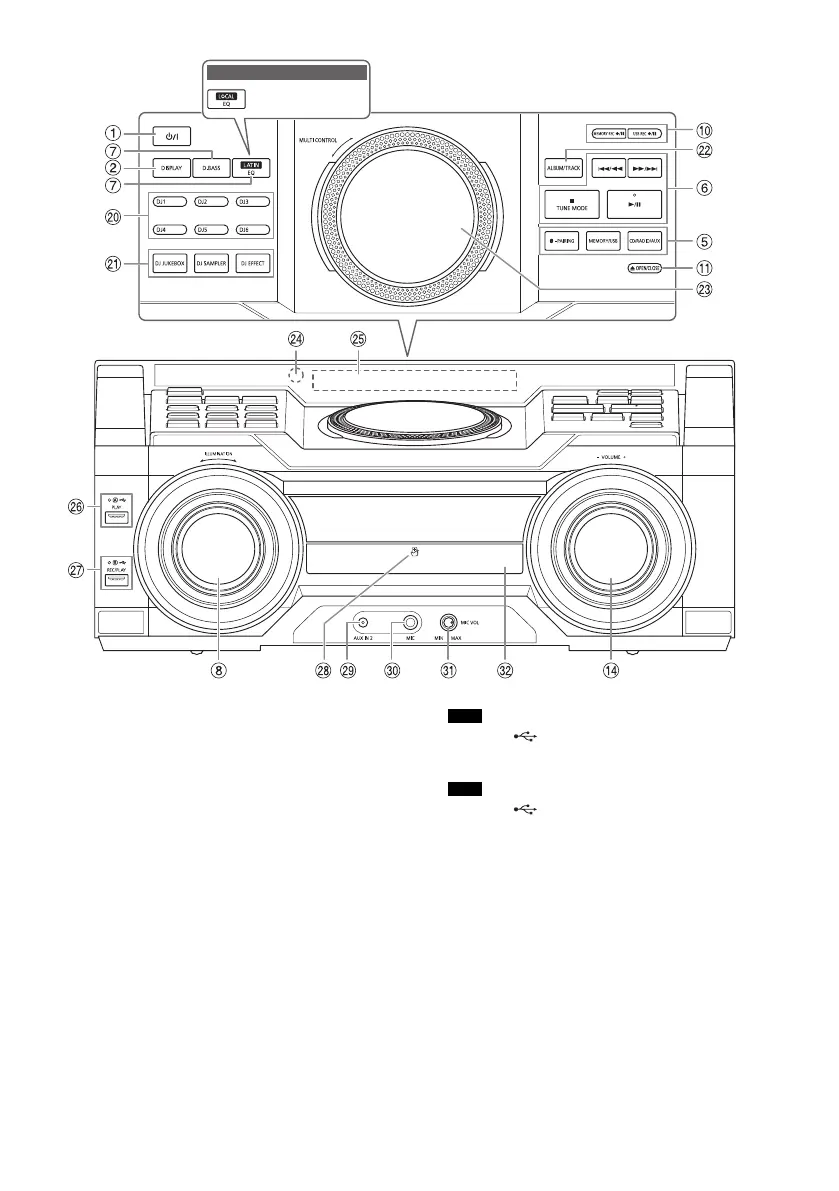
T DJ function direct buttons
Press [DJ JUKEBOX], [DJ SAMPLER] or [DJ EFFECT]
to switch on the DJ function.
Press [DJ1] to [DJ6] on the main unit to select the
desired function.
To cancel, press the selected [DJ1] to [DJ6] again.
U Switch on the DJ function
To cancel, press the button again.
V Select MP3 album or track
Press [ALBUM/TRACK] to select album or track.
Browse tracks or albums
Turn [MULTI CONTROL] to browse.
To start playback from the selection, press [4/9].
W Turntable for DJ and multi control
X Remote control sensor
Distance: Within approximately 7 m
Angle: Approximately 20° up and down,
30° left and right
Y Display panel
Z USB A
USB port ( )
USB status indicator
Play MP3 tracks.
a USB B
USB port ( )
USB status indicator
Play MP3 tracks.
Record sound or music tracks.
b NFC touch area
c AUX IN 2 jack
d Microphone jack
e Adjust the microphone volume level
f Disc tray
For Australia and New Zealand
RQT9980-3B_en.fm Page 9 Friday, March 6, 2015 3:51 PM




 To Next Page