5
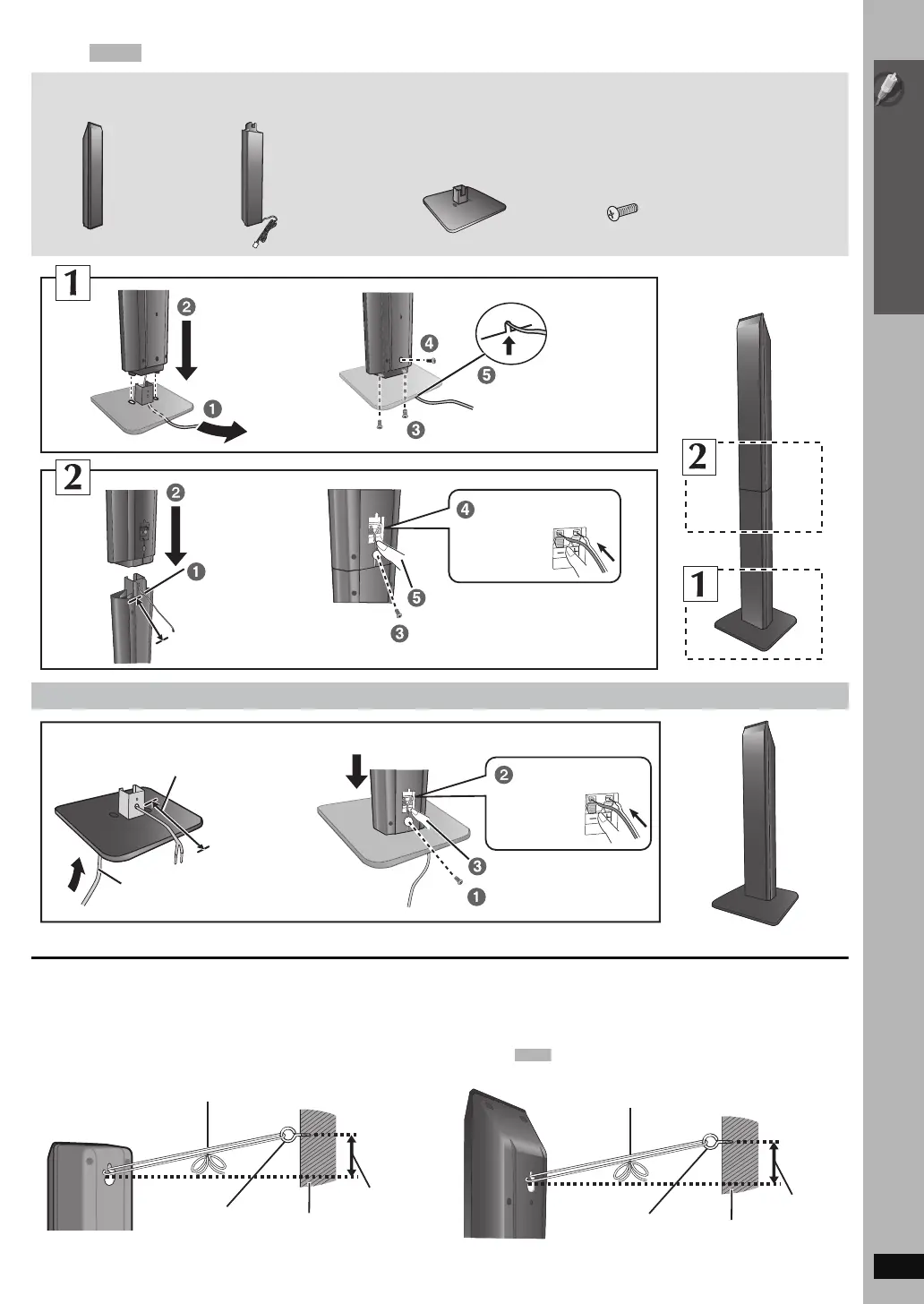
Assembling the speakers
RQTX0105
[PT960] : Front speakers
∫ Preventing the speakers from falling
≥ You will need to obtain the appropriate screw eyes to match the walls or pillars to which they are going to be fastened.
≥ Consult a qualified housing contractor concerning the appropriate procedure when attaching to a concrete wall or a surface that may not have
strong enough support. Improper attachment may result in damage to the wall or speakers.
e.g. [PT760] [PT954] Front speakers
e.g. [PT960] Front speakers
Speaker assembly option
Make sure you have all the indicated components before starting assembly, setup, and connection.
2 Bases 8 Screws2 Front
speakers
2 Stands
(with cable)
Tighten securely.
Slide into the groove.
Position the cable
between the ridges.
Tighten securely.
Press into the groove.
Insert the wire fully.
i: White
j: Blue
Push!
Leave about 90 mm (3
17
/32z)
Leave about 100 mm (3
15
/16z)
You can remove and use the cable from
the stand. To reattach the cable, refer to
page 7.
Insert the wire fully.
i: White
j: Blue
Push!
Tighten securely.
Press into the groove.
Thread the speaker cable through
the base.
Attach the speaker.
String (not included)
Thread from the wall to the speaker and tie tightly.
Rear of the speaker
Wall
Approx.
150 mm
(5
29
/32z)
Screw eye
(not included)
String (not included)
Thread from the wall to the speaker and tie tightly.
Rear of the speaker
Wall
Approx.
150 mm
(5
29
/32z)
Screw eye
(not included)


 To Next Page