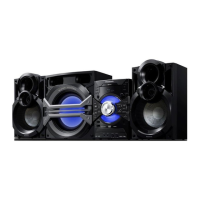
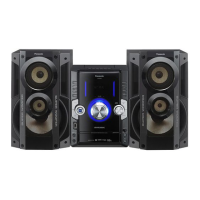
This document outlines the operation and maintenance of the Panasonic SC-VKX60 DVD Stereo System.
Function Description
The Panasonic SC-VKX60 is a comprehensive DVD stereo system designed for audio and video playback, recording, and radio reception. It supports DVD-Video, DVD-R/-RW, DVD-R DL, +R/+RW, CD, and CD-R/RW discs, including various data formats like WMA, MP3, JPEG, MPEG4, and DivX. The system features a powerful amplifier with a total RMS stereo mode power of 600 W, delivering high-quality sound through its 3-way, 3-speaker system.
For video playback, the system offers both composite video and component video outputs, supporting PAL625/50, PAL525/60, and NTSC video systems. It can convert NTSC signals to PAL60 for display on PAL TVs. The system also supports progressive video output for compatible TVs, enhancing picture quality.
Audio playback is versatile, with support for various disc formats and a cassette tape deck for playing and recording tapes. It includes an FM/AM tuner with manual and automatic presetting capabilities for up to 30 FM and 15 AM stations. The system can receive AM broadcasts in 10 kHz steps.
A key feature is its USB functionality, allowing playback and recording of audio content from USB mass storage devices. It supports MP3, WMA, JPEG, MPEG4, and DivX files from USB. The system also includes a music port and auxiliary input for connecting external audio equipment, and microphone jacks for karaoke.
The system incorporates various sound effects, including surround sound, preset EQ (Heavy, Clear, Soft, EQ-Off), D.Bass for enhanced low-pitch sound, and Super Woofer level adjustment. For karaoke enthusiasts, it offers Key Control, Vocal Cancel, and Audio Change functions.
Usage Features
Basic Playback:
To play discs, open the disc tray, place a disc label-side up, and close the tray. Press the play button to start. The system supports various playback controls like stop, pause, skip track/content, and slow-motion. Repeat playback can be set for titles, chapters, or specific sections (A-B Repeat).
Program and Random Playback:
While stopped, users can select program or random playback modes. Program playback allows queuing up to 30 items from a disc. Random playback shuffles the order of tracks or titles.
Navigation Menus:
The system utilizes navigation menus for data discs (WMA, MP3, JPEG, MPEG4, DivX). A "PLAYBACK MENU" appears for discs with video and other formats, allowing selection of "AUDIO/PICTURE" or "VIDEO". For JPEG content, a thumbnail menu facilitates picture selection.
On-Screen Menus:
The "FUNCTIONS" button brings up on-screen menus (Disc/Play, Video, Audio, Karaoke) for detailed settings and controls. These menus allow users to adjust various parameters like picture mode (Normal, Cinema1, Cinema2, Dynamic, Animation), zoom sizes, transfer mode for progressive output, audio settings (Dialogue Enhancer, Re-Master), and karaoke functions.
USB Play and Record:
Connect a USB mass storage device to the USB port. The system can play supported audio, video, and still picture files. For recording, select the desired source (CD, tape, radio, music port, AUX, microphone) and press the USB record button. Recordings are saved as MP3 files in a "REC_DATA" group. Tracks can be divided automatically (AUTO 5M) or manually during recording. Contents on the USB device can also be deleted.
Cassette Tape Play and Record:
Insert a cassette tape with the side to be played facing up. Basic playback controls (play, stop, pause, fast-forward, rewind) are available. For recording, select the source and press the record button. The system supports erasure prevention by removing tabs on the cassette.
FM/AM Radio:
Select FM or AM mode. Stations can be tuned manually or automatically. Up to 30 FM and 15 AM stations can be preset. The system allows for AM allocation setting (10 kHz steps) and offers a "MONO" option for noisy FM broadcasts.
Timer Functions:
The system includes a play timer (wake-up) and a record timer. These can be set for specific start and end times. The sleep timer automatically switches off the system after a set duration (30, 60, 90, 120 minutes). An auto-off function switches off the system after 10 minutes of inactivity in disc, USB, or tape source.
Sound Effects:
Users can enhance their audio experience with surround sound (Standard, Stereo, A.SRND), preset EQ modes (Heavy, Clear, Soft, EQ-Off), D.Bass, and Super Woofer level adjustment. Echo effect can be adjusted when a microphone is connected.
Microphone Usage:
Connect microphones to the dedicated jacks. Microphone volume can be adjusted. The system supports karaoke functions like Key Control, Vocal Cancel, and Audio Change (for DVD-V and DVD-VR/VCD sources).
External Equipment:
The system has a music port (3.5 mm stereo jack) for portable audio equipment and auxiliary input (RCA jacks) for connecting VCRs or DVD players. A digital output (coaxial) allows connection to an amplifier for multi-channel audio.
System Settings:
The "SETUP" menu provides access to various system settings, including language for on-screen messages, TV aspect ratio, PCM digital output sampling frequency, audio language, subtitle language, disc menu language, ratings level for DVD-Video playback, password management, DivX registration/deregistration codes, JPEG slideshow time, DVD-VR/DATA playback format, screen dimmer, and reset to default settings. Video settings include time delay for audio/video sync, NTSC disc output (NTSC/PAL60), still mode (Field/Frame), and video output (Interlace/Progressive).
Remote Control and Main Unit Mode:
The system allows changing the remote control and main unit mode (REMOTE 1 or REMOTE 2) to prevent interference with other Panasonic equipment.
Maintenance Features
General Cleaning:
To clean the system, wipe it with a soft, dry cloth. Avoid using alcohol, paint thinner, or benzine. For chemically treated cloths, follow the cloth manufacturer's instructions.
Cassette Tape Deck Maintenance:
Regularly clean the heads of the cassette tape deck to ensure good quality playback and recording. A cleaning tape (not included) can be used for this purpose.
AC Mains Lead:
Ensure the AC mains lead is connected correctly and is not damaged. Do not pull, bend, or place heavy items on the lead. Grasp the plug firmly when unplugging.
Fuse Replacement (for Saudi Arabia and Kuwait models):
Instructions are provided for replacing the fuse in the AC mains plug, with illustrations showing different plug types.
Battery Replacement:
The remote control uses alkaline or manganese AA batteries. Ensure correct polarity when installing. Replace used batteries with the same or equivalent type. Remove batteries if the remote control will not be used for a long time.
Memory Reset (Initialisation):
In cases of unresponsiveness or to clear memory contents, the system can be reset. This involves disconnecting the AC mains lead, then reconnecting it while pressing and holding the standby/on button on the main unit. This restores all settings to factory presets.
Troubleshooting Guide:
The manual includes a comprehensive troubleshooting guide covering common issues related to power, main unit display messages, TV display messages, general operation, disc operation, sound, picture, USB, and cassette tape. It provides solutions for problems like no power, distorted sound, playback issues, and remote control malfunction.


 To Next Page
 Amplifier Section