60
VQT3J03
4 Select the scene to be played
back, then press the joystick.
≥ The operation icon will be displayed or
hidden each time the centre of the joystick
is pressed.
≥ Next (previous) page can be displayed by
selecting / .
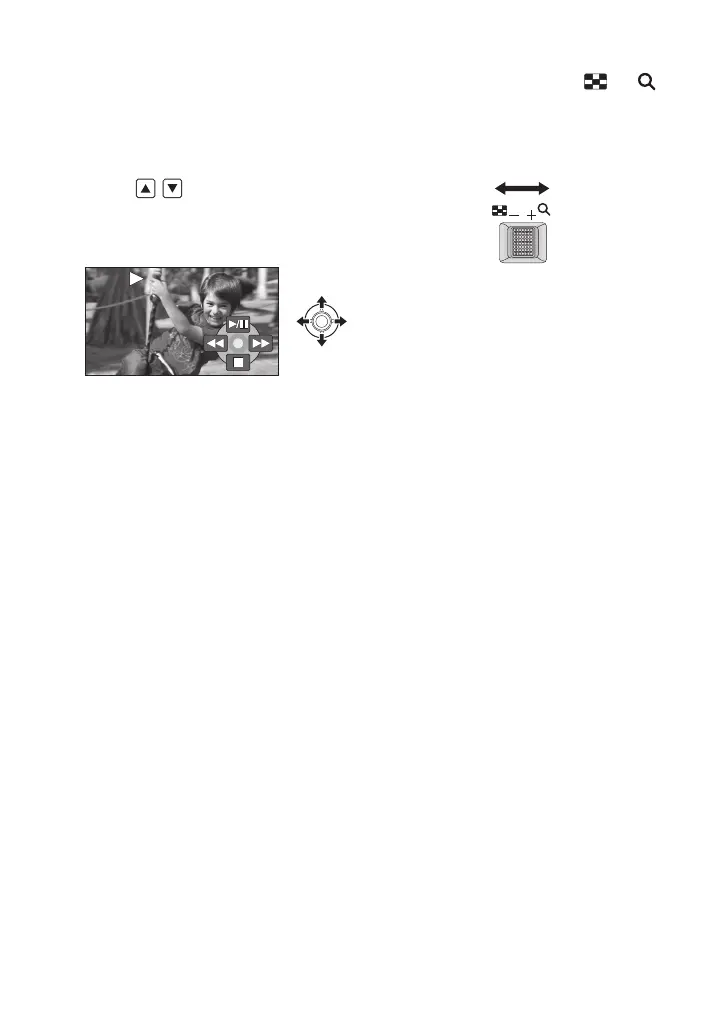
5 Select the playback operation
with the joystick.
1/;: Playback/Pause
6: Rewind playback
5: Fast forward playback
∫: Stops the playback and shows
the thumbnails.
∫ Change the thumbnail display
Pressing the zoom lever to the or
side as in step 4 will cause the thumbnail
display to change in the order shown below.
20 scenes () 9 scenes () 1 scene
() Time frame index (l 62)
≥ 9 scenes display returns if the power is
turned off or the mode is changed.
SDRH101&T76&S71GC-VQT3J03_mst.book 60 ページ 2010年11月22日 月曜日 午後4時49分











 To Next Page