9
Setup
9
RQTX0174
ENGLISH
≥ Refer also to the operating instructions for your home theater unit.
≥ When you enjoy 7.1-channel playback, refer also to "Using the surround back speakers" (B 10).
Conserving power
The wireless system consumes a small amount of power, even when it is
off (approx. 0.3 W). To save power when the unit is not to be used for a
long time, unplug it from the household mains socket.
Making the wireless link
1
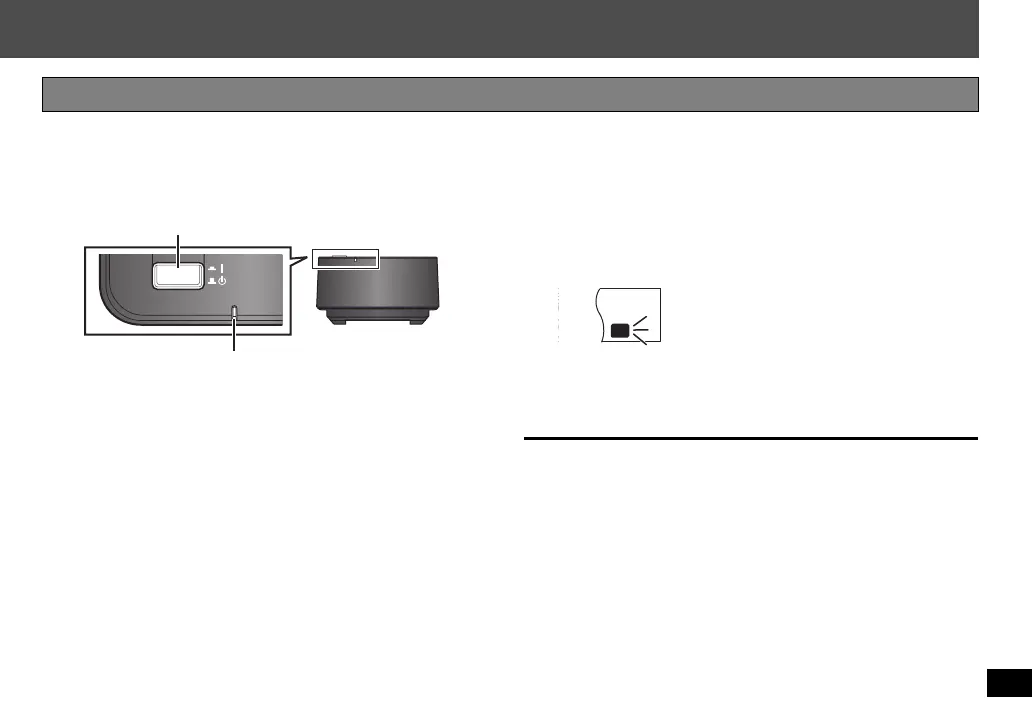
Turn on the wireless system.
Unit on/off button [C I, BÍ]
Use this button to turn the unit on and off.
C I: The unit is on.
BÍ: The unit is off.
WIRELESS LINK indicator
Red: The unit is on and the wireless link is deactivated.
Green: The unit is on and the wireless link is activated.
2
Turn on your home theater unit.
The wireless link indicator on your home theater unit will be turned
on.
≥ The type of the indicator varies according to the home theater
unit.
3
Start play on the home theater unit.
SLP
ST CT
RDS
RND
PGM
EQ
PRG
SRDE.
PL
DDTS
W2
WS
W1
≥ If the indicator is flashing, refer to
Troubleshooting guide (B 11).
e.g. Display on the home theater unit
SH-FX70_RQTX0174-G_En.book Page 9 Wednesday, December 3, 2008 3:24 PM


 To Next Page