English
13
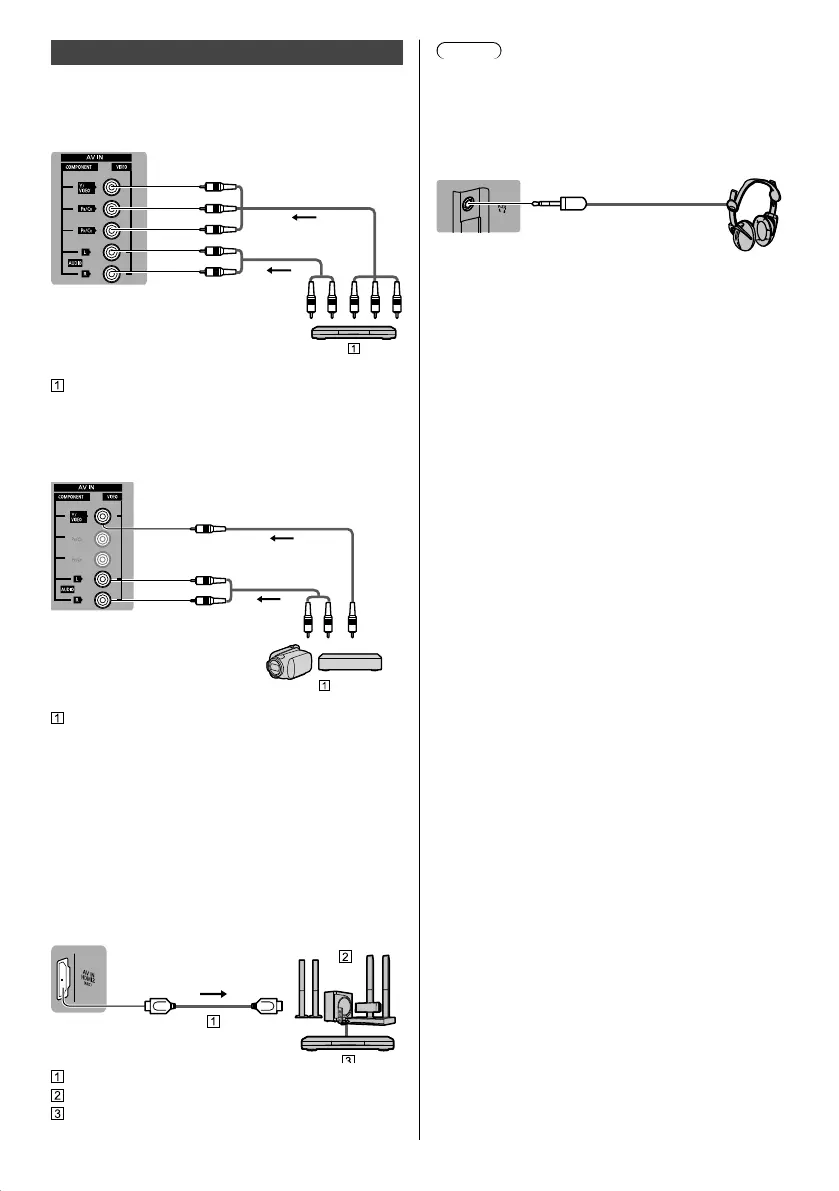
Other connections
■ DVD Player
(COMPONENT equipment)
TV
(Viewing)
(Listening)
DVD Player
■ Camcorder / Game equipment
(VIDEO equipment)
TV
(Viewing)
(Listening)
Camcorder / Game equipment
■ Amplifier (listening with external speakers)
●
Use HDMI2 to connect the TV to an amplifier which
has ARC (Audio Return Channel) function.
If connecting to an amplifier without ARC function,
use DIGITAL AUDIO OUT.
●
To enjoy multi-channel sound from external
equipment (e.g. Dolby Digital 5.1ch), connect the
equipment to the amplifier. For information about the
connections, read the manuals of the equipment and
amplifier.
TV
HDMI cable
Amplifier with speaker system
External equipment (DVD Player, etc.)
Note
●
ARC function is not supported when performing
mirroring on the TV set.
■ Headphones
●
For information about the volume settings, refer to
[eHELP] (Search by Purpose > Settings > Sound).
(3.5 mm stereo mini plug)
■ USB HDD (for recording)
●
Use USB 1 port for connecting the USB HDD.
●
For details, refer to [eHELP] (Search by Purpose >
Recording).
■ VIERA Link
●
Use HDMI1 - 3 for VIERA Link connection.
●
For details, refer to [eHELP] (Search by Purpose >
Functions > VIERA Link “HDAVI Control™”).
TH_55FX600_640AZ_Eng.indb 13TH_55FX600_640AZ_Eng.indb 13 3/19/2018 2:49:41 PM3/19/2018 2:49:41 PM



 To Next Page